EasyManua.ls Logo

DoorKing 1506-086 - User Manual

DoorKing 1506-086
22 pages
Print Icon
To Next Page IconTo Next Page
Loading...
4
7
0
1
5
8
2
6
9
3
4
7
0
1
5
8
2
6
9
3
UL Listed
Copyright 2009 DoorKing, Inc. All rights reserved.
Copyright 2017 DoorKing, Inc. All rights reserved.
Installation/Owner’s Manual
Models 1504 / 1506
Models 1504 / 1506
Models 1504 / 1506
Use this manual for circuit board 1506-010 Revision G or higher.
Programmable Stand Alone Digital Keypad Entry Devices
Date Installed:
Installer/Company Name:
Phone Number:
Leave Manual with Owner
Circuit Board
Serial Number
and Revision Letter:
Model Number
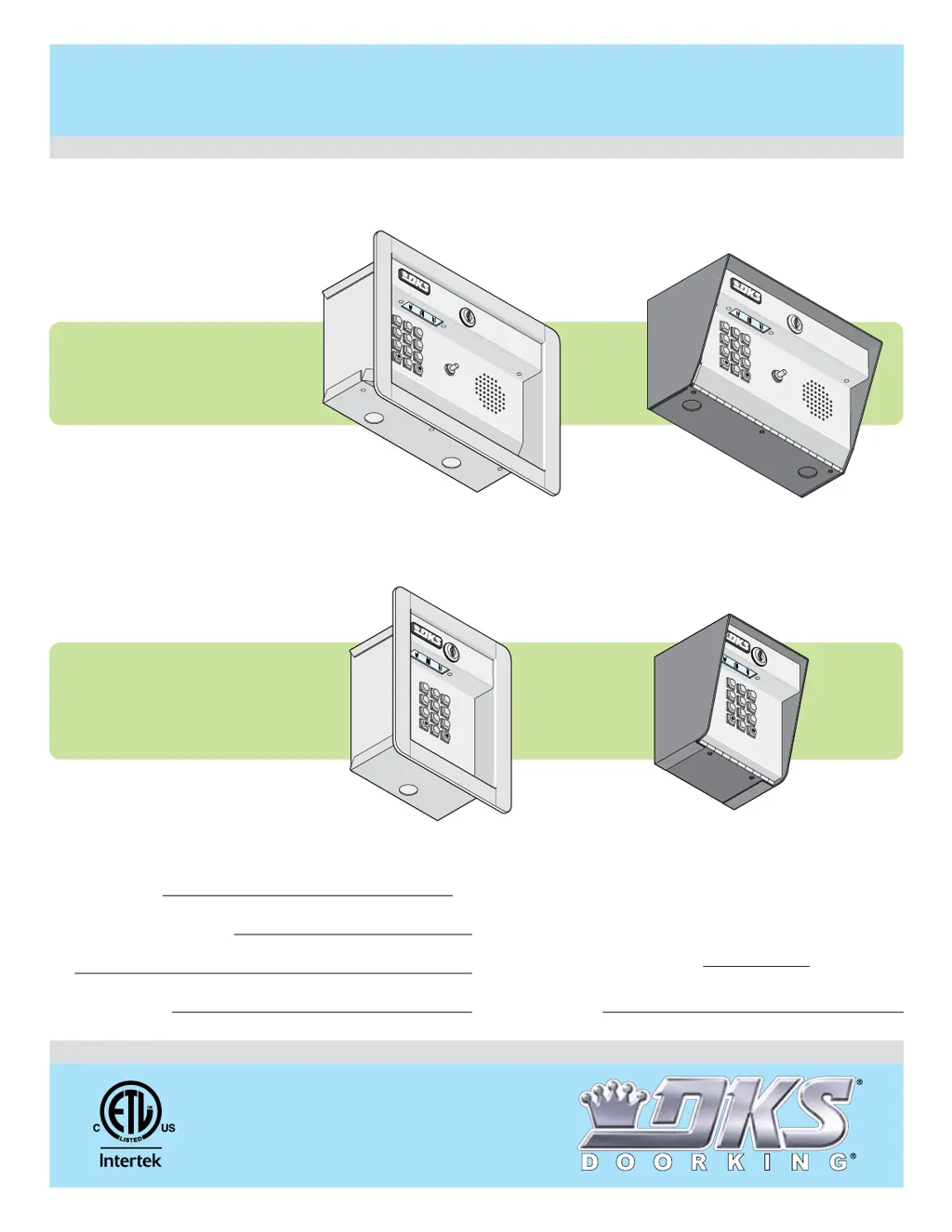
1504
1504
1504
1506
1506
1506
1504-096
1504-086
1506-086
1506-096
Flush Mount
Surface Mount
Surface Mount
Flush Mount
Push Button
P
u
sh
Butt
o
n
To
Cal
l
To
C
a
ll
Push Button
Pu
sh Butto
n
To Call
To
C
a
l
l
Control a main entry point plus an additional entry point.
4
7
0
1
5
8
2
6
9
3
4
7
0
1
5
8
2
6
9
3
with Intercom
1506-065-K-6-17

Questions and Answers

  • J
    Joseph MillerAug 12, 2025
    What to do if DoorKing 1506-086 system is dead?
    • P
      pattersonjadeAug 12, 2025
      If your DoorKing Keypad system appears dead, there are a few things to check. First, verify that there is power at terminals 13 and 14. Next, ensure the keypad is correctly plugged in by unplugging it and reconnecting it. Also, the X strikes feature may be activated; if so, wait 3 minutes and try again.
  • N
    nicolesmithAug 16, 2025
    Why do DoorKing 1506-086 Keypad relays lock on for long periods?
    • E
      erik51Aug 16, 2025
      If the relays on your DoorKing Keypad lock on for extended periods, several factors could be responsible: * Excessive voltage-drop on power wires. Check the transformer and wire size. * The transformer has too low VA rating. Check the transformer and wire size. * The relay hold feature may be activated. Reprogram the hold boundaries. * The relay strike time may be programmed too long. Reprogram the relay strike time.
  • B
    Brandon CallahanAug 20, 2025
    What to do if DoorKing Keypad emits a long tone and cancels programming mode?
    • J
      Jessica ParkAug 20, 2025
      If your DoorKing Keypad emits a long tone and cancels the programming mode, it could be due to several reasons. You might be waiting too long between button presses while programming, in which case you should delete some codes or erase the entire memory. Another reason could be that the memory is full, so deleting codes or erasing the memory is suggested. Also, ensure you press * first when programming.
  • T
    Tina MartinezAug 25, 2025
    Why won't four-digit codes activate relay 1 on DoorKing 1506-086?
    • M
      merrittjohnAug 25, 2025
      If four-digit entry codes are not activating relay 1 on your DoorKing Keypad, it could be that the entry code is not programmed into the keypad. Ensure the entry code is programmed correctly. Also, the code may be time zone restricted, so reprogram the time zone or disable time zone input. Finally, make sure the entry code is less than the divide number, or reprogram the divide number.
  • J
    Jordan FosterAug 27, 2025
    Why don't four-digit entry codes activate relay 2 on DoorKing 1506-086?
    • A
      Alicia KingAug 27, 2025
      If four-digit entry codes are not activating relay 2 on your DoorKing Keypad, verify that the entry code is programmed into the keypad. Also, the code may be time zone restricted, so reprogram the time zone or disable time zone input. Ensure that the entry code is greater than the divide number, or reprogram the divide number.
  • D
    Dalton SalasAug 31, 2025
    Why won't five-digit codes activate relay 1 on DoorKing Keypad?
    • E
      Erica MilesAug 31, 2025
      If five-digit entry codes are not activating relay 1 on your DoorKing Keypad, first, be sure the entry code is programmed into the keypad. Second, ensure the user presses # first before entering the five-digit code directly on the keypad. Lastly, verify that the entry code is less than the divide number, or reprogram the divide number.
  • K
    keith93Sep 4, 2025
    Why doesn't a five-digit entry code activate relay 2 on DoorKing 1506-086 Keypad?
    • G
      Gregory YorkSep 4, 2025
      If a five-digit entry code is not activating relay 2 on your DoorKing Keypad, it could be because the entry code is not programmed into the keypad, so ensure it is programmed. Also, make sure the user presses # first, then enters the five-digit code directly on the keypad. Finally, the entry code must be greater than the divide number, so check and reprogram the divide number if necessary.
  • J
    Johnny GraySep 8, 2025
    What to do if request to exit input will not operate relay on DoorKing 1506-086?
    • F
      flewisSep 8, 2025
      If the request to exit input will not operate the relay on your DoorKing Keypad, check the wiring connected to terminals 1 and 12.

DoorKing 1506-086 Specifications

General IconGeneral
TypeKeypad
Model1506-086
Backlit KeysYes
BacklightingLED
Weather ResistanceYes
MountingSurface Mount
Power Supply12-24 VAC/DC
Operating Temperature-20°F to 150°F
Housing MaterialCast aluminum

Related product manuals