EasyManua.ls Logo

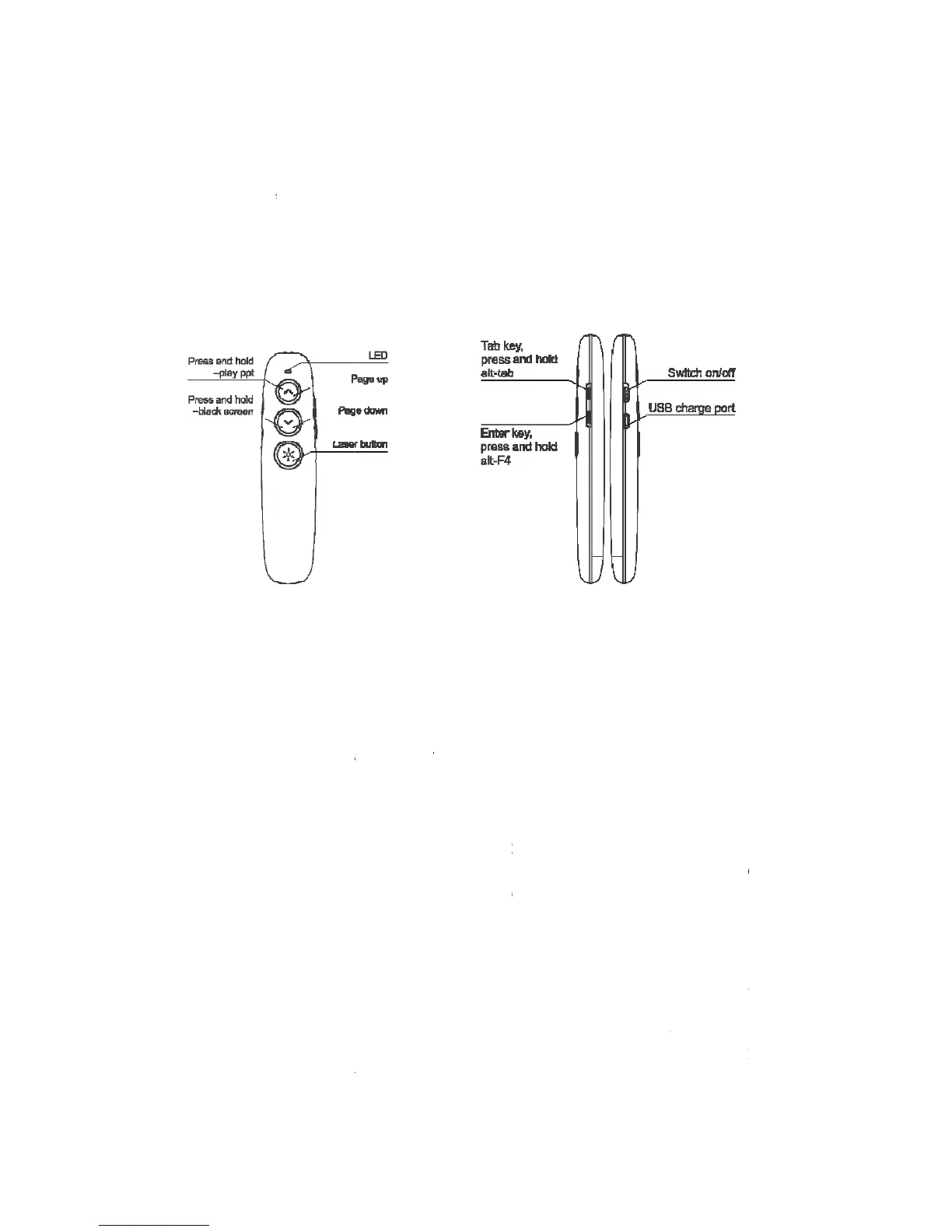
Doosl DSIT007 - Getting Started and Usage; Function Map and Descriptions; Installation and Setup

Doosl DSIT007
8 pages
Print Icon
To Next Page IconTo Next Page
To Previous Page IconTo Previous Page
Loading...
G
e
z
Pr
e
Pr
e
Pa
g
Pa
g
La
s
Ta
b
En
t
US
Sw
i
z
1.
2.
3.
4.
5.
In
s
e
tting St
a
Function
更换按
e
ss and ho
e
ss and ho
g
e up
g
e down
s
er button
b
key, pres
s
t
er key, pr
e
B charge
i
tch on/off
Function
Laser poi
n
focus
Start the
M
Press an
d
page in fu
l
screen di
s
to enter Bl
Blank Scr
e
Page Up/
D
page or t
h
Hyperlink
s
key to op
e
and the
A
Press an
d
same tim
e
s
tallatio
n
a
rted
map
功能
ld –play p
p
ld –black
s
s
and hold
e
ss and h
o
p
ort
Descript
i
n
ter: Pres
s
M
icrosoft
P
d
hold the
l
l screen, t
s
play. In fu
l
ank Scre
e
e
en mode
.
D
own: Cli
c
h
e next pa
g
s
: Click th
e
e
n an hyp
e
A
lt key at
t
d
hold the
e
, to close
t
n
意线条
p
t
s
creen
, alt-tab
o
ld, alt-F4
i
on
s
the Lase
r
P
owerPoin
t
PageUp
hen press
l
l screen
m
e
n mode, a
.
c
k the Pag
g
e
e
Tab key
f
e
rlink; Pre
s
t
he same
Enter key
,
t
he curren
r
key to e
m
t
and ope
n
button for
and hold
t
m
ode, you
c
nd then pr
e
eUp or P
a
f
or switch
s
s and hol
d
time, for
s
,
or press
t window
m
it the lase
n
a Power
P
2 second
t
he PageU
c
an press
e
ss and h
o
a
geDown
k
among h
y
d
the Tab
k
s
witch am
the Alt ke
r beam an
P
oint file.
s to displ
a
p button a
g
and hold t
o
ld the Pa
g
k
ey to go t
o
y
perlinks;
C
k
ey, or pre
s
ong the
o
y and the
d highligh
t
a
y the cu
r
g
ain to exi
t
he PageD
o
g
eDown to
o
the prev
C
lick the
E
s
s the Tab
o
pen wind
o
F4 key a
t
t
the
r
rent
t
full
o
wn
exit
ious
E
nter
key
o
ws;
t
the

Other manuals for Doosl DSIT007