EasyManua.ls Logo

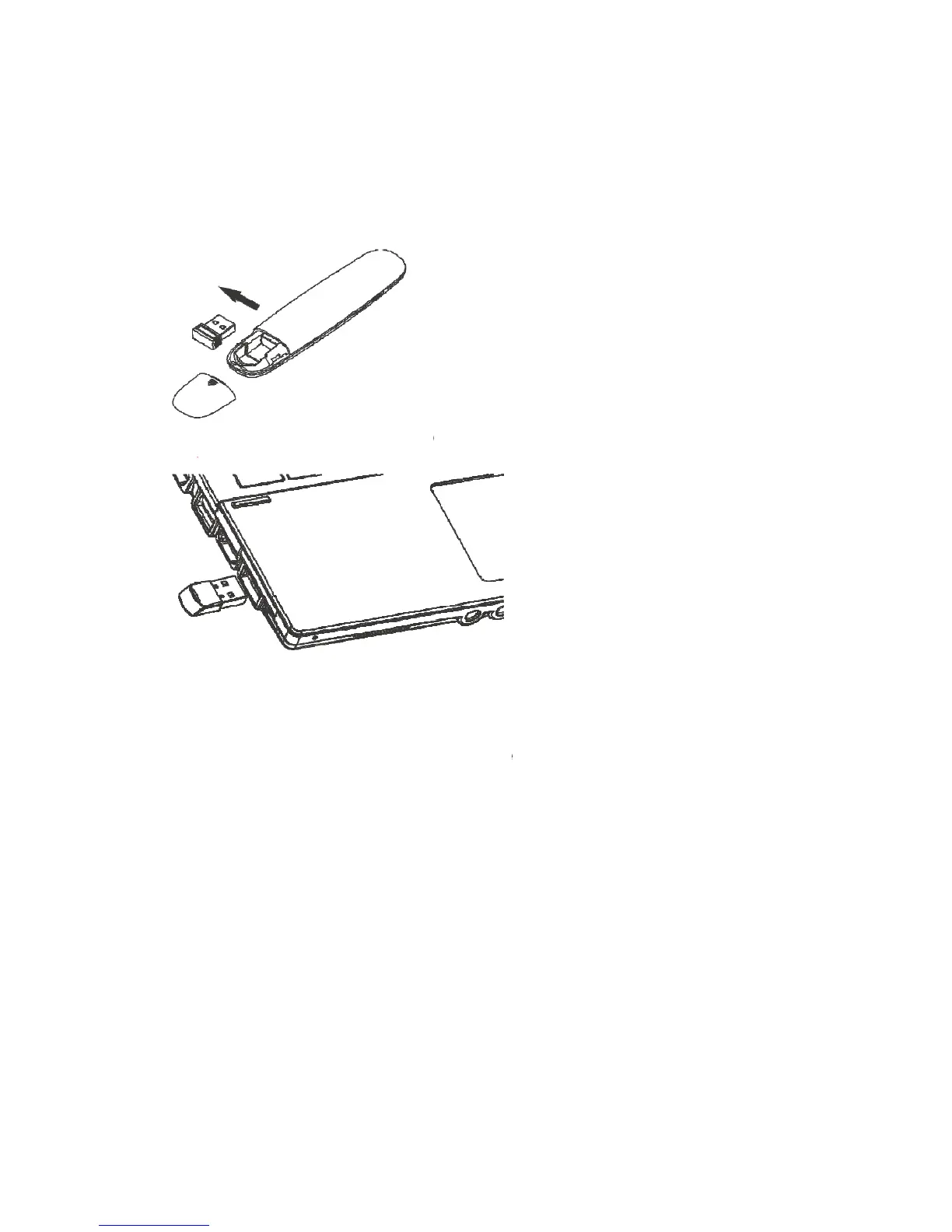
Doosl DSIT007 - Operate the USB Receiver; Operate the Wireless Presenter; Turn off the Wireless Presenter

Doosl DSIT007
8 pages
Print Icon
To Next Page IconTo Next Page
To Previous Page IconTo Previous Page
Loading...
1.
a.
R
b.
P
2.
Ple
aut
o
US
3.
fla
s
rec
e
4.
A
ft
e
off
t
Take out
power swi
power is
o
means th
e
附图:
给出
R
emove th
给出
P
lug the re
Operate t
h
ase plug
o
matically
B device
a
Operate t
h
When a
s
h. When
t
e
iver will fl
Turn off t
h
e
r use, ple
a
t
he power
(请给
the mini
U
tch to on
p
o
n or not.
e
wireless
p
后盖,
e rear cov
将接收
ceiver int
o
h
e USB re
c
the rece
detect th
e
a
nd compl
e
h
e wireles
s
button is
t
he USB
r
ash too.
h
e wireles
s
a
se put th
e
switch on
收纳接
U
SB rece
p
osition; y
o
If the LE
D
p
resente
r
出接收器
er and tak
e
器插入
o
the USB
p
c
eive
r
iver into
e
device.
F
e
te the set
u
s
presente
pressed,
t
r
eceiver r
e
s
presente
r
e
USB rec
e
the left.
器、关
iver from
o
u can pre
s
D
is flashi
is turned
o
的示意线
e
out the r
电脑 U
S
p
ort
the lapto
F
ollow th
e
u
p.
r
t
he blue L
e
ceives co
r
e
ive back i
电源开关
the wirel
e
s
s any but
t
ng when
t
o
n.
图)
eceiver.
S
B 接口
p’s USB
e
steps to
ED on th
e
ntrol sign
a
nto the wi
r
的示意线
e
ss prese
n
t
on to che
c
t
he button
的示
port. Th
e
search th
e
e
wireless
a
l, the LE
D
r
eless pre
s
图)
n
te
r
. Push
c
k whethe
r
is presse
线条
e
system
e
driver o
f
presenter
D
on the
U
s
enter and
the
r
the
d, it
will
f
the
will
U
SB
turn

Other manuals for Doosl DSIT007