EasyManua.ls Logo

DORANI Touch - Page 2

Default Icon
12 pages
Print Icon
To Next Page IconTo Next Page
To Previous Page IconTo Previous Page
Loading...
2
KNOW YOUR MONITOR
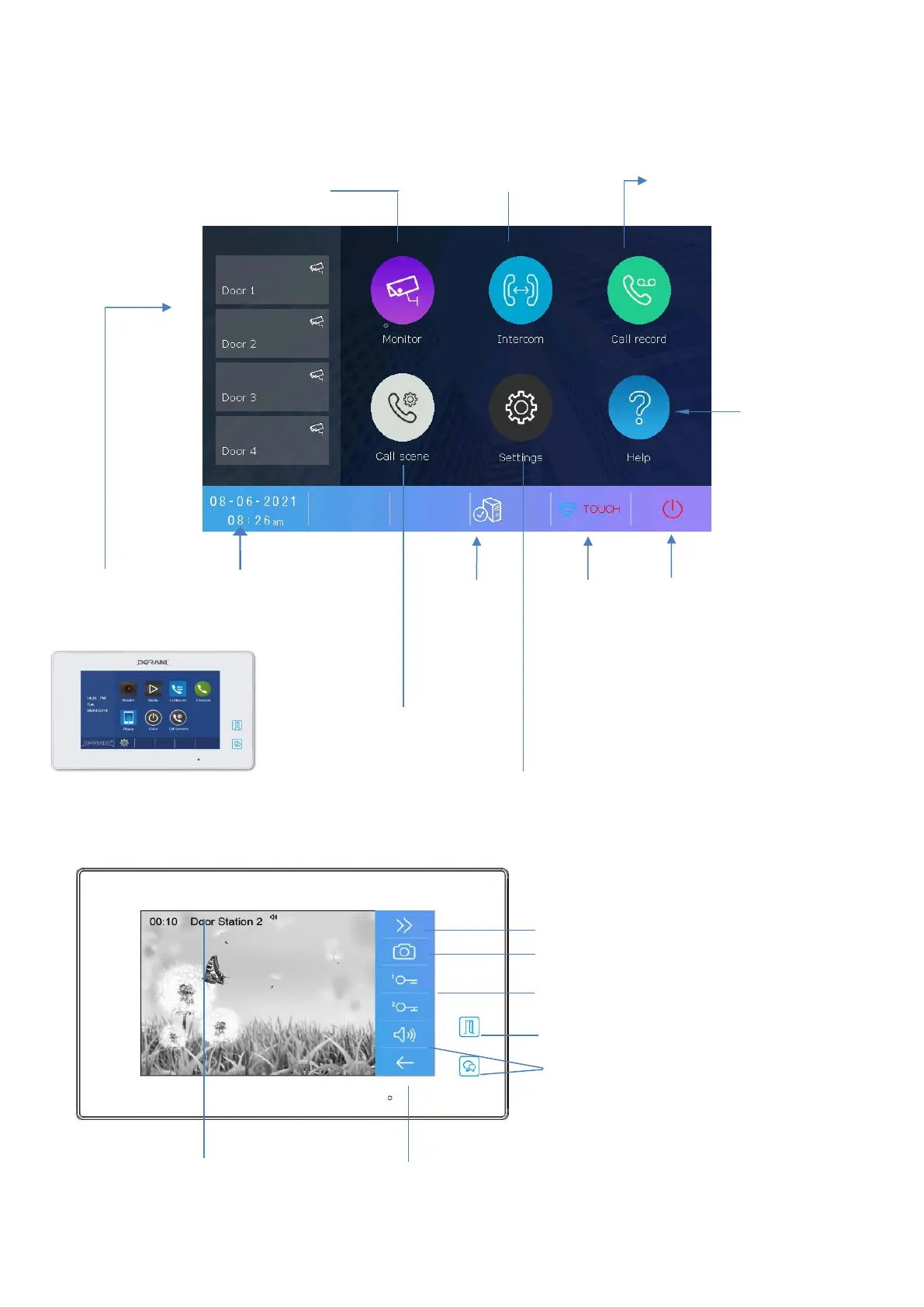
DORVT22 Master ONLY Monitor
Monitor Menu
Monitoring of Door
Stations
Call Record Menu
Reviewing of picture
Memory
Intercom Menu
Calling Other
Monitors in System
Settings Volume, Brightness, Contrast
Snapshot Takes a Snapshot Image of Screen
Unlock Lock 1 or Lock 2
Talk Starts the communication to the door station
WiFi Menu
(Optional
not
available to
ALL
systems)
Identifies Door
Station Number
Calling
SIP Menu
(Optional not
available to ALL
systems)
Back Button
Exit
Unlock Lock 1
DORVT03
Master/Slave
Settings Menu
All Installer Setting
Lock Release
Off
Call Scene
Selects how the
monitor managed
calls
Help Button
Wi-Fi
instructions ,
manuals and
troubleshooting
Time and Date
Touch here to
set

Related product manuals