2. STARTING UP THE DEVICE
CAUTION
Since this device has a non-remov-
able baery, all aempts of device
disassembly (baery cover included) will
void the warranty.
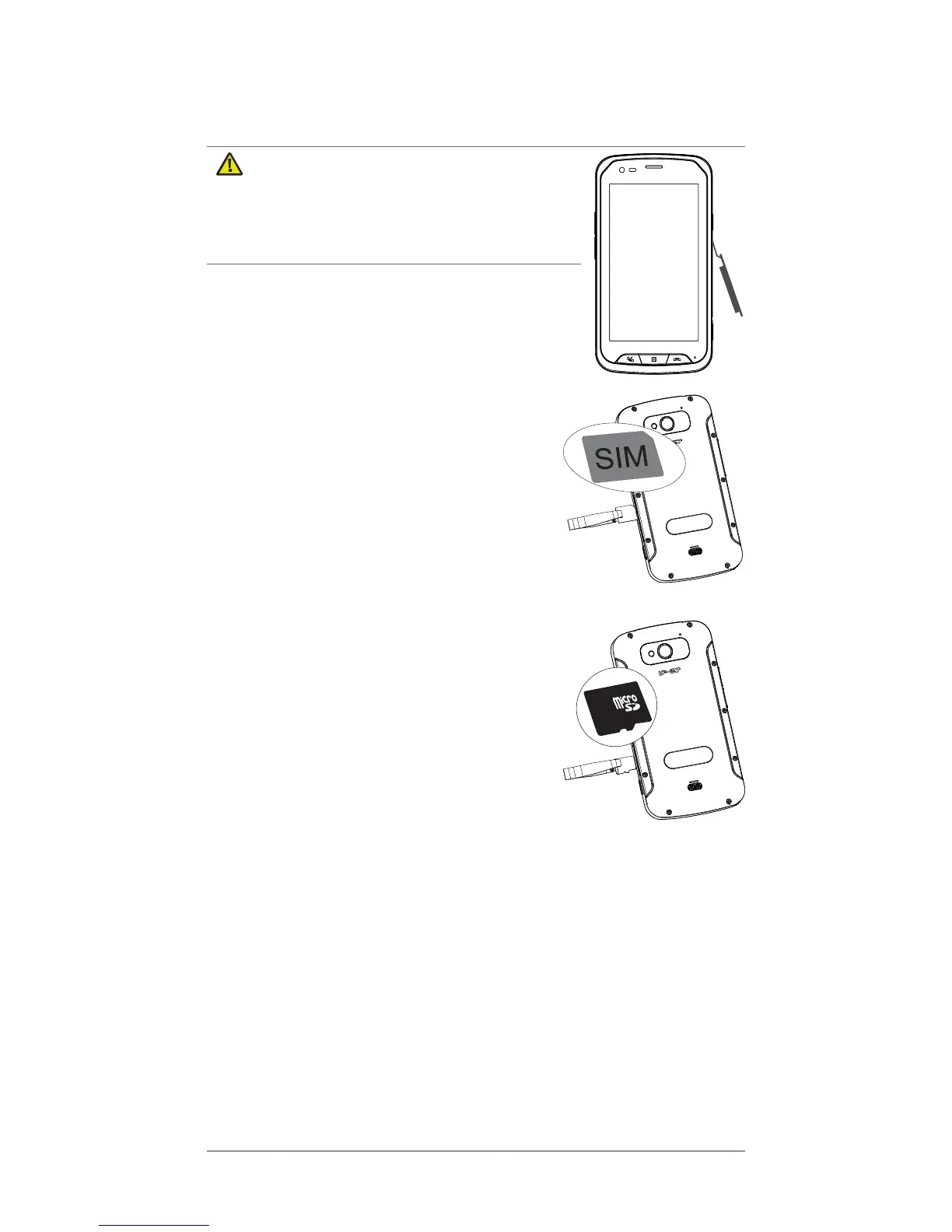
1. Open the plasc cap on the right side
of the phone to access the micro SIM
and micro SD card slots as shown:
2. Use the tool provided in the box to
insert the SIM card, making sure
that the cut o corner is on the right
place. This device accepts micro SIM
or 3FF SIM card. Use of incompat-
ible SIM cards may damage the
card or the device, and may corrupt
data stored on the card. If your SIM
format is not compable, contact
your operator.
3. If you have a memory card (Micro SD
format), insert it in the memory card
slot as described:
Note: It is possible to insert and remove
your SD card while the mobile is switched
on without aecng its operaon. It is
recommended to unmount your card in
â
Storage
â
before removing it in case the mobile is
turned on. It allows to not corrupng some of the data on the SD
card.
A micro USB cable and a charger are provided with your
phone.
1. First, connect the USB port in the charger.
2. Then, connect the micro USB plug of the cable to the
connector of your phone and plug in the charger to an
electrical outlet to start charging the baery.
GB



 To Next Page