18
English
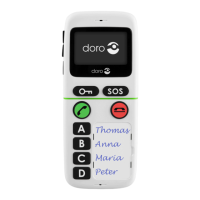
SOS key
Important!
The SOS key is pre-programmed to call 112.
As this telephone does not have an ordinary keypad we
advise you to keep this key programmed to call 112.
This way, in case of an emergency it is always
possible to call 112 from this phone.
Press and hold
w
(on the side) >4 seconds.
Scroll to Emergency using the side keys +/–, and
press
q
.
Scroll to SOS key and press
q
.
Select SOS and press
q
.
SOS is pre-programmed.
Change the name using the side keys +/–, then press
q
to conrm. Use
w
to move the cursor.
Delete with
L
.
Scroll to 112 using the side keys +/–,
and press
q
.
Enter the number using the side keys +/– and
w
, then
press
q
to conrm. Delete with
L
.
Press
L
one or more times to return to stand-by.
1.
2.
3.
4.
5.
6.
7.
8.


 To Next Page