6
7
Delivery Set:
Banknote counter DORS 750 ...................................................... 1pc.
Power cord..................................................................................1pc.
User manual ...............................................................................1 pc.
Package ..................................................................................... 1 set
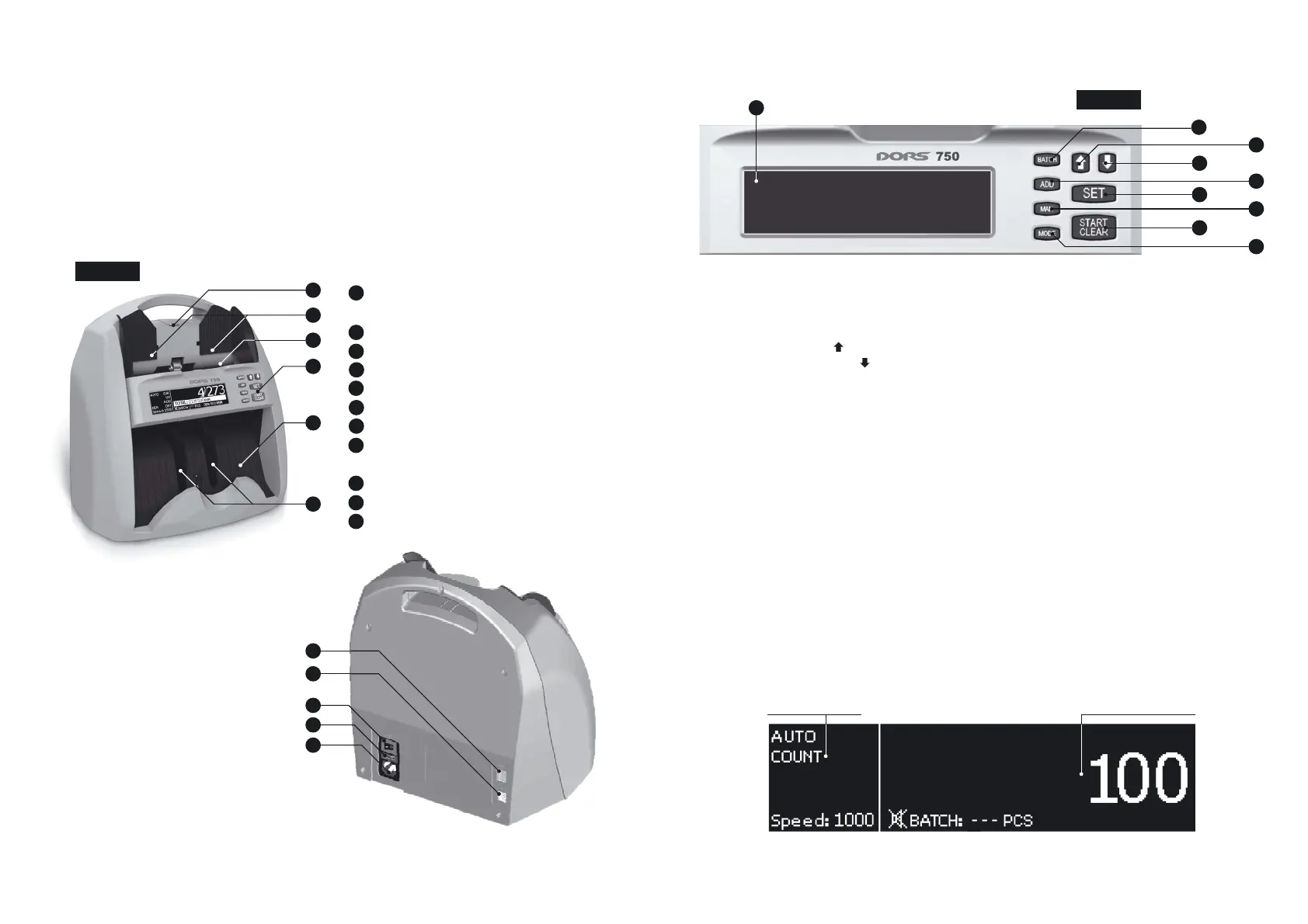
COUNTER DESCRIPTION
Appearance
Figure 1
7
8
9
10
11
Screw to adjust thickness of the
banknotes being counted;
Banknote guides;
Hopper;
Control panel;
Stacker;
Stacker wheels;
Remote display connector;
USB connector for making a personal
computer connection;
Power switch;
Fuse;
Power connector.
Appearance
Figure 2 Control panel
1
2
3
4
6
5
CONTROL PANEL
1. Graphical display;
2. MODE key for switching the counting modes;
3. MAN ON OFFkey for switching / of the manual start;
4. ADD ON OFFkey for switching / of the summation mode;
5. BATCH key for switching on a variable batching mode;
6. UPNavigation key ;
7. DOWNNavigation key ;
8. SET key for the menu entry /selection confirmation;
9. START CLEAR/ key for the start of counting in the mode of manual start / clearing the
results.
1
3
4
5
7
2
9
8
6
OPERATING KEYS
2. The MODE key for the banknote counting mode selection
The counter may count banknotes in three modes:
COUNT DENOMINATION MIX, , . To select a mode, use a
sequential search by pressing the key. The selected mode isMODE
shown in the left part of the graphical display table. The mode types:
– The mode for simple counting. This mode allows1. COUNT
counting of banknotes; the number of the counted banknotes is
shown on the display.
Indicator of switching on
simple counting
Number counted banknote
BANKNOTE COUNTER DORS 750BANKNOTE COUNTER DORS 750
1
4
3
2
5
6
7
8
9
10
11



 To Next Page