3332
CONTENTS
Banknote counter DORS 820 Banknote counter DORS 820
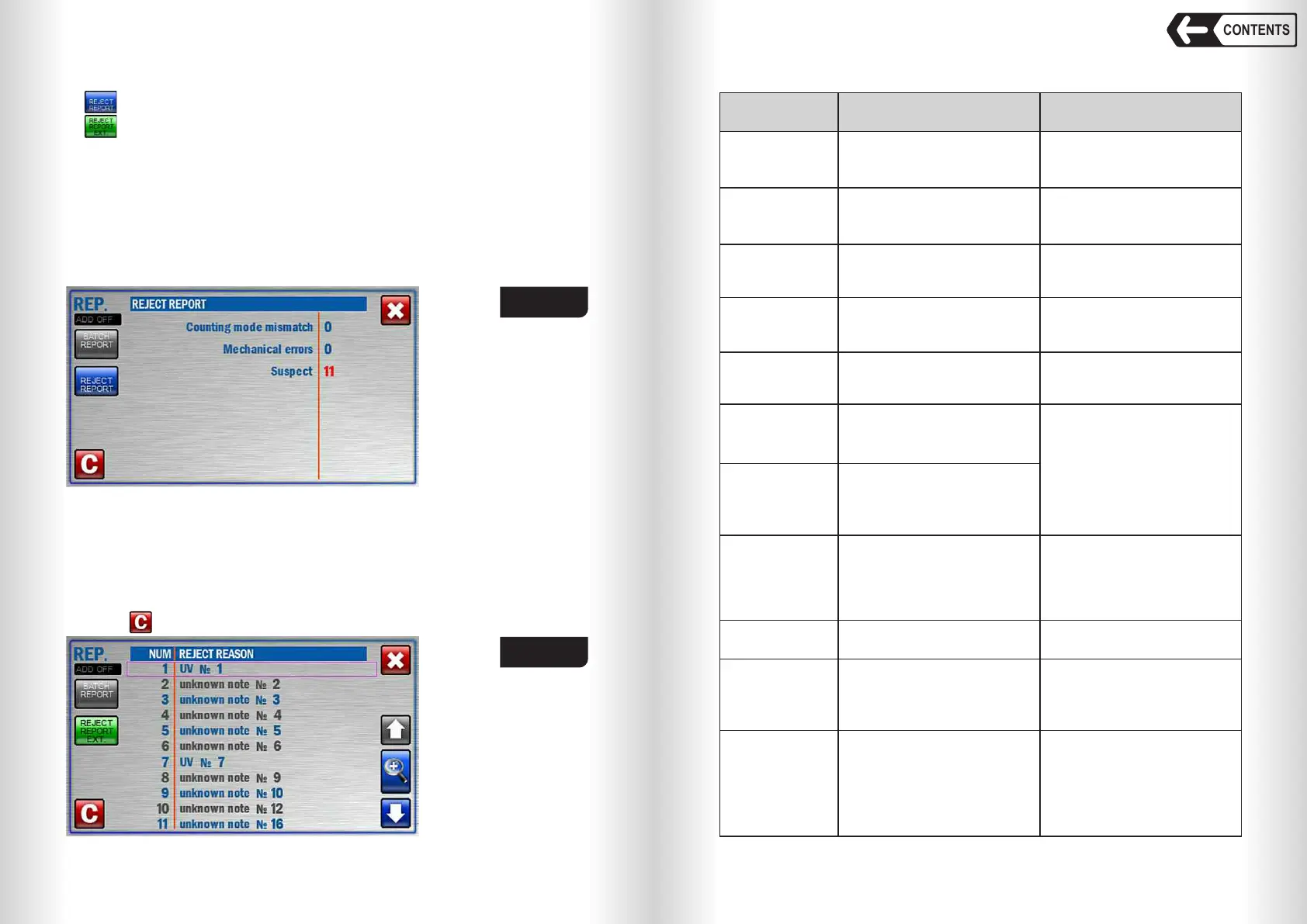
Fig. 51
Extended reject report (Fig. 52) contains the numbers of the banknotes and
their reject reasons.
NUM – banknote position in reject pocket (the position may not match the
actual one due to some errors: small notes gap, double etc).
REJECT REASON – an error which led to banknote reject (see Table 1).
The number of the banknote in the counted batch is displayed to the right of
reject reason (for reference).
Touch to reset the reports (acknowledgement is required, see Fig. 45).
«Counting mode mismatch» - rejected banknotes do not match selected
counting mode (for instance the banknotes of various denomination are
counted in DEN mode; currency or denomination mismatch).
«Mecanical errors» - the banknotes were rejected due to skew in the path
leading to detection error.
«Suspect» - rejected banknotes do not match main criteria of selected
currency.
Fig. 52
SMALL GAP
IN THE PATH
Continuous notes chain in the path
(short side of note is too long or the
gap between two notes is too
short).
Remove the banknotes that got
stuck together. Adjust the feeder
gap («–» for gap decrease) for
operation with the thin banknotes.
To adjust the required gap, turn
screw 1 (Fig. 1) slightly clockwise.
DOUBLE
NOTE:
DARK
Double or very dark banknote was
detected.
Remove the rejected banknote(s).
Adjust the feeder gap («–» for gap
decrease) for operation with the
thin banknotes. To adjust the
required gap, turn screw 1 (Fig. 1)
slightly clockwise.
SMALL GAP
IN
THE FEEDER
Continuous notes chain between
separating and feeding rollers
(short side of note is too long or the
interval between two notes is too
short).
DOUBLE NOTE:
TRANSPARENT
A very transparent banknote
has been detected.
Remove the banknote.
DIMENSIONS
A banknote differs from the
average dimensions of the first five
notes in a batch (the difference
exceeds 20mm by the long side of
note or 10% by its short side.
Remove the banknote. Adjust the
feeder gap (if required) according
to article 3 of section «Operation».
ANGLE
Banknote skew angle exceeds 14°. Adjust the banknote guides to the
length of the longest note in the
batch. If required, adjust the
banknote feeder gap («+» to
increase the gap) for operation with
thicker banknotes. To achieve the
required gap, turn screw 1 (Fig.1)
counterclockwise.
TABLE 1
REJECT
REASON
SUSPECT
NOTE
Currency and denomination are
detected, but authenticity is not
confirmed
Remove the banknote and recount
it. In case of repeated rejection,
verify the authenticity of the
banknote by other means.
Description Teller's actions
CURRENCY (X Y),
X for the currency
and Y for the
denomination
Banknote currency doesn't match
the selected one in DEN or MIX
mode
Remove the banknote.
Remove the banknote.
DENOM (X Y),
X for the currency
and Y for the
denomination
Banknote denomination doesn't
match the selected one in DEN
mode
UNKNOWN
NOTE
Banknote currency and denomina-
tion can't be detected
Remove the banknote and recount
it. In case of repeated rejection,
verify the authenticity of the
banknote by other means.
ORIENTATION
Banknote orientation does match
the selected one.
Place the banknote into the hopper
according to selected orientation
Reject report is available in two versions:
– Reject pocket report;
– Extended reject pocket report.
Reject report (Fig. 51) contains possible reject reasons and rejected
banknotes’ quantity for each reason:


 To Next Page
 Loading...


