41
40
CONTENTS
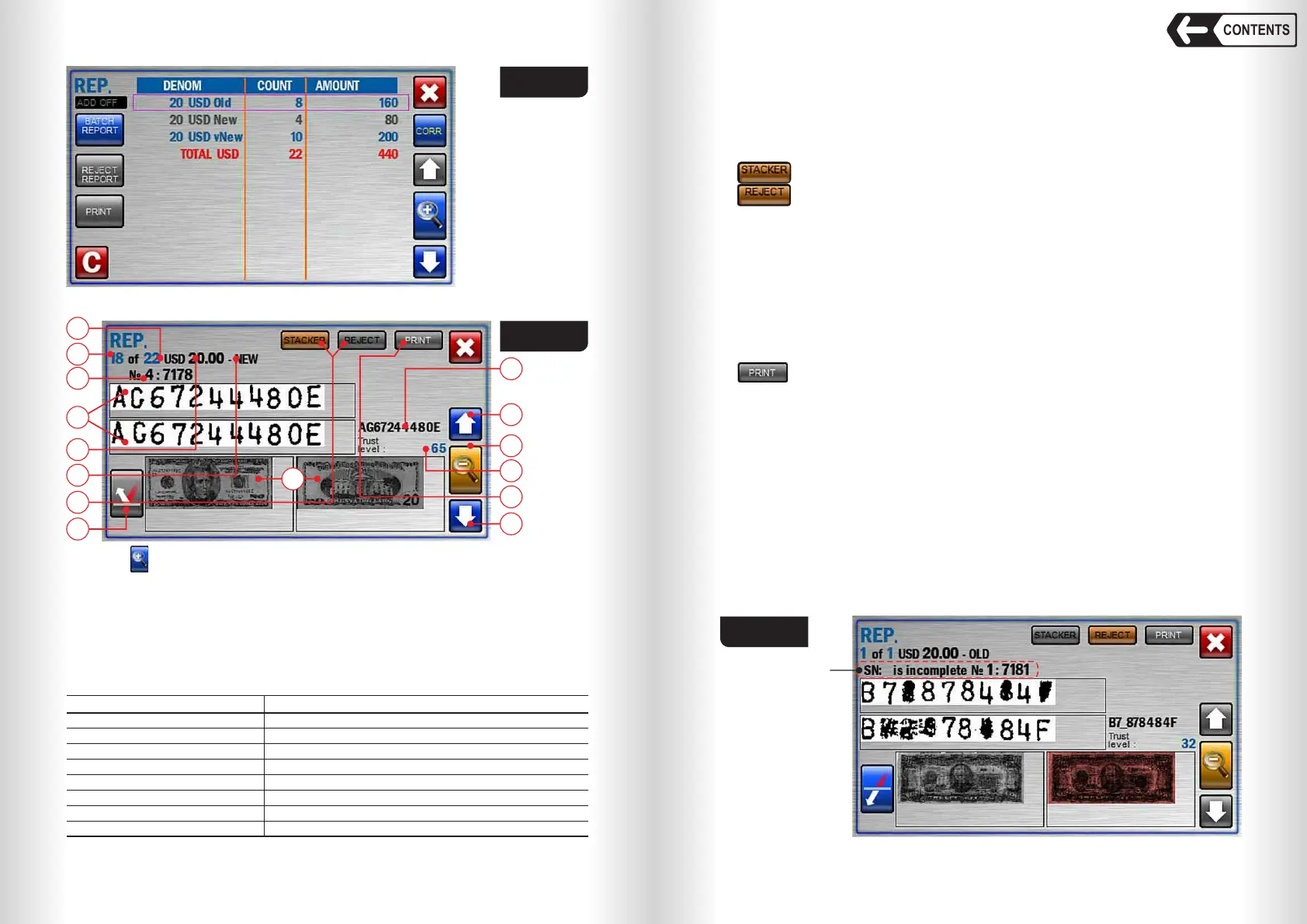
Fig. 63
Fig. 64
Touch (Fig. 63) to open detailed SN detection report (see Fig. 64).
Fig. 64 shows:
1 Detected (scanned) image of banknote serial numbers. Please mind that the
image is enhanced and may differ from actual.
2 Banknote position in the batch that has been placed in the hopper. Reject
report will show reject reason (Fig. 65).
SN reject reasons:
Trust Level Reject reason
33..64
1..32
0
– 1
– 2
– 3
– 4
– 5
Too many recovered SN characters
SN is incomplete
No SN detection was done
SN character mismatch
SN formula violation
Missing characters, SN is probably in the black list
SN: No detection result received
SN matches the data in the black list
1
2
3
4
5
6
7
14
9
10
10
11
12
13
8
Banknote counter DORS 820 Banknote counter DORS 820
3 Banknote number in the stacker.
4 Detected currency.
5 Detected denomination.
6 Banknote issue (if any).
7 Reject pocket report and stacker report keys. Highlighted key designates
the selected pocket:
– for stacker report (see Fig. 64);
– for reject report (see Fig. 65).
Warning: SN images (pos. 1 Fig. 64) and banknote images (pos. 13 Fig.
64) are displayed from the last single count only (the images from the previous
counts are deleted). Single count starts when the banknotes are placed in the
hopper and it stops when:
— Pocket limit or batch limit is reached, or
— Hopper is empty, or
— Note jam or another error requiring immediate counting interruption has
happened.
8 – key will output the count of the last batch results to the printer
depending on selected pocket. Stacker output data contains banknote
position, currency, denomination, issue and banknote SN. Reject pocket
output data contains banknote position and reject reason.
9 Detected SN in text format. Besides the figures and letters it may contain:
(_) – not detected, (!) – found different symbols that should match in the
same banknote.
10 Navigation keys to select a banknote in the report.
11 Switch between batch report and banknote report key.
12 Detected SN trust level.
13 Banknote scanned image (if available)
14 Select the colour of banknote scanned image.
15 Count number (unique identification of the counted batch).
Fig. 65
Reject reason


 To Next Page
 Loading...


