45
44
CONTENTS
Banknote counter DORS 820 Banknote counter DORS 820
SN parameters menu
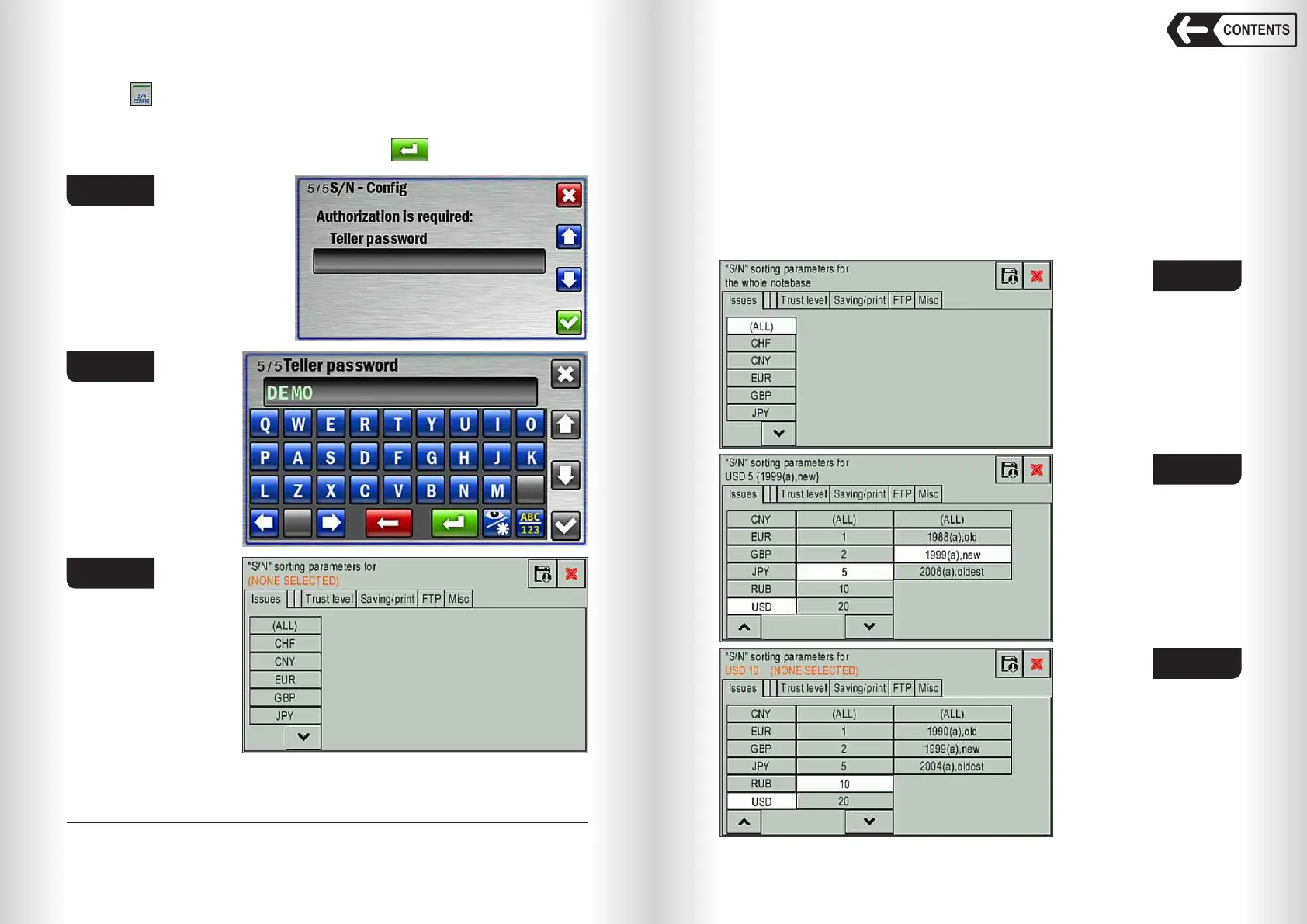
Touch (Fig. 61) to open SN parameters menu.
5
WARNING: SN parameters menu is password protected. Enter valid
password to open the menu: touch grey rectangle (Fig. 68) to display the
keyboard (Fig. 69), type the password and touch to open SN parameters
menu (Fig. 70).
5
— Default password is DEMO (Fig. 69).
Selected currency, denomination and issue are displayed in the upper part
of the screen. If any of the above is not selected (Fig. 70), then trust level
setting is unavailable (Fig. 74).
Fig. 68
Fig. 69
Fig. 70
ISSUES tab
ISSUES tab contains the list of currencies, denominations and issues
preset in the counter memory.
ALL will set trust level for all preset currencies (Fig. 71). You may also set
trust level for a certain currency, denomination and issue; to do this please
select required currency, then select required denomination (or all
denominations) and then select required issue (or all issues); see Fig. 72. If
any of the parameters hasn't been selected (for example, the currency and
denomination are selected while the issue is not, see Fig. 73), then trust level
setting is unavailable (Fig. 74).
Fig. 71
Fig. 72
Fig. 73


 To Next Page
 Loading...


