61
60
Banknote counter DORS 820 Banknote counter DORS 820
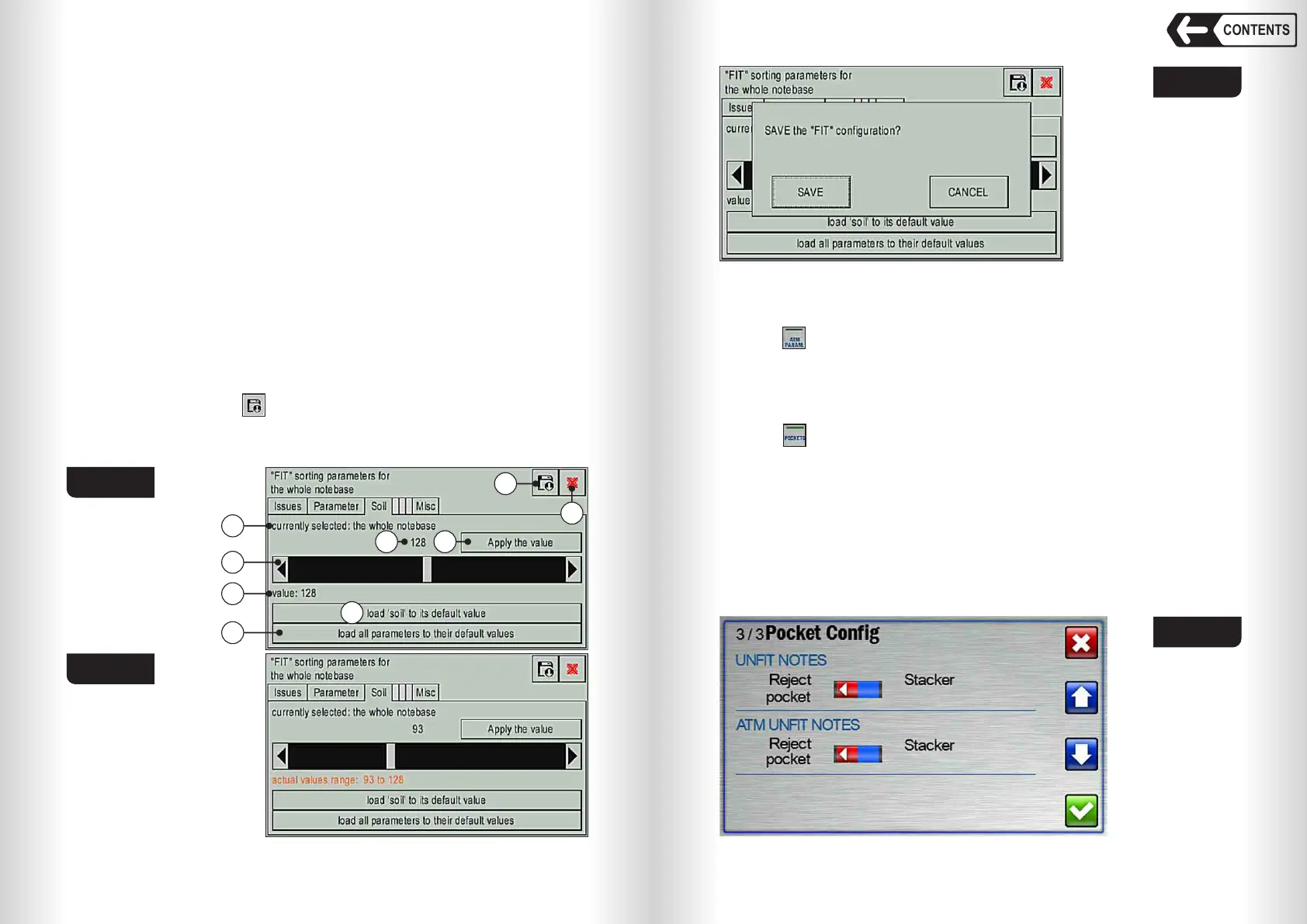
for the adjusted parameter. The more is the value the more negligible
defects will be detected and rejected. The less is the value the more is the
tolerance of the selected defect in the counted banknotes. If the value is 0
then the parameter is ignored during the detection. Standard values of the
parameters are are set by the manufacturer for each individual currency,
based on generally accepted recommendations in force in the territory of its
circulation.
3 The current value (or the range of actual values (see Fig. 103)) of the current
fitness parameter is the last saved value (or 128; factory setting). The range
of actual values appears when for the selected set of currencies,
denominations, emissions, various values of the current parameter for
specific emissions or denominations are set.
4 The key (load «Soil» to its default value) will set the parameter to factory
settings for the selected set of currencies, denominations, emissions.
5 The key (load all parameters to their default values) will set all the
parameters to factory settings for all the currencies, denominations,
emissions.
6 Current parameter value set by the slider.
7 «Apply the value» key. Touch it to save the selected parameter value for
the selected set of currencies, denominations, emissions.
Warning: the saved value will be implemented for the operation only after
saving all the changes ( key item 9 Fig. 102).
8 Exit key
9 Save key. Touch it to open the menu (see Fig. 104), for saving all the actual
values of the fitness parameters for all the performed adjustments.
Fig. 102
Fig. 104
Fig. 103
1
2
3
4
5
6 7
8
9
ATM parameters menu
Touch (item 5 Fig. 89) to open ATM parameters menu.
The configuration and functions of this menu are the same as UNFIT
parameters menu except default settings from the factory.
POCKETS menu (see Fig. 105)
Touch (item 6 Fig. 89) to open POCKETS menu (see Fig.105).
Select with the switches «UNFIT NOTES» and «ATM UNFIT NOTES» the
pocket for the banknotes that do not meet the criteria defined in the submenu
«UNFIT PARAM.» or «ATM PARAM.». This function is useful, for example, if it
is known that in a counted batch most of the banknotes can be rejected
according to those criteria.
Warning: If selected the option that the banknotes that do not meet the
fitness criteria are sent to the stacker, then the banknotes detected as suitable,
as well as all other banknotes rejected for other reasons, will be sent to the
reject pocket.
Fig. 105
CONTENTS


 To Next Page
 Loading...


