EasyManua.ls Logo

DoubleSight DS-245W - Page 15

DoubleSight DS-245W
24 pages
Print Icon
To Next Page IconTo Next Page
To Previous Page IconTo Previous Page
Loading...
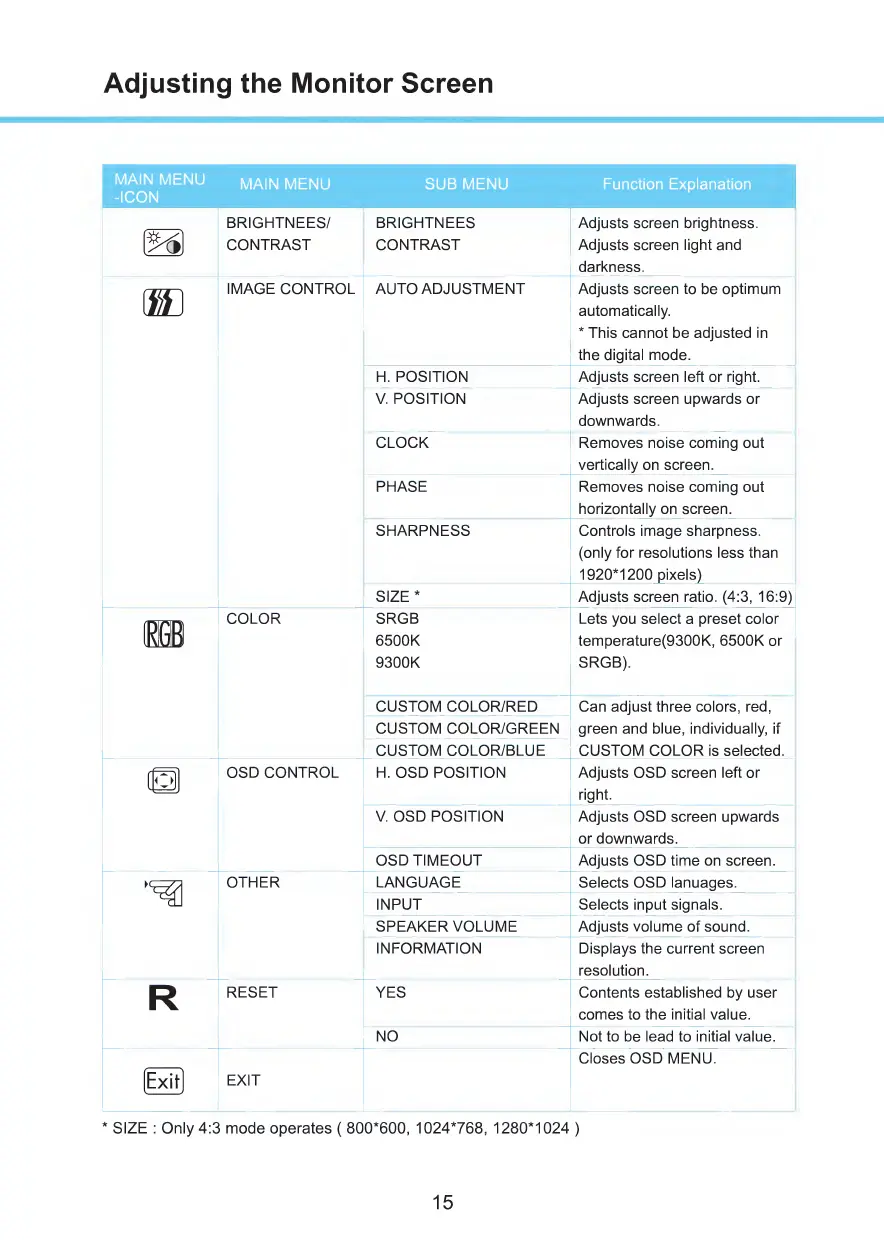
Adjusting
the
Monitor
Screen
MAIN
MENU
-ICON
MAIN
MENU
SUB
MENU
Function
Explanation
(5~6)
BRIGHTNEES/
BRIGHTNEES
Adjusts
screen
brightness.
CONTRAST
CONTRAST
Adjusts
screen
light
and
darkness.
m
IMAGE
CONTROL
AUTO
ADJUSTMENT
Adjusts
screen
to
be
optimum
automatically.
*
This
cannot
be
adjusted
in
the
digital
mode.
H.
POSITION
Adjusts
screen
left
or
right.
V.
POSITION
Adjusts
screen
upwards
or
downwards.
CLOCK
Removes
noise
coming
out
vertically
on
screen.
PHASE
Removes
noise
coming
out
horizontally
on
screen.
SHARPNESS
Controls
image
sharpness.
(only
for
resolutions
less
than
1920*1200
pixels)
SIZE*
Adjusts
screen
ratio.
(4:3,
16:9)
minni
COLOR
SRGB
Lets
you
select
a
preset
color
IRffl
6500K
temperature(9300K,
6500K
or
9300K
SRGB).
CUSTOM
COLOR/RED
Can
adjust
three
colors,
red,
CUSTOM
COLOR/GREEN
green
and
blue,
individually,
if
CUSTOM
COLOR/BLUE
CUSTOM
COLOR
is
selected.
fpjjl
OSD
CONTROL
H.
OSD
POSITION
Adjusts
OSD
screen
left
or
right.
V.
OSD
POSITION
Adjusts
OSD
screen
upwards
or
downwards.
OSD
TIMEOUT
Adjusts
OSD
time
on
screen.
OTHER
LANGUAGE
Selects
OSD
lanuages.
INPUT
Selects
input
signals.
SPEAKER
VOLUME
Adjusts
volume
of
sound.
INFORMATION
Displays
the
current
screen
resolution.
R
RESET
YES
Contents
established
by
user
comes
to
the
initial
value.
NO
Not
to
be
lead
to
initial
value.
Closes
OSD
MENU.
EE)
EXIT
*
SIZE
:
Only
4:3
mode
operates
(
800*600,
1024*768,
1280*1024
)
15

Related product manuals