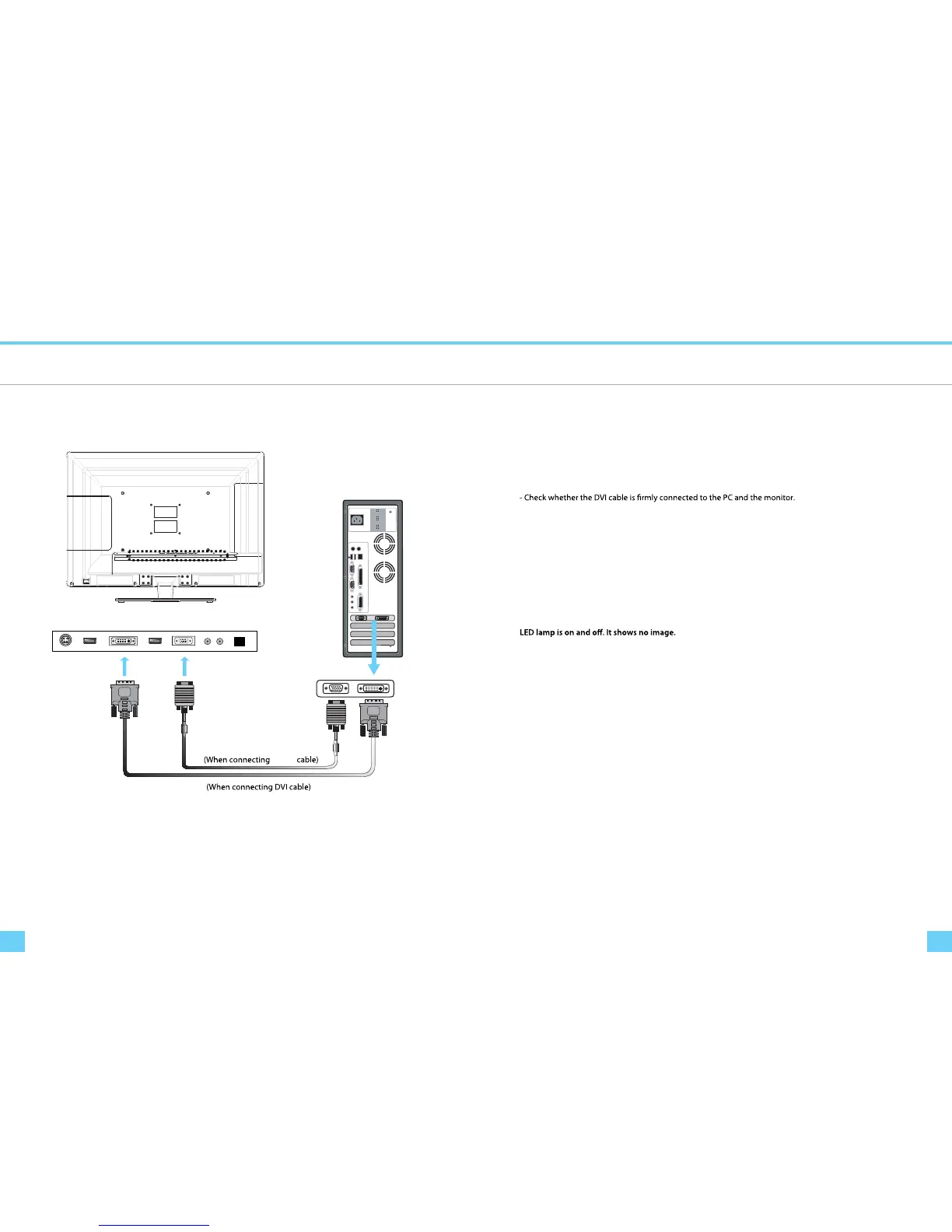
Connecting to PC
XXXW
Computer Connection
VGA
tIf only one connections is required a DVI connection is recommended if available
Troubleshooting
Troubleshooting
If you encounter a problem with your monitor please review these troubleshooting tips.
If the problem persists please contact your monitor dealer or DoubleSight customer service for additional
assistance.
No image on the monitor
- Check whether a graphic card is correctly inserted into the slot.
- Check whether the power of the PC and the monitor is on.
- Check whether a graphic card or mode is set appropriately on the PC.
- Check whether DVI cable pins are not inserted or bent.
No Power
- Check whether the power cord is correctly inserted and reconnect if necessary.
- Pull out the power cord from wall outlet and reconnect in 1 ~ 2 minutes.
- Check whether DVI cable is connected to the monitor and the PC.
- Check whether the PC is in power saving made and attempt to operate keyboard and mouse.
Unstable or unfocused image or trembling
- Check whether DVI cable is connected to the monitor and the PC.
- If the PC’s display mode is changed, the screen needs readjusting. So check the display mode.



 To Next Page