Need help?
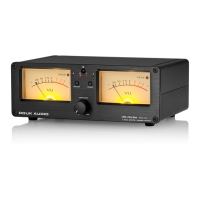
Do you have a question about the DOUK AUDIO VU102 and is the answer not in the manual?
USB power needs DC 5V, at least 1A; avoid fast/dual voltage chargers for stable backlight.
If A/B ports are unselected, it auto-switches to build-in load and connects to L/R channels.
When powered off, A/B disconnect from I/O, enter mute mode, and switch to build-in load.
A relatively loud sound during A/B channel switching is normal operation.
Remote control battery (AAA) and DC5V power adapter are not included; prepare them separately.
Turn the WATT knob on the front panel to maximum (200W) before connecting.
Connect power amplifier and speaker to the VU102's A/B or I/O interfaces for operation modes.
Connect the power cord; the VU102 turns on automatically. It can be turned off via the panel or remote.
Select A/B working modes via panel or remote. 1-IN-2-OUT allows simultaneous A and B work.
Use the WATT knob to adjust the VU pointer to an appropriate swing range.
When off, A/B and I/O ports disconnect, backlight off, and speakers mute. Pointer may swing if audio signal persists.
If pointer swings randomly without music, adjust WATT knob to set pointer in suitable range.
 General
| Frequency Response | 20Hz-20kHz (±1dB) |
|---|---|
| Input Sensitivity | 200mV |
| Dimensions | 330mm x 220mm x 180mm |
| Input Impedance | 100kΩ |
| Power Supply | AC 220V/110V, 50/60Hz |
| Weight | 8kg |
| Power Output | 10W x 2 (8Ω) |
| Impedance | 8Ω |
| Output Power | 10W x 2 (8Ω) |

 To Next Page