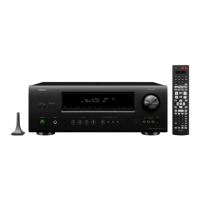
The Denon AVR-1912 is an integrated network AV receiver designed for home audio and video systems. It serves as a central hub for various audio and video sources, providing amplification, signal processing, and network connectivity.
Function Description:
The AVR-1912 functions as a multi-channel audio/video receiver, capable of decoding various audio formats, amplifying sound to multiple speakers, and managing video signals from different sources. Its integrated network capabilities allow for internet radio, streaming from network devices, and firmware updates. The receiver supports multi-zone audio, enabling audio output in a separate room (ZONE2). It also includes a sleep timer function for automatic power-off.
Important Technical Specifications:
Audio Section:
- Power Amplifier (Rated Output):
- Front: 90 W + 90 W (8 Ω/ohms, 20 Hz – 20 kHz with 0.05 % T.H.D.); 125 W + 125 W (6 Ω/ohms, 1 kHz with 0.7 % T.H.D.)
- Center: 90 W (8 Ω/ohms, 20 Hz – 20 kHz with 0.05 % T.H.D.); 125 W (6 Ω/ohms, 1 kHz with 0.7 % T.H.D.)
- Surround: 90 W + 90 W (8 Ω/ohms, 20 Hz – 20 kHz with 0.05 % T.H.D.); 125 W + 125 W (6 Ω/ohms, 1 kHz with 0.7 % T.H.D.)
- Surround Back: 90 W + 90 W (8 Ω/ohms, 20 Hz – 20 kHz with 0.05 % T.H.D.); 125 W + 125 W (6 Ω/ohms, 1 kHz with 0.7 % T.H.D.)
- Output Connector: 6 – 16 Ω/ohms
- Input Sensitivity/Input Impedance: 200 mV/47 kΩ/kohms
- Frequency Response: 10 Hz – 100 kHz +1, -3 dB (DIRECT mode)
- S/N (IHF-A weighted, Direct mode): 100 dB
Video Section:
- Standard Video Connectors (Input/Output Level and Impedance): 1 Vp-p, 75 Ω/ohms
- Frequency Response: 5 Hz -10MHz, 0, - 3dB
Tuner Section (FM):
- Reception Frequency Range: 87.5 MHz - 107.9 MHz
- Usable Sensitivity: 1.2 μV (12.8 dBf)
- 50 dB Quieting Sensitivity (Mono): 2.8 μV (20.2 dBf)
- S/N (IHF-A) (Mono): 70 dB (DIRECT Mode)
- S/N (IHF-A) (Stereo): 67 dB (DIRECT Mode)
- Total Harmonic Distortion (At 1 kHz) (Mono): 0.7%
- Total Harmonic Distortion (At 1 kHz) (Stereo): 1.0%
Tuner Section (AM):
- Reception Frequency Range: 520 KHz - 1710 KHz
- Usable Sensitivity: 18μV
General Section:
- Power Supply: AC 120V, 60Hz
- Power Consumption: 460W
- Power Consumption in Standby Mode: 0.1W
- Power Consumption in Network Standby Mode: 3W
- Maximum External Dimensions: 17 1/8" (W) x 6 3/8" (H) x 15 3/64" (D) (435.0 x 162.0 x 382.0 mm)
- Weight: 22 lbs 7.8 oz (10.2 kg)
Remote Control Unit (RC-1156):
- Batteries: R6/AA Type (two batteries)
- Maximum External Dimensions: 2-3/32" (W) x 8-13/16” (H) x 1-7/64” (D) (53 x 224 x 28 mm)
- Weight: 5.6 oz (160 g, including batteries)
Usage Features:
Front Panel Controls:
- Power Operation Button (ON/STANDBY): Turns the unit on and off (standby).
- Power Indicator: Lights to show power status.
- Headphones Jack (PHONES): For private listening; disables audio output to connected speakers and PRE OUT connectors when in use.
- Quick Select Buttons: For quick access to preset configurations.
- Internet Radio Button: Direct access to internet radio.
- Preset Channel Buttons (1-3): For recalling preset radio channels.
- USB/iPod Port: For connecting USB devices or iPods for media playback.
- V.AUX INPUT Connectors: Auxiliary input for video and audio sources (caps must be removed before use).
- SETUP MIC Jack: For connecting the sound calibration microphone.
- MASTER VOLUME Control Knob: Adjusts the overall volume.
- Master Volume Indicator: Displays the current volume level.
- Display: Shows various information including input source, surround mode, settings, and other operational data.
- Remote Control Sensor: Receives signals from the remote control.
- Tuner Preset Channel Buttons (TUNER PRESET CH+,-): For navigating tuner preset channels.
- ZONE SELECT Button: For selecting different audio zones.
- ZONE2 ON/OFF Button: Turns on/off audio output to ZONE2.
- Input Source Select Button: For choosing the desired audio/video input source.
- iPod Play Button (iPod ►): Initiates playback from a connected iPod.
- STATUS Button: Displays system status information.
Display Indicators:
- Decoder Indicators: Light up when specific audio decoders (e.g., dts HD, TrueHD, DIGITAL+) are active.
- Input Signal Indicators: Show the type of input signal.
- Information Display: Provides details like input source name, surround mode, and setting values.
- Front Speaker Indicator: Lights according to the front A and B speaker settings.
- Multi-zone Indicators: Lights when ZONE2 power is on.
- Master Volume Indicator: Displays the master volume level.
- Sleep Timer Indicator: Lights when sleep mode is active.
- MUTE Indicator: Lights when mute mode is active.
- Audyssey® Indicators: Show the status of Audyssey MultEQ® XT, Dynamic EQ®, and Dynamic Volume® settings.
- Surround Back Indicator: Lights when audio is output to surround back speakers.
- Input Mode Indicators: Show the selected audio input modes.
- RESTORER Indicator: Lights when RESTORER mode is selected.
- HDMI Indicator: Lights when playing via HDMI connections.
- Tuner Reception Mode Indicators: Show tuner reception conditions (STEREO, TUNED, AUTO).
Rear Panel Connections:
- FM/AM Antenna Terminals: For connecting radio antennas.
- Analog Audio Connectors: For analog audio input/output.
- PRE OUT Connectors: For connecting to external power amplifiers.
- S-VIDEO/VIDEO Connector: For S-Video and composite video connections.
- COMPONENT VIDEO Connector: For component video connections.
- Speaker Terminals: For connecting speakers (6-16 Ω/ohms).
- Power Cord: For connecting to AC power.
- HDMI Connectors: For HDMI audio/video input/output.
- Digital Audio Connectors: For optical and coaxial digital audio input.
- ETHERNET Connector: For network connection.
- DOCK CONTROL Jack: For connecting a Denon dock.
Remote Control (RC-1156) Features:
- ZONE SELECT Button: For controlling different audio zones.
- Zone Mode Indicators: Show active zones.
- SOURCE SELECT Buttons: For selecting input sources.
- QUICK SELECT Buttons: For quick access to preset configurations.
- INTERNET RADIO Button: Direct access to internet radio.
- Preset Channel Buttons (PRESET 1-3): For recalling preset radio channels.
- AMP Button: For amplifier control.
- Channel Buttons (CH +, -): For changing channels or navigating menus.
- Muting Button (X): Mutes audio output.
- MENU Button: Accesses the main menu.
- Cursor Buttons (▲▼◄►): For menu navigation.
- SEARCH Button: Initiates search functions.
- System Buttons: Includes search, skip, play, pause, and stop buttons for media playback.
- Tuner System Buttons: For FM/AM band switching, tuning mode, and tuning up/down.
- Character Buttons: For text input.
- MEMORY Button: Saves settings.
- Number Buttons: For direct input of numbers.
- SHIFT Button: For accessing secondary functions of buttons.
- TV Operation Buttons (TV I / O / INPUT): For controlling a connected TV.
- Remote Control Signal Transmitter: Emits IR signals to the receiver.
- Power Buttons (ON / STANDBY): Turns the unit on and off.
- Master Volume Control Buttons (◄▲▼►): Adjusts master volume.
- Channel Level Button (CH LEVEL): Adjusts individual channel levels.
- RETURN Button: Returns to the previous screen or menu.
- ENTER Button: Confirms selections.
- Surround Mode Buttons: Selects various surround sound modes (MOVIE, MUSIC, GAME, DIRECT).
- SLEEP Button: Activates the sleep timer.
- PARTY Button: Activates party mode.
- ZONE/DEVICE Power Buttons: Controls power for specific zones or devices.
Maintenance Features:
Firmware Updates:
- The unit can update its firmware over the internet via Wi-Fi or Ethernet.
- It automatically searches for new updates and displays a message with options to update "NOW," "LATER," or "IGNORE."
- Firmware notification can be disabled in the "Setup" menu.
- If an update is interrupted, "Update retry" appears, and the unit attempts to resume the update. If it times out, messages like "Connection fail," "Download fail," "Updating fail," "Server is busy," or "Login failed" may appear.
- Users can manually check for firmware updates via the "SETUP" menu (GENERAL > FIRMWARE > UPDATE > CHECK FOR UPDATE).
- The current firmware version can be displayed on the TV screen (SETUP > GENERAL > INFORMATION > FIRMWARE).
- Links are provided to download the latest firmware and view recent updates/upgrades from the Denon website.
Microprocessor Reset:
- A microprocessor reset can restore normal operation if the unit freezes, locks up, or behaves erratically.
- Procedure: With the power off, press and hold the "PRESET CHANNEL 2," "PRESET CHANNEL 3," and "POWER" buttons simultaneously on the AVR until the display flashes at 1-second intervals.
- Important Note: This procedure resets most settings to factory defaults, erasing all saved configurations. Users are advised to back up settings before performing a reset.
- Causes for Reset: Static electricity jolts or current surges through an input can affect microprocessor performance.
- Pre-Reset Checks: Before resetting, users should check all connections carefully, look for setup errors, and back up their settings.
- Web Control Feature: The Web (Browser) Control feature can be used to save a configuration file to a hard drive for backup. Recommended browsers include Internet Explorer 10+, Mozilla Firefox 24+, Google Chrome 29+, and Safari 5.x+.
- Installer Setup: If the system was set up by an installer, it is recommended to contact them first, as specific EQ calibrations (Audyssey) may need to be re-performed.
- Length of Non-Transferable Warranty:
- 2 years for units purchased new.
- 1 year for refurbished (B-Stock) units.
- Coverage: Covers defects in material and workmanship during the warranty periods.
- Exclusions: Products not distributed in the U.S.A. by DENON ELECTRONICS (USA), LLC; products not purchased from an authorized DENON dealer; products with defaced, modified, or removed serial numbers; damage from accident, abuse, misuse, neglect, unauthorized repair, or failure to follow instructions; shipping damage (claim to be presented to carrier); items subject to normal wear (tape heads, cartridges, stylus, battery); periodic check-ups without defects; use outside the U.S.A.; damaged magnetic tape or CD/DVD/BD discs; industrial/commercial/professional applications; installation/removal charges.
- Warranty Performance: Defective products will be repaired or, at Denon's option, replaced with new, reconditioned, or equivalent models, free of charge for parts and labor.
- Obtaining Service: Units can be taken or shipped to an authorized Denon service station or DENON ELECTRONICS. Shipping charges to the service center are the user's responsibility, while return shipping charges are covered if repairs are under warranty.
- Required for Service: A copy of the original sales slip, name, address, daytime telephone number, model and serial number, and a description of the problem. For CD/DVD/BD Players, enclose one defective disc for testing.
- Legal Rights: The warranty provides specific legal rights, which may vary by state.

 Need help?
 General

 To Next Page