EasyManua.ls Logo

D+M Group AVR-1612 - User Manual

D+M Group AVR-1612
18 pages
Print Icon
To Next Page IconTo Next Page
Loading...
MODEL: AVR-1612
Model Information
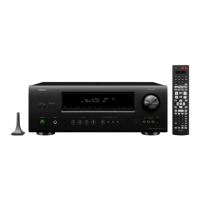
INTEGRATED NETWORK AV RECEIVER
I/R Codes
Product Specifications
Upgrades/Updates
Accessories
Reset Procedure
Warranty
Remote Control
Rear Panel
Front Panel
1
Model Information
Index
MI093015E3-1
NOTE:
This edition is missing the FAQ’s content (pages 12 and 13) ……………………………………………………….11/16/2016
This edition is missing the link to the IR Codes…………………………………………………….………………….11/16/2016
Protection History
Display Mode
Question and Answer IconNeed help?

Do you have a question about the D+M Group AVR-1612 and is the answer not in the manual?

Summary

Front Panel

Power and Indicator Controls

Features for powering the unit on/off and status indication.

Audio Output and Input Jacks

Connections for headphones and external audio devices.

iPod and Portable Media Controls

Buttons and jacks for controlling iPod and portable media.

Display and Volume Control

Master volume knob and display for unit information.

Source and Function Buttons

Buttons for selecting sources, tuning, and accessing functions.

Display Indicators (1 of 2)

Decoder and Signal Indicators

Lights showing active decoders and input signal types.

Information and Status Displays

Display area for source, mode, settings, volume, and status.

Audyssey and Surround Indicators

Indicators for Audyssey features and surround sound output.

Input Mode Indicators

Lights for selected audio input modes.

Display Indicators (2 of 2)

Connection Status Indicators

Lights for HDMI connections and tuner reception modes.

Restorer and Tuner Mode Indicators

Indicators for RESTORER mode and tuner reception status.

Rear Panel Connectors

Antenna and Audio Inputs

Terminals for FM/AM antennas and analog audio inputs.

Speaker Terminals

Connections for speakers and impedance information.

Video, HDMI, and Dock Connections

S-VIDEO/VIDEO, HDMI, and DOCK CONTROL connections.

Digital Audio and Pre-Out

Digital audio input and pre-amplifier output connections.

Power Cord Connection

Connection point for the unit's power cord.

Remote Control Functions (1 of 2)

Signal Transmission and Source Selection

Indicator for signal transmission and buttons for selecting input sources.

Quick Select and Channel Controls

Buttons for quick source access and channel tuning.

Volume, Menu, and Navigation

Buttons for volume adjustment, menu access, and cursor navigation.

System and Tuner Operation

Buttons for system functions, search, and tuner band/tuning.

Numeric and Function Input

Keypad for direct input and special function buttons.

Remote Control Functions (2 of 2)

Character and Memory Buttons

Buttons for character input and memory functions.

TV Operation and Source Select

Buttons for TV control and selecting the input source.

Master Volume and Channel Level

Controls for adjusting master volume and channel levels.

Return, Enter, and Sleep Functions

Buttons for navigation, confirmation, and sleep timer.

Surround Mode and Device Power

Buttons for selecting surround modes and device power.

Denon Limited Warranty (1 of 2)

Warranty Coverage and Honoring

Details on where and how the warranty is honored.

Warranty Duration

Specifies warranty periods for new and refurbished units.

Service and Contact Information

Contact details for Denon Electronics USA and repair services.

Denon Limited Warranty (2 of 2)

Items Not Covered by Warranty

Exclusions from warranty coverage, including accident and misuse.

Obtaining Warranty Performance

Procedure for service, including shipping and required documentation.

Warranty Limitations and Legal Rights

Details on liability limitations and consumer legal rights.

Reset Procedure

Resetting the Microprocessor

Procedure to reboot the microprocessor for normal operation.

Factors Affecting Microprocessor Performance

Issues like static electricity or current surges that can impact performance.

Pre-Reset Checks

Recommendations to check connections and setup errors before resetting.

Accessories

Remote Control and Antennas

Details on the remote control and AM/FM antennas.

Microphones and Stands

Information on sound calibration microphones and stands.

Cables and Documentation

Includes power cords, owner's manual, and safety instructions.

Connectivity Accessories

External antennas for Bluetooth/wireless connectivity.

Upgrades and Updates

Update Availability

Indicates if any software updates are available for the unit.

Specifications - Audio Section

Power Amplifier Rated Output

Detailed output power specifications for front, center, surround, and surround back.

Analog Input Specifications

Input sensitivity, impedance, and frequency response for analog signals.

Signal-to-Noise Ratio (S;N)

S/N ratio for analog audio inputs in Direct mode.

Specifications - Video, Tuner, General

Video Connector Specifications

Details on standard video connectors and frequency response.

Tuner Reception Specifications

Reception frequency range and sensitivity for FM and AM.

General Power Specifications

Power supply, consumption, and standby power details.

Specifications - Dimensions and Weight

Unit Dimensions Diagram

Diagram showing the physical dimensions of the unit in inches/mm.

Unit Weight

Specifies the total weight of the unit in pounds and kilograms.

Overview

The Denon AVR-1612 is an integrated network AV receiver designed to deliver a comprehensive home theater experience. It serves as the central hub for audio and video components, offering a wide array of connectivity options and sound processing capabilities.

Function Description:

The AVR-1612 functions as a multi-channel audio/video receiver, capable of decoding various surround sound formats and amplifying audio signals to connected speakers. Its "integrated network" designation indicates its ability to connect to a home network, potentially enabling features like internet radio, music streaming, or control via network-connected devices. The receiver manages multiple audio and video inputs, allowing users to switch between sources such as Blu-ray players, game consoles, TVs, and various audio devices. It also provides output to a display (monitor) and multiple speaker configurations, including front, center, surround, and surround back channels, along with a subwoofer. The inclusion of a "DOCK CONTROL" jack suggests compatibility with Denon's proprietary iPod/iPhone docks, allowing for integrated control and playback of Apple devices.

Important Technical Specifications:

  • Power Amplifier (Rated Output):
    • Front: 75 W + 75 W (8 Ω/ohms, 20 Hz – 20 kHz with 0.05 % T.H.D.) and 120 W + 120 W (6 Ω/ohms, 1 kHz with 0.7 % T.H.D.)
    • Center: 75 W (8 Ω/ohms, 20 Hz – 20 kHz with 0.05 % T.H.D.) and 120 W (6 Ω/ohms, 1 kHz with 0.7 % T.H.D.)
    • Surround: 75 W + 75 W (8 Ω/ohms, 20 Hz – 20 kHz with 0.05 % T.H.D.) and 120 W + 120 W (6 Ω/ohms, 1 kHz with 0.7 % T.H.D.)
    • Surround Back: 75 W + 75 W (8 Ω/ohms, 20 Hz – 20 kHz with 0.05 % T.H.D.) and 120 W + 120 W (6 Ω/ohms, 1 kHz with 0.7 % T.H.D.)
  • Output Connector: 6 – 16 Ω/ohms
  • Analog Input Sensitivity/Impedance: 200 mV/47 KΩ/kohms
  • Analog Frequency Response: 10 Hz – 100 kHz +1, -3 dB (DIRECT mode)
  • Analog S/N: 98 dB (IHF-A weighted, Direct mode)
  • Video Section (Standard Video Connectors):
    • Input/Output Level and Impedance: 1 Vp-p, 75 Ω/ohms
    • Frequency Response: 5 Hz -10MHz, 0, - 3dB
  • Tuner Section (FM):
    • Reception Frequency Range: 87.5 MHz - 107.9 MHz
    • Usable Sensitivity: 1.2 μV (12.8 dBf)
    • 50 dB Quieting Sensitivity (Mono): 2.8 μV (20.2 dBf)
    • S/N (IHF-A) (Mono): 70 dB (DIRECT Mode)
    • S/N (IHF-A) (Stereo): 67 dB (DIRECT Mode)
    • Total Harmonic Distortion (At 1 kHz) (Mono): 0.7%
    • Total Harmonic Distortion (At 1 kHz) (Stereo): 1.0%
  • Tuner Section (AM):
    • Reception Frequency Range: 520 KHz - 1710 KHz
    • Usable Sensitivity: 18μV
  • General Section:
    • Power Supply: AC 120V, 60Hz
    • Power Consumption: 360W
    • Power Consumption in Standby Mode: 0.1W
    • Power Consumption in Network Standby Mode: 3W
  • Dimensions: 17 1/8 (435.0) inches wide, 6 3/8 (162.0) inches high, 15 3/64 (382.0) inches deep (including protrusions).
  • Weight: 20 lbs 8 oz (9.3 kg)

Usage Features:

The AVR-1612 offers a user-friendly interface with a clear front panel display and a comprehensive remote control.

  • Front Panel Controls:
    • Power Operation Button (ON/STANDBY): For turning the unit on and off.
    • Headphones Jack (PHONES): Allows private listening, muting speaker output when in use.
    • QUICK SELECT Buttons: For quick access to frequently used settings or input sources.
    • iPod Play Button (iPod): Dedicated control for iPod playback.
    • iPod System Buttons: Includes Stop, Skip, and other playback controls for iPod.
    • PORTABLE IN Jack: For connecting portable audio devices.
    • V.AUX INPUT Connectors: Versatile auxiliary inputs for various devices.
    • SETUP MIC Jack: Used for the Audyssey auto-calibration system.
    • MASTER VOLUME Control Knob: For adjusting the overall volume.
    • Display: Provides information on input source, surround mode, settings, and other operational data.
    • Decoder Indicators: Lights up to show active audio decoders (e.g., dts HD, TrueHD, DIGITAL+).
    • Input Signal Indicators: Shows the type of input signal.
    • Audyssey® Indicators: Lights up based on Audyssey MultEQ® XT, Dynamic EQ®, and Dynamic Volume® settings.
    • Surround Back Indicator: Indicates audio output to surround back speakers.
    • Input Mode Indicators: Shows selected audio input modes.
    • RESTORER Indicator: Lights when RESTORER mode is active.
    • HDMI Indicator: Lights when using HDMI connections.
    • Tuner Reception Mode Indicators: Shows STEREO, TUNED, or AUTO modes for tuner.
  • Rear Panel Connectivity:
    • FM/AM Antenna Terminals: For radio reception.
    • Analog Audio Connectors: Multiple stereo RCA inputs for various audio components.
    • Speaker Terminals: Connections for front, center, surround, and surround back speakers, supporting 6-16 Ω impedance.
    • S-VIDEO/VIDEO Connector: For standard definition video inputs.
    • Power Cord: Detachable power input.
    • HDMI Connectors: Multiple HDMI inputs and one output (with ARC support).
    • PRE OUT Connectors: For connecting external power amplifiers or powered subwoofers.
    • Digital Audio Connectors: Coaxial and optical digital inputs.
    • DOCK CONTROL Jack: For Denon's proprietary iPod/iPhone docks.
  • Remote Control (RC-1157): A comprehensive remote with dedicated buttons for:
    • Input Source Select: BD, SAT/CBL, TV, USB/iPod, DVD, V.AUX, DOCK, TUNER, GAME.
    • QUICK SELECT Buttons: Mirrors front panel functionality.
    • AMP Button: For amplifier control.
    • Channel Buttons (CH +, -): For changing channels on tuner or other devices.
    • Muting Button: Temporarily silences audio.
    • MENU Button: Accesses on-screen menus.
    • Cursor Buttons (▲▼◄►) and ENTER: For menu navigation.
    • SEARCH Button: For searching content.
    • System Buttons: Playback controls (Search, Skip, Play, Pause, Stop).
    • Tuner System Buttons: BAND (FM/AM), MODE (tuning mode), TUNING (up/down).
    • Character Buttons: For text input.
    • MEMORY Button: For storing settings.
    • Number Buttons: For direct input.
    • SHIFT Button: For secondary functions.
    • TV Operation Buttons: TV, Power, Input.
    • SOURCE SELECT Button: General input selection.
    • Master Volume Control Buttons: Up/down volume.
    • Channel Level Button (CH LEVEL): Adjusts individual speaker levels.
    • RETURN Button: Returns to previous menu.
    • Surround Mode Buttons: MOVIE, MUSIC, GAME, DIRECT for different audio processing.
    • SLEEP Button: Activates sleep timer.
    • DEVICE Power Buttons: For controlling connected devices.

Maintenance Features:

  • Reset Procedure: The manual outlines a "microprocessor reset" procedure to resolve temporary freezes, lock-ups, or erratic behavior. This involves simultaneously pressing and holding the "◄◄", "►►" buttons, and the "POWER" button on the AVR until the display flashes. This action erases any previously programmed settings.
  • Troubleshooting for Reset: Before performing a reset, users are advised to check all connections carefully and look for setup errors, as these can often be the cause of performance issues.
  • Warranty Information: The device comes with a limited warranty in the U.S.A.
    • New Units: 2 years from the date of purchase.
    • Refurbished (B-Stock) Units: 1 year from the date of purchase.
    • The warranty covers defects in material and workmanship but excludes damage from accidents, misuse, unauthorized repairs, or commercial use.
    • Service can be obtained from authorized Denon service stations or directly from Denon Electronics (USA).
    • When returning for service, a copy of the original sales slip, along with a description of the problem, is required.
  • Upgrades/Updates: The manual indicates "No update available for this unit" in the Upgrades/Updates section, suggesting that firmware updates or feature enhancements may not be provided for this specific model.

The AVR-1612 is designed to be a robust and versatile component for a home entertainment system, offering a blend of powerful audio amplification, extensive connectivity, and user-friendly controls, backed by a clear maintenance and warranty policy.

D+M Group AVR-1612 Specifications

General IconGeneral
BrandD+M Group
ModelAVR-1612
CategoryStereo Receiver
LanguageEnglish

Related product manuals