DT03
3
General information
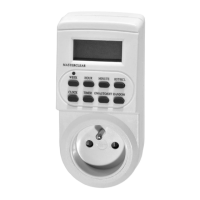
The plug-in digital timer switch can be used to program when the electrical devices connected to the socket
are switched on and off. The timer power switch operates in 10 selected time intervals (day / week /
random switching cycle)
Safety instructions
1. User’s manual is apart of the product and it should be stored with the device.
2. Before use read the user’s manual and check the technical specication of the device and strictly obey it.
3. Operating the unit contrary to the instruction manual and its purpose may cause damage to the unit, re,
electric shock or other hazards to the user.
4. The manufacturer is not liable for any damages to persons or property caused by improper use, contrary
to its intended purpose, the technical specications or the user’s manual.
5. Before use check if the device or any of its components is not damaged. Do not use damaged product.
6. Do not open, disassemble or modify the device. All repairs may only be made by an authorized service center.
7. Use the device only in dry interior rooms. International Protection Rating for the device is IP20.
8. The device should be protected against: dropping and shaking, high and low temperatures, humidity,
ooding and splashing, direct sunlight, chemicals, and other factors that could affect the device and its
operation.
9. The device should be cleaned with adry and soft cloth. Do not use abrasive powders, alcohol, solvents, or
other strong detergents.
10. Product is not atoy. The device and packaging must be kept out of the reach of children and animals.
Technical specication
Input/output voltage: AC 230 V ~ 50 Hz / max. rated current (power): 16 A(3600 W) / working tempera-
ture: from –10
o
C to +40
o
C / timekeeping accuracy: ±1 min/30 days / minimum on / off time interval:
1minute / built-in battery: NiMH DC 1,2 V (> 100 h)
Instructions
Initial settings
Before first use, it is recommended to plug in your timer switch to the mains socket AC 230 V ~
50 Hz for 14 hours in order to charge the built-in battery.
1. Plug your timer switch into mains socket, 230 V AC ~ 50 Hz.
2. Press the MASTER CLEAR buton to reset all the programmes and time settings.
Set the current time
1. Press and hold the CLOCK button and press the WEEK button to set the current day of the week.
2. Press and hold the CLOCK button and press the HOUR button to set the current hour.
3. Press and hold the CLOCK button and press the MINUTE button to set the current minute.
Set the on / off switch programmes
Individual programmes should not overlap. If any programmes overlap, the time switch will
switch on at the start of the first overlapping programme and switch off at the end time of
the last overlapping programme. If the ON and OFF actions are set to the same time, only
the OFF action will be executed.
You cannot change the timer switch operating mode or set RANDOM function while setting the programmes.
1. Press the TIMER button. The display will show 1 ON - - : - -. Set the start time of the rst programme.
2. Press the WEEK button to set the day of the week. It is possible to set 16 combinations of the day of
the week: MO / TU / WE / TH / FR / SA / SU / MO, TU, WE, TH, FR, SA, SU / MO, TU, WE, TH, FR / SA, SU
/ MO, TU, WE, TH, FR, SA / MO, WE, FR / TU, TH, SA / MO, TU, WE / TH, FR, SA / MO, WE, FR, SU
Abbreviations: MO – Monday, TU – Tuesday, WE – Wednesday, TH – Thursday, FR – Friday, SA – Saturday,
SU – Sunday.
3. Press the HOUR and MINUTE buttons to set the start time of the rst programme.
4. Press the TIMER button to nish setting the start time of the rst programme and start setting the
end time. The display will show 1 OFF - - : - -. To set the end time of the programme, repeat items 2 and
3. Press the TIMER button to nish setting the end time of the rst programme and proceed to set the
next programme.
Press and hold down the TIMER button to quickly cycle through the time settings of
subsequent programmes.
5. Press the CLOCK button when you have nished setting the programme times. Your timer switch is
ready for operation.
6. Connect your electrical device to the timer socket.
Set the timer operating mode
Push the ON/AUTO/OFF button to set the timer operating mode.
ON – manual power on – the set programmes are ignored
AUTO – timer operation – the set programmes are executed
OFF – manual power off – the set programmes are ignored
RANDOM function
The RANDOM function allows you to randomly switch on the device connected to the timer switch for aperiod
of 10-30 minutes during the following hours: 18:00-6:00. The RANDOM mode is only available during auto-
matic timer switch operation AUTO .
1. Press the RANDOM button to activate the RANDOM function. The R symbol in the display indicates the
active RANDOM function.
2. Press the RANDOM button again to deactivate the RANDOM function.
AM/PM or 24-hour timekeeping mode
Press and hold the CLOCK button and press TIMER button to select the 12-(PM) or 24-hour time display.
Set DST on/off
Press the CLOCK and ON/AUTO/OFF buttons simultaneously to turn on the Daylight Saving Time (DST).
The S (summer time) symbol will appear on the display and the clock will move forward one hour. Press the
CLOCK and ON/AUTO/OFF buttons simultaneously again to turn off the Daylight Saving Time (DST).
Warranty
The warranty terms are available at http://www.dpm.eu/gwarancja
Popis
MASTER CLEAR – vynulování všech nastavení asů aprogramů
RANDOM – funkce náhodného zapnutí/vypnutí
CLOCK – nastavení aktuálního asu / výběr 12/24hodinového formátu zobrazení asu
TIMER – nastavení délky programů / výběr 12/24hodinového formátu zobrazení asu
ON/AUTO/OFF – režim provozu
WEEK – nastavení dne týdne
HOUR – nastavení hodiny
MINUTE – nastavení minut
RST/RCL – mazání/obnovení továrního nastavení
Charakteristika
Digitální spínací hodiny slouží k naprogramování zapnutí avypnutí elektrických zařízení připojených do
zásuvky v10 vybraných asových intervalech (cyklus/denní/týdenní/náhodné zapnutí).
Podmínky bezpeného používání
1. Návod na obsluhu je neodluitelnou souástí výrobku aje nutno jej uchovávat spolu se zařízením.
2. Před zahájením používání zařízení je nutno se seznámit s návodem na obsluhu as technickou speci kací
zařízení abezpodmíneně je dodržovat.
3. Používání zařízení v rozporu s návodem na obsluhu av rozporu s jeho urením může způsobit poškození
zařízení, požár, zásah elektrickým proudem nebo ijiná nebez- peí pro použivatele.
4. Výrobce nenese zodpovědnost za poškození majetku nebo těla, která mohou vznik- nout v důsledku použí-
vání zařízení v rozporu s jeho urením, technickou speci ka- ci anávodem na použití.
5. Před zahájením používání je nutno zkontrolovat, zda zařízení nebo jakákoliv jeho ást nejsou poškozeny.
Poškozené zařízení se nesmí používat.
6. Nesmí se otevírat, rozkládat na souásti nebo upravovat zařízení. Jakékoliv opravy může provádět pouze
autorizovaný servis.
7. Zařízení je ureno výhradně pro použití uvnitř místností. Úrove ochrany zaříze- ní je IP20.
8. Zařízení je nutno chránit před: úpadkem aotřesy; vysokými anízkými teplotami; vlhkem, zalitím aostříká-
ním; přímým slunením zářením; působením chemických látek ajinými faktory, které by mohly negativně
ovlivnit zařízení ajeho fungování.
9. Zařízení je nutno istit pomocí suchého aměkkého hadříku. K ištění se nesmějí pou- žívat isticí prášky,
alkohol, rozpouštědla nebo jiné silné detergenty.
10. Tento výrobek není hraka. Zařízení aobal je nutné uchovávat na místě nedostupném pro děti azvířata.
Technické specikace
Vstupní/výstupní napětí: AC 230 V ~ 50 Hz / max. zátěže: 16 A(3600 W) / pracovní teplota: –10
o
C až
+40
o
C / přesnost měření spínacích hodin: ±1 min/30 dni / minimální as zapnutí/vypnutí: 1 minuta /
zabudovaný lánek: NiMH DC 1,2 V (> 100 h)
Návod na obsluhu
Předběžná nastavení
Před prvním použitím připojte programátor na 14 hodin do síťové zásuvky AC 230 V ~ 50 Hz,
aby se nabil zabudovaný lánek.
1. Spínací hodiny připojte do síťové zásuvky AC 230 V ~ 50 Hz.
2. Stiskněte tlaítko MASTER CLEAR , abyste vynulovali všechna nastavení asu aprogramů.
Nastavení aktuálního asu
1. Stiskněte apřidržte tlaítko CLOCK atlaítkem WEEK nastavte aktuální den týdne.
2. Stiskněte apřidržte tlaítko CLOCK atlaítkem HOUR nastavte aktuální hodinu.
3. Stiskněte apřidržte tlaítko CLOCK atlaítkem MINUTE nastavte aktuální minutu.
Nastavení programů
Jednotlivé programy se nesmí vzájemně překrývat. V případě překrývání se programů bude
zapnutí/vypnutí programátoru provedeno příslušně podle asu programu, anikoli podle ísla
programu. Pokud program ON aOFF budou nastaveny na stejnou hodinu, bude proveden
pouze program OFF.


 To Next Page
 Loading...