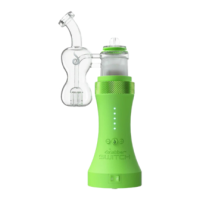
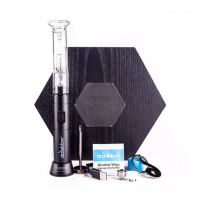
We recommend filling your Switch glass attachments with water just above the perc holes. Fill the water from the
mouthpiece until it has reached the appropriate height. Over filling the attachment may cause splash back. Using
water in the glass attachment cools and filters vapor for a cleaner hit.
When using upgraded Directional or Bubble carb caps, we recommend using the silicone seal from your standard
carb cap and placing it on your Switch glass attachment. This will help to create maximum vapor production. Video
for reference. (https://vimeo.com/643681920)
Flower Use and Tips
When using the Switch with flower, we recommend starting low temp (around 400) and working your way up to find
the best temp for you personal needs. We recommend setting the temp at 420 for a more traditional vaping
experience. Higher heat settings (above 600) will give more of a bong-like experience, providing heavy head and
body highs. Temp guide for reference (https://www.instagram.com/p/BuARlYRHMvs/).
Press flower down firmly in induction cups (about finger tight) and make sure to stir your flower in between heating
cycles to get the most from your materials.
Take long, slow drags for best results.
Dry flower may require lower heat settings and fresh or dense flower may require slightly higher heat settings.
Water levels will impact vapor density. We recommend water levels about a 1/2 inch above the peculator holes, but
you may need to increase or decrease water levels based on the desired vapor density.
The Switch can vaporize flower in many different ways. Experiment with different heat settings, water levels,
material packing, and draw lengths/hold time to find the best settings for your personal needs.
We recommend using the ceramic leaf filter with dry herb. This filter helps heat the induction cups evenly for better
vapor production and keeps dry herbs inside the induction cup while in use. You may use a torch to clean the
ceramic filter or soak in isopropyl alcohol for 10-20 minutes
We recommend Directional Caps and the Sidecar Glass Attachment for flower use, but all caps and glass
attachments will work great as well.
Charging your Switch
The Switch unit will illuminate the current power percentage in Pink after confirming/changing the heat setting. Five
solid Pink lights indicate 100% charged. These Pink LED lights will begin to flash when the unit has less than a
10% charge.We only recommend charging your unit once it reaches less than a 20% charge(One Pink LED)and


 To Next Page
 Loading...