16 DR
®
VERSA TRAILER™
Attaching the Crane
Tools Needed:
22mm and 17mm Wrench
21mm, 16mm and 30mm Sockets
Large Adjustable Wrench
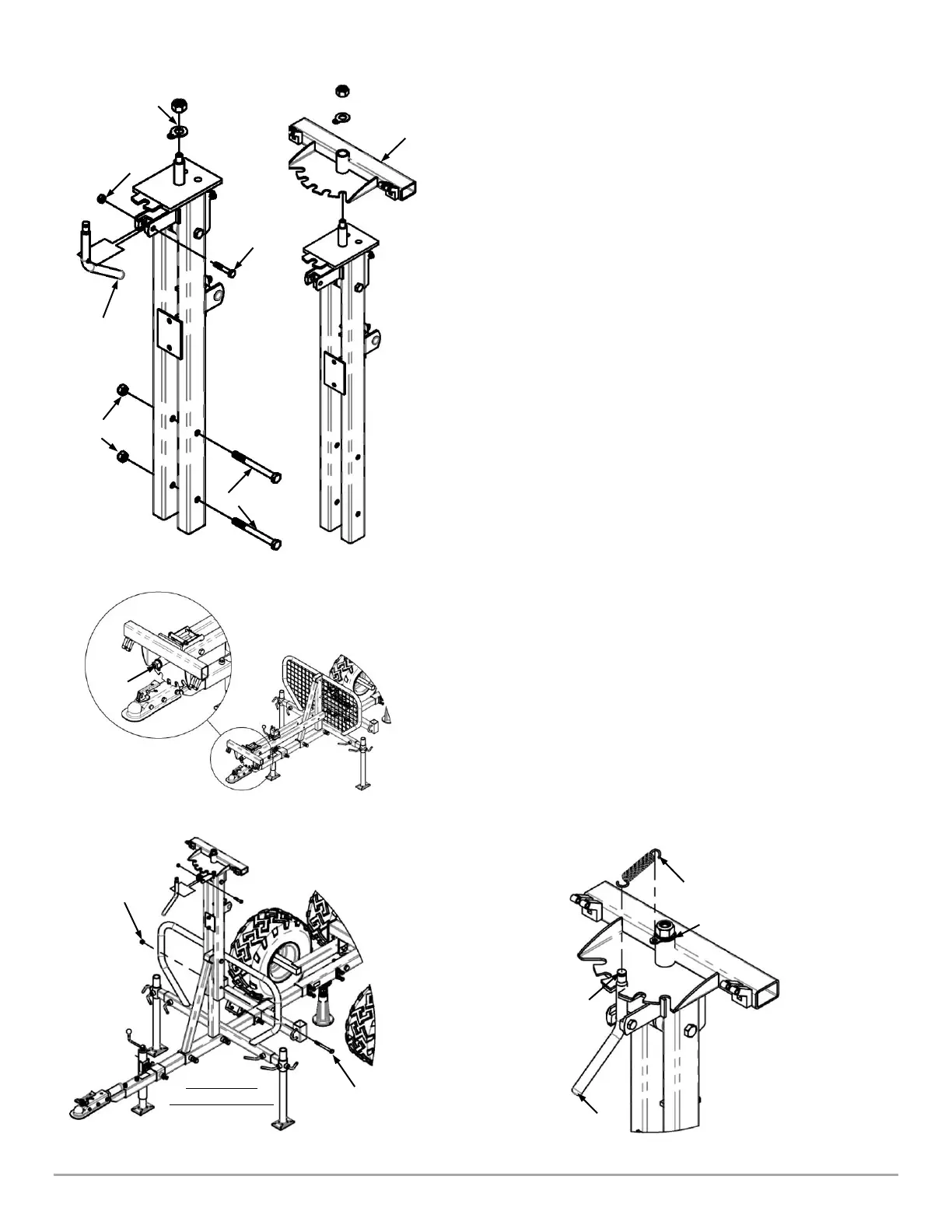
1. Remove the Lock Nut, Flat Washer, and Tabbed Washer from
the top of the Crane (Figure 24) along with the Pivot Lock
Handle by removing the M10 x 1.75mm Bolt and M10 Lock
Nut with a 16mm Socket for the Bolt and a 17mm Wrench for
the Nut.
2. Remove the two M14 x 140mm Bolts and M14 Nuts from the
Crane with a 21mm Socket for the Bolt and a 22mm Wrench
for the Nut.
3. Install the Boom Pivot (Figure 25) on top of the Crane with the
Mounting Boss pointing up and re-install the Tabbed Washer
1
st
, Flat Washer 2
nd
, then the Lock Nut. Do not tighten yet.
4. Lay the Crane on the Operator Guard, with the Diagonal
Support of the Operator Guard between the two legs of the
Crane (Figure 26). Snug the Lock Nut on the Boom Pivot
using a large Adjustable Wrench, or a 30mm Socket making
sure the Tabbed Washer is facing downward. Back the Nut off
½ turn, to make sure the Boom Pivot rotates freely.
5. With the assistance of another person, rotate and lift the Crane to
the vertical position (Figure 27). Install two M14 x 140mm Bolts,
from the Left side, through the Crane and Operator Guard and
attach the M14 Lock Nuts. Tighten using a 21mm Socket on the
Bolt and a 22mm Wrench on the Nut (Figure 27).
6. Install the Pivot Lock Handle in the orientation shown in Figure 27
with the hardware removed in Step 1 of this section.
7. Install the Extension Spring on the Boom Pivot Handle. Hook one
end around the Handle and the other end through the Tabbed
Washer (Figure 28) on the Boom Pivot. Ensure that the Spring is
properly seated in the Groove on the Boom Pivot Handle.
Lock Nut, Flat
Washer and
Tabbed Washer
Mesh Guard
Hidden for Clarity


 To Next Page
 Loading...