18 DR
®
VERSA TRAILER™
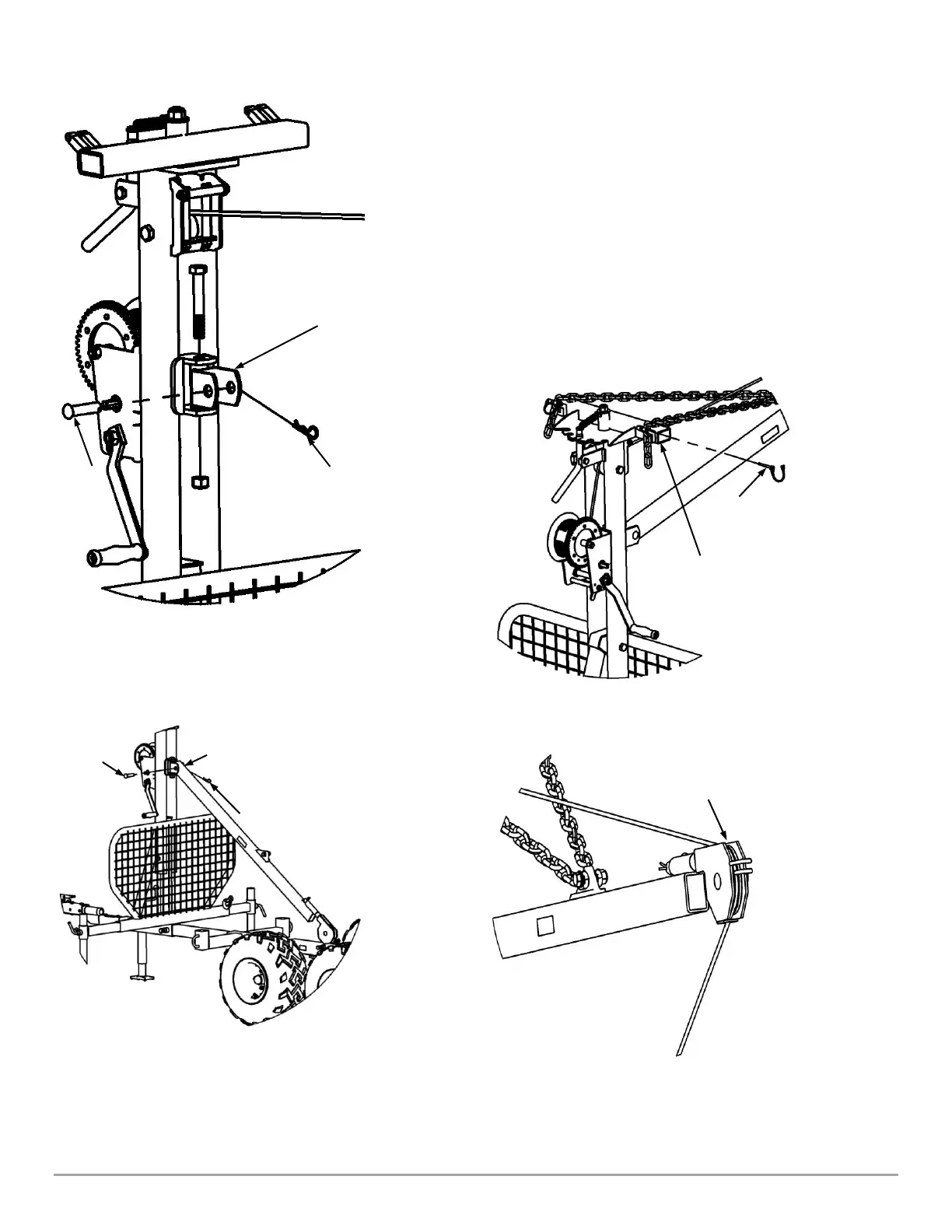
5. Reinstall the Boom Swivel Bracket and hardware, and then remove the
Hitch Clip Pin and Pin from the Bracket (Figure 34).
6. Install the Boom to the Boom Swivel Bracket with the Chain Attachment
Bracket on the Boom pointing up (Chains not shown for clarity), using the
Hitch Clip Pin and Pin that was removed in step 5 (Figure 35).
7. Have a second person lift the Boom then hook the fourth link of the Left
and Right Chains into the Boom Pivot (Figure 36) and insert a Safety Snap
Pin in the Boom Pivot on both sides to secure the Chains (Figure 36).
8. With the assistance of another person, pull the Winch Cable forward, while
the other person cranks the Winch in reverse to let the Cable out and loop it
around the Rear Cable Support. Thread the Cable in horizontally between
the two Hooks (Figure 37) to hold it in place.


 To Next Page