OUR PHOTO
Username
Password
LOGIN
Forgot Password? Sign Up
Username
Password
Verify password
Email
Veruft Code
Submit
Log In
Sign Up
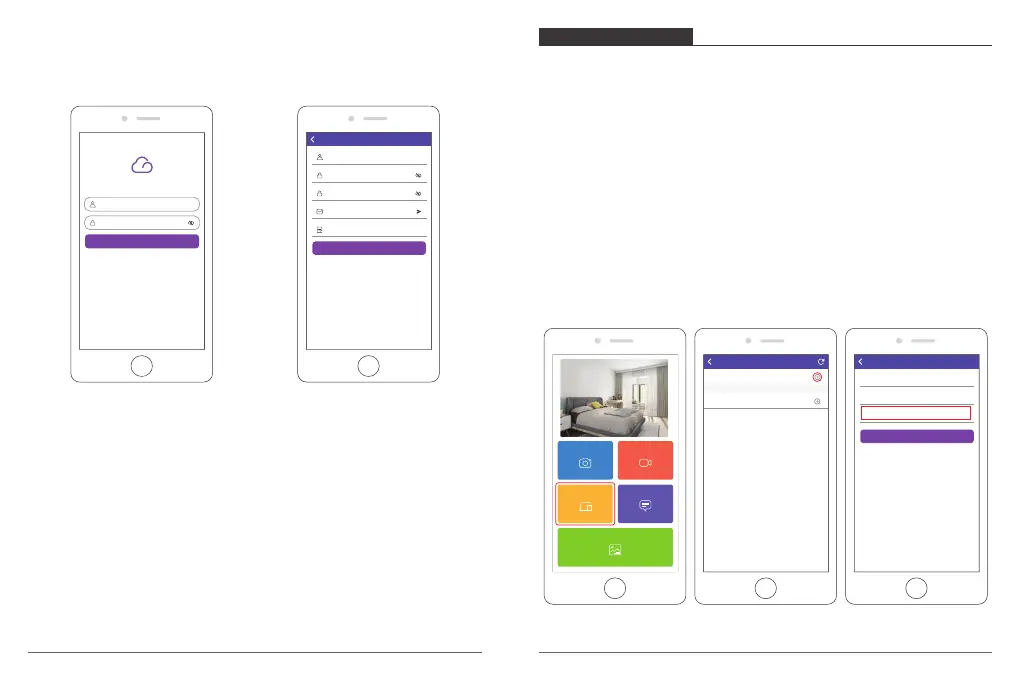
3. Invite friends to download and log in the App
If your friends would like to share their photos and videos to your frame via App, we
recommend your friends download and install the OurPhoto App in their smartphones or
tablets, and log in their accounts in the App (refer to step 2).
BIND YOUR FRAME
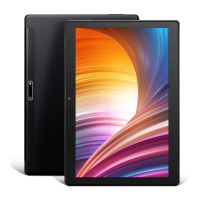
1. Bind your frame with App
① Please confirm you have signed in OurPhoto App.
② Select Devices.
③ Click the “+” next to My Devices.
④ Enter the Frame ID.
Note: Frame ID is a 6-digit series number which can be found in your frame, Settings →
Device Info.
⑤ Create a Device Name for your frame.
Note: We recommend you to name your frame after the Frame ID for easy
identification, for example, Frame ID is 123456, please name your frame Frame123456.
⑥ Create a unique email account for your frame.
Note: We recommend you to create the account with the Frame ID for easy
identification, for example, Frame ID is 123456, please create such an email account
frame123456@ourphoto.cn.
⑦ Then click Bind.
Devices
Messages
Video
Photo
Media
My Devices
Bound Devices
Back
Devices
Device name frame123456
Device Email frame123456@ourphoto.cn
Frame ID 123456
Bind
Devices
Devices Bind
06
07



 To Next Page