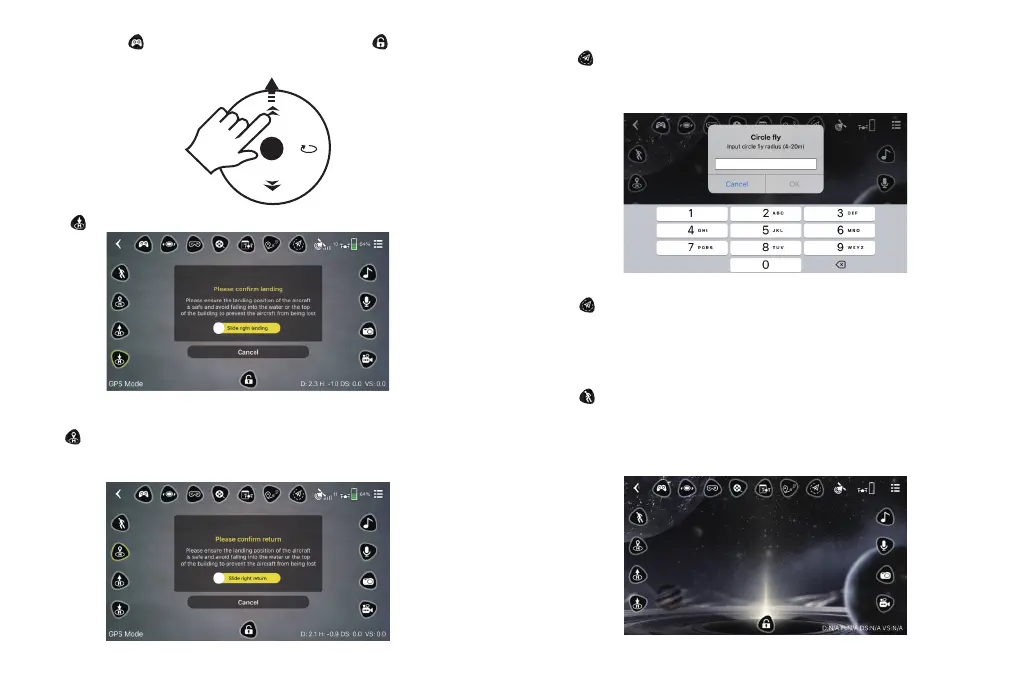
Method 2: Press to turn on the virtual remote. Then press to unlock the
drone, and the four propellers will start rotating. Swipe the Left Control Stick up
arrow button upwards to take off.
5. LANDING
Press to land the drone during the flight.
6. Smart RTH
Press to initiate the Smart RTH (Return to Home) procedure during the flight
and have the drone return to the last recorded Home Point. Slide the yellow bar
to the right in the pop-up window to confirm return.
7. AROUND POINT FLIGHT
Press to activate Around Point Flight while flying. Input your desired fly radius
and press OK to start. The drone will circle around the current drone position
while keeping that point centered in the frame.
Press again during the flight to cancel this mode and regain control of the
drone.
Note: This function can't be activated when the drone battery is low.
8. FOLLOW ME
Press to enable the Follow Me function. When Follow Me is enabled during
flight, the drone rotates automatically as you move with the controller.
The drone's camera lens will keep pointing at the target and maintain a 25 meter
(82 foot) distance from it.
13 14


 To Next Page