Need help?
Do you have a question about the Dragon Touch DF01G and is the answer not in the manual?
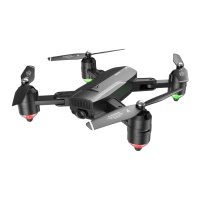
Visual representation of the drone's components and their names.
Instructions for maintaining and caring for the drone to ensure longevity.
Instructions for installing propellers, protective covers, and transmitter batteries.
Labeled diagram of the transmitter and procedure for recharging the drone battery.
Steps to pair the drone with its remote control for successful communication.
Instructions for performing geomagnetic and horizontal calibration.
Steps to acquire a GPS signal and methods for unlocking and taking off the drone.
Alternative takeoff method and procedures for landing the drone.
Controls for ascending, descending, turning, forward/backward, and side fly.
Steps to download the app and connect to the drone's Wi-Fi.
Explanation of Headless, One-key Return, Orbit, and Surround flight modes.
How to take photos, record videos, and change flight speed settings.
Instructions to launch and use the VS GPS mobile application control interface.
Configuration options for drone flight parameters like distance and altitude.
Methods for taking off the drone using the virtual remote within the app.
Procedures for landing the drone and activating Smart RTH for safety.
How to use Orbit and Follow Me flight modes to track a target.
How to define custom flight paths and use photo/video features.
How to record videos with background music from the app.
Explanation of the drone's LED light indicators and their meanings.
Troubleshooting common issues like no LEDs, unresponsive controls, or unstable flight.
Information for contacting Dragon Touch customer support for inquiries.
 General
| Video Resolution | 720p |
|---|---|
| Charging Time | 60 minutes |
| Headless Mode | Yes |
| One Key Takeoff/Landing | Yes |
| Altitude Hold | Yes |
| 3D Flips | Yes |
| Photo Resolution | 720P |
| Camera | 720P HD |
| Battery | 3.7V LiPo |
| Speed Modes | Yes |

 To Next Page