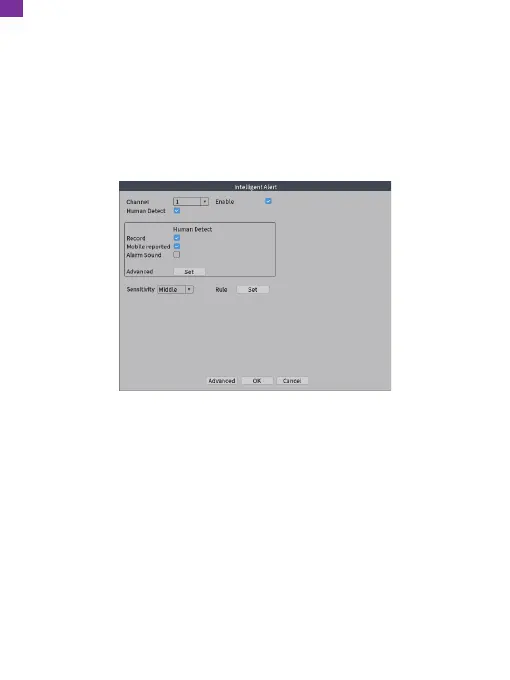
13. Intelligent Alert
① Go to the NVR's [Main Menu] → [Main Menu] → [Record] → [Record
Configuration] and check [Detect].
② Go to the NVR's [Main Menu] → [Alarm] → [Intelligent Alert] to enter the
Intelligent Alert interface. The human body motion detection function is enabled
by default. If you only need motion detection, disable "Human Detect".
Set Period/Record Channel/Tour/Snapshot/Mobile Reported and other functions
according to your needs, then click [OK] to save.
14. Light Mode
Go to the NVR's [Main Menu] → [IPC Param.] → [Image Set] → [Day/Night Mode].
[Starlight Infrared]: The camera detects the ambient light levels through the
sensor, and video output will automatically switch between color and black and
white.
[Full Color]: Display footage in full color, even when ambient light is insufficient.
[Black and White]: Display footage in black and white, even when ambient light is
sufficient.
EN
21


 To Next Page