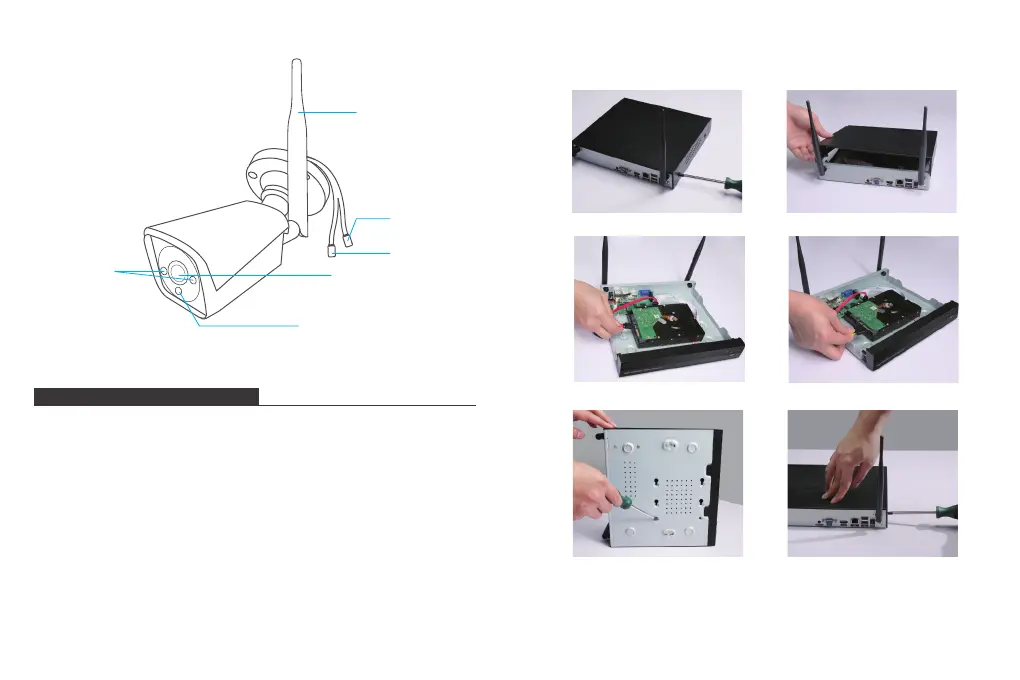
IPC (IP Camera)
CONNECTING YOUR SYSTEM
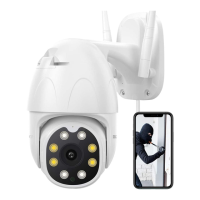
Hard Disk Installation
The NVR system requires a SATA internal hard drive or mobile hard disk drive for
video recording. The system can display real-time video, but you can’t record or
playback video footage without installing a hard drive. The system supports an up
to 8TB hard drive.
SATA Internal Hard Drive Installation
The system supports a 3.5” or 2.5" SATA internal hard drive (A 2.5" SATA internal
hard drive needs a bracket to hold the HDD).
1. Remove the screws 2. Remove the cover
4. Connect the power wire3. Connect the data wire
6. Put the cover back, and secure
the screws of the cover
5. Secure the screws of the hard drive
Note:
• 3OHDVHSRZHURWKH195EHIRUH\RXLQVWDOOWKHKDUGGULYH
• The system cannot record or playback video without a hard drive.
3 4
Antenna
DC Jack
RJ45 Port
LED Light
Lens
IR Lights


 To Next Page