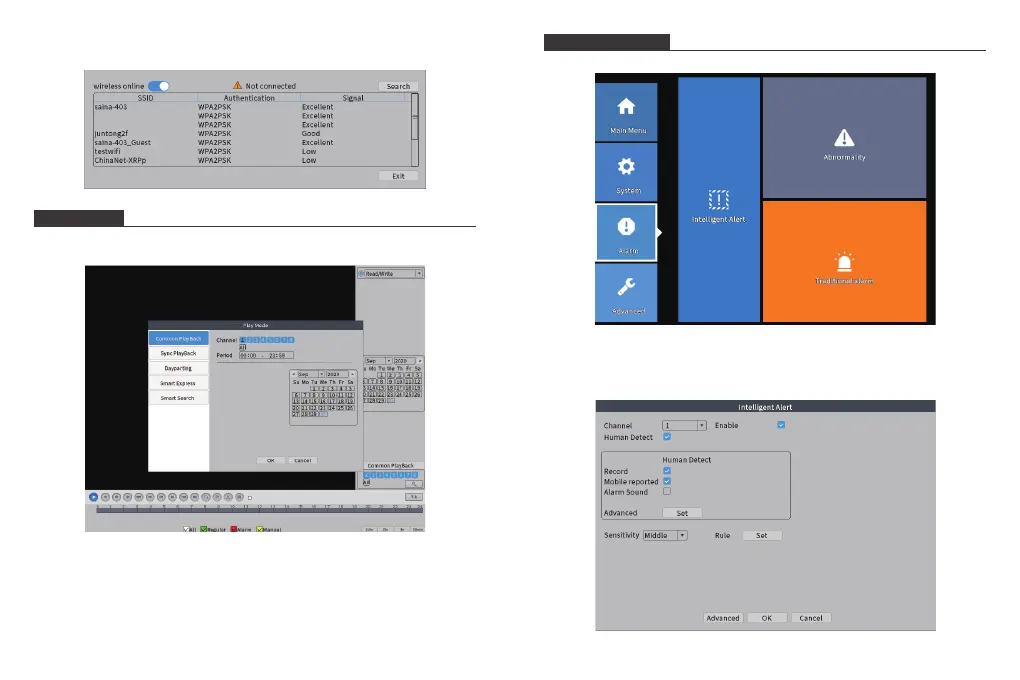
[Wireless Connection]: 7RFRQQHFWWR:LȴVHOHFW\RXU:LȴQHWZRUNDQGHQWHU
your password.
PLAYBACK
The [PlayBack] includes common playback, sync playback, dayparting, smart
express, and smart search.
[Common PlayBack]: In the normal playback mode, you can select the channel,
period, date.
[Sync PlayBack]: Play back videos of multiple channels at the same time.
[Dayparting]: 3OD\EDFNWKHGLHUHQWWLPHYLGHRVRIDFKDQQHODWWKHVDPHWLPH
[Smart Express]:ΖQWHOOLJHQWO\IDVWIRUZDUGWKHVSHFLȴHGȴOHW\SH
[Smart Search]:ΖQWHOOLJHQWO\SOD\EDFNWKHVSHFLȴFȴOHW\SH
ALERT SETTING
The [Alert] includes intelligent alert, abnormality, and traditional alarm.
[Intelligent Alert]: Set the human detection or motion detection.
The human body motion detection function is enabled by default. You can set
human detection or motion detection in the area.
9 10



 To Next Page