7
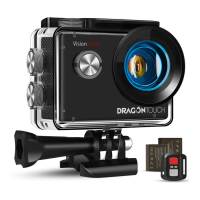
Video Settings Mode
On the preview screen, press the Mode
button several times till you see a gear
icon show on the screen, then press the
OK button to enter Video Settings Mode.
In this mode, you're free to change the
video settings.
Video Resolution
Recording Sound
Time-Lapse Close
Close
720P 120FPS
Loop Recording
Slow Motion
4K 30FPS
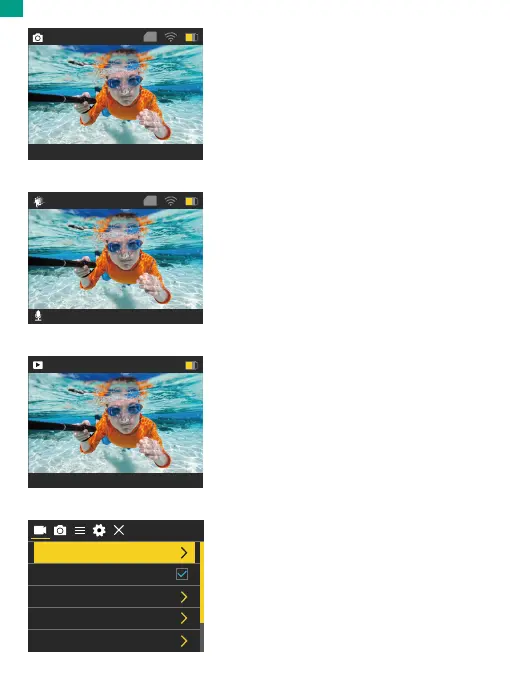
Photo Mode
On the preview screen, press the Mode
button once to enter Photo Mode.
In this Mode, press the Shutter button to
take a photo.
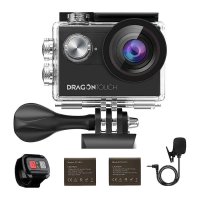
Slow Motion Mode
On the preview screen, press the Mode
button twice to enter Slow Motion Mode.
In this mode, you can press the Shutter
button to record a slow motion video at
the set resolution.
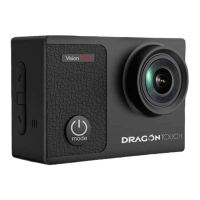
Playback Mode
On the preview screen, press the Mode
button 3 times to enter Playback Mode.
In this mode, you can press the Up/ Down
button to select a video or photo file for
playback.
16M 4373
01/01/2024 10:11:23
TF
720P120FPS 14.4G
01/01/2024 10:13:23
TF
00001 /04372
01/01/2024 10:11:23
EN


 To Next Page