FOR southpaw
Dragonwar03
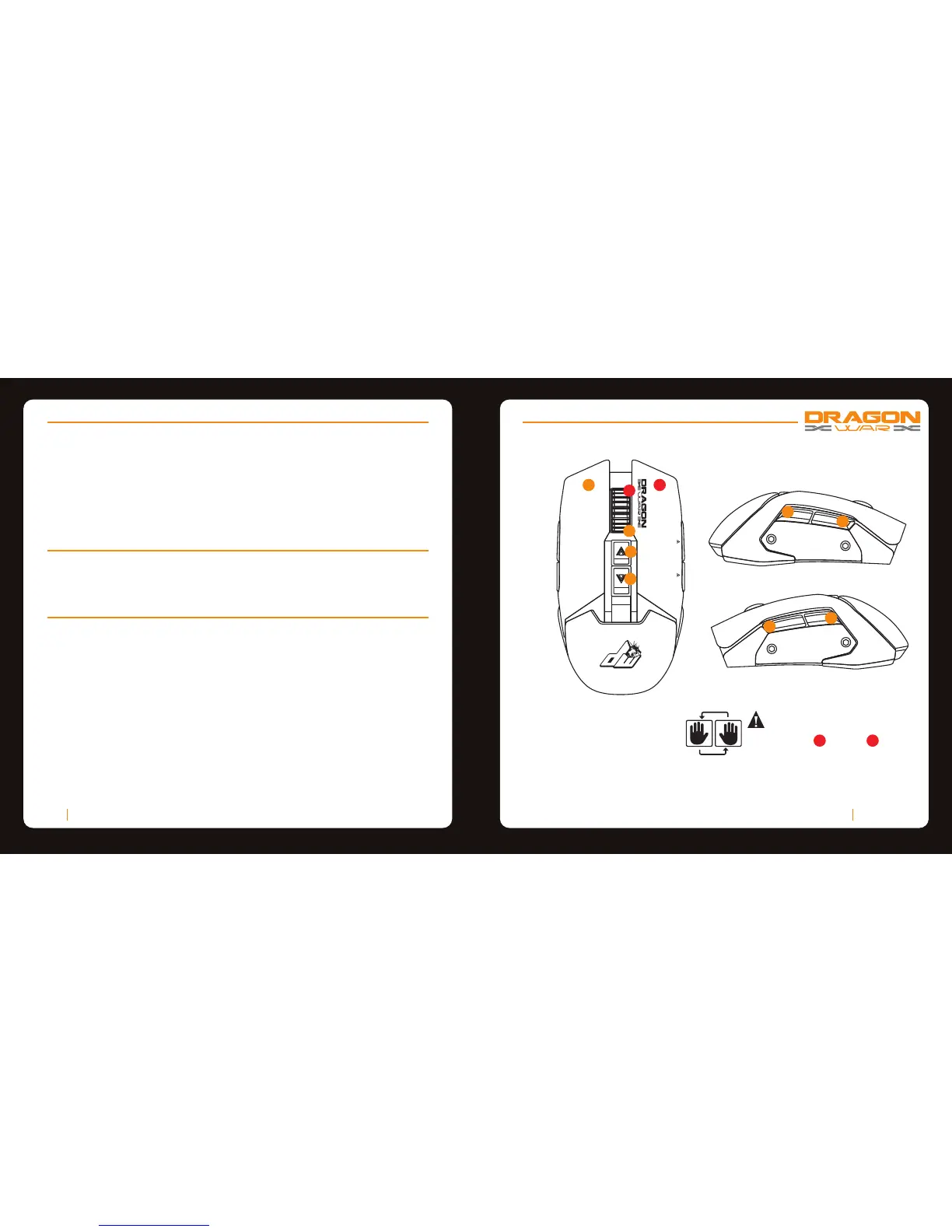
GAMING MOUSE LAYOUT
A. Left Mouse Button
B. Right Mouse Button
C. Scroll Up
D. Scroll Down
E. Sensitivity Stage UP
F. Sensitivity Stage Down
G. Forward
H. Backward
I. Volume UP
J. Volume Down
A
B
C
D
E
F
PACKAGE CONTENTS / SYSTEM REQUIREMENTS
PACKAGE CONTENTS
• Dragonwar G18 Gaming Mouse
• User Manual
SYSTEM REQUIRMENTS
• PC with a free USB 2.0 port
• Windows 10 / Windows 8 / Windows 7 / Windows Vista / Windows XP
TECHNICAL SUPPORT
• 1 years limited warranty
• Free online technical support at www.dragonwar.jp
• Driver download from : www.dragonwar.jp
TECHNICAL SPECIFICATIONS
• Customizable ergonomics to fit all hand sizes
• Swap between LEFT / RIGHT hander
• 3400dpi Optical sensor system
• Gold plated connector
• Braided USB cable
Dragonwar02
G
H
I
J
Hold the scroll wheel & right
key for 3 seconds.
The function of the key will swap.
(Vice versa)
B
C
Swap between Left/Right Hander :



 To Next Page