Need help?
Do you have a question about the Dreamus Astell&Kern SA700 and is the answer not in the manual?
Details on the SA700 player, protective film, USB Type-C cable, and user guides.
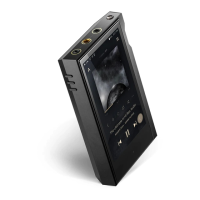
Visual guide showing the location of all ports on the SA700 device.
Explanation of the function of each button, the LED indicator, and the volume wheel.
How to turn the device on/off and perform a reset in case of failure.
Configuring the screen to turn off automatically after a period of inactivity.
Procedure for charging the SA700 using a compatible 5V 2A USB wall adapter.
Connecting headphones via 3.5mm unbalanced and 2.5mm balanced ports.
Linking the device to balanced audio devices using specific ports.
Connecting to a computer for file transfer, DAC use, and safe disconnection.
Step-by-step guide for inserting and safely removing microSD cards.
Information on recommended brands, capacity, and usage precautions for microSD cards.
How to update the device firmware wirelessly via Wi-Fi.
Using the LCD touchscreen for basic operations and menu access.
Viewing past playback history and scrolling through lists of music.
Accessing the notification bar and viewing the current music playlist.
Explanation of menu, details, song progress, and playlist access on the Home Screen.
Details on playback controls, shuffle, repeat modes, and song information.
Identification of icons for Wi-Fi, Bluetooth, EQ, disk mode, and more in the Notification Bar.
Using Notification Bar icons to manage Wi-Fi, Bluetooth, EQ, and access settings.
Adjusting brightness, managing notifications, and accessing Car Mode via the Notification Bar.
Enables users to install specific APK music streaming apps onto the device.
Connecting the device to music libraries or speakers over a network.
How to stream and download music files from your library using the feature.
Illustrations of various ways to use AK Connect with different devices and setups.
How to select music by category, folder, or search, and start playback.
Using volume, playback buttons, progress bar, and accessing list options.
Interface elements and options for managing music playlists.
Steps for creating new playlists and adding songs from the music library.
Removing songs, playing playlists, and adding playlist parts to Now Playing.
Procedures for renaming existing playlists and deleting unwanted ones.
Understanding the USB DAC feature, supported OS, and audio format specifications.
Guide on connecting the device to an external DAC via USB Type-C.
Selecting PCM or DoP output for DSD audio when using USB Audio.
Steps to connect the CD-Ripper and start ripping audio CDs.
Interpreting symbols that show the success or failure of CD ripping.
Instructions for using the CD-Player function with the AK CD-Ripper accessory.
Overview of the Car Mode screen, including exit, play/pause, and screen rotation.
How to enter the main settings menu and select various configuration options.
Settings for Wi-Fi connection and Bluetooth pairing/management.
Customizing equalizer, gapless playback, LR balance, and playback settings.
Adjusting brightness, managing notification panel, and LED indicator options.
Setting device language, date, time, and input method preferences.
Configuring timers, download folders, and managing system/application updates.
Options for media scan reset, settings reset, and factory data reset.
Steps to find and connect the device to available Wi-Fi networks.
Pairing, connecting, and disconnecting Bluetooth devices for wireless audio.
How to remove previously paired Bluetooth devices from the device.
Steps to create, name, and save custom EQ settings.
Fine-tuning frequencies, gain, and Q values in the advanced PEQ settings.
Procedures for deleting and renaming custom equalizer presets.
Guidelines for safe device operation, avoiding liquids, extreme temperatures, and impacts.
Warnings against vehicle use, physical activities, and ensuring a safe environment.
Solutions for device not turning on or failing to charge.
Troubleshooting computer connectivity errors and no sound or static.
Resolving issues with files not playing or the device becoming unstable.
Details on Dreamus Company's rights and reproduction restrictions for manual content.
Information on FCC ID, Part 15 compliance, and user cautions for radio frequency energy.
List of registered trademarks including Microsoft Corp., Qualcomm aptX HD.
Explanation of MQA technology for authenticated master quality audio playback.
Information on liability, future updates, and potential specification changes.
Warnings about battery replacement, body-worn usage distance, and hearing loss.
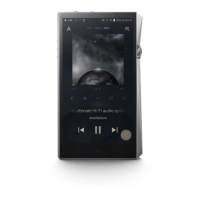
Comprehensive technical data including dimensions, weight, audio specs, and supported formats.
 Display
| display size | 4.1 inch |
|---|---|
| display resolution | 720x1280 |
 Audio Specifications
| frequency response unbalanced | ±0.24 dB (20Hz~20kHz) |
|---|---|
| frequency response balanced | ±0.24 dB (20Hz~20kHz) |
| S/N unbalanced | 120 dB @ 1kHz |
| S/N balanced | 123 dB @ 1kHz |
| crosstalk unbalanced | -134 dB @ 1kHz |
| crosstalk balanced | -138 dB @ 1kHz |
| THD+N unbalanced | 0.0006% @ 1kHz |
| THD+N balanced | 0.0006% @ 1kHz |
| IMD SMPTE unbalanced | 0.0003% 800Hz 10kHz (4:1) |
| IMD SMPTE balanced | 0.0004% 800Hz 10kHz (4:1) |
| output impedence unbalanced | 1.8 ohm |
| output impedence balanced | 1.9 ohm |
| reference clock jitter | 70 ps (Typ) |
 Power
Power| charging voltage | 5 V |
|---|---|
| charging current | 2 A |
 Memory
| built-in memory | 128 GB [NAND] |
|---|---|
| external memory | microSD (Max. 1TB) |
 Battery
| battery capacity | 3, 150 mAh |
|---|---|
| battery voltage | 3.7 V |
 Weight and Dimensions
| width | 59.1 mm |
|---|---|
| height | 115.9 mm |
| depth | 16.5 mm |
| weight | 303 g |

 To Next Page