EasyManua.ls Logo

dreo Macro Max S - Using Your Air Purifier

dreo Macro Max S
26 pages
Print Icon
To Next Page IconTo Next Page
To Previous Page IconTo Previous Page
Loading...
USING
YOUR
AIR
PURIFIER
Getting Started
step1
step2
h“nfl
m
B
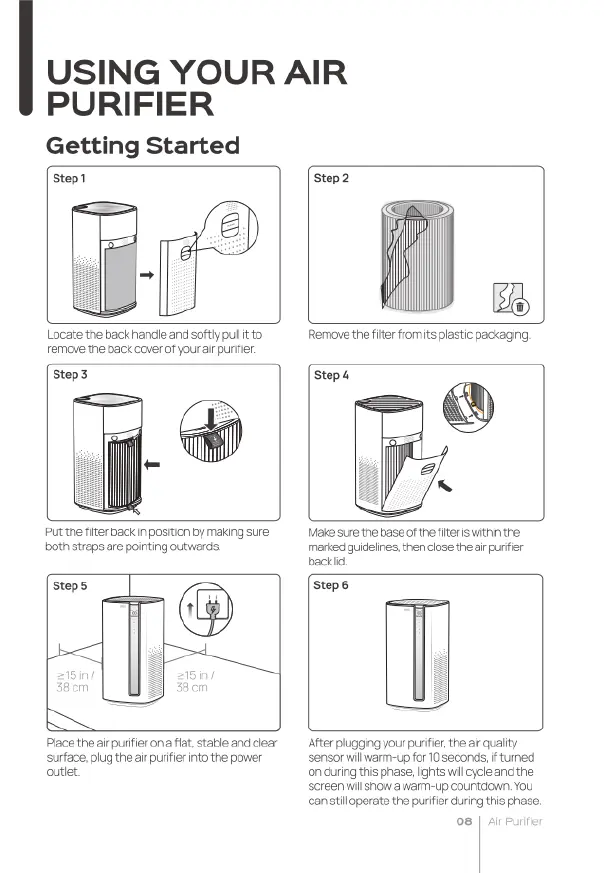
Locate
the
back
handle
and
softly
pul
o
remove
the
back
cover
of
your
ar
purifier.
Remove
the
iter
romits
plastic
packaging
Step3 Stept
Put
the
filter
back
n
position
by
making
sure
both
straps
are
pointing
outwards.
Make
sure
he
base
of
thefiter
swithinthe:
merked
guideines,
then
cose
thearr
purfier
backid.
Step6
Place
theair
purifier
ona
fat.
stable
and
ciear
surface,
plug
theair
purifier
nto
the
power
outiet
Ater
plugging
your
purifer,
the
air
quality
‘sensor
willwarm-up
for
10
seconds,
ftured
onauring
this
phase,
ights
il
cycle
and
the
screen
willshow
a
warm-up
countdown.
You
can
il
operate
the
purifier
during
this
phase.
o8

Related product manuals