EasyManua.ls Logo

dreo Macro Pro - Controls & Lights

dreo Macro Pro
24 pages
Print Icon
To Next Page IconTo Next Page
To Previous Page IconTo Previous Page
Loading...
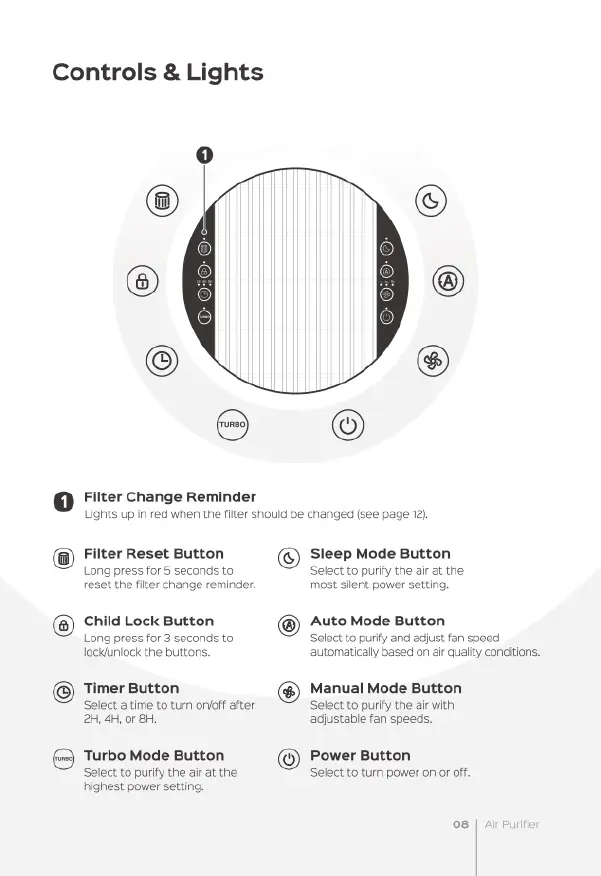
Controls
&
Lights
Filter
Change
Reminder
Lights
up
in
red
when
the
filter
shouid
be
changed
(see
page
12}
@
©
Filter
Reset
Button
Sleep
Mode
Button
Long
press
for
5
seconds
to
Select
to
purify
the
ar
at
the
reset
the
fiter
change
reminder.
most
silent
power
setting.
Child
Lock
Button
Auto
Mode
Button
Long
press
for
3
seconds
to
Select
to
purify
and
adjust
fan
speed
lockiuniock
the
buttons.
automatically
based
on
air
qualtty
conditions.
Manual
Mode
Button
Select
to
purify
the
air
with
Timer
Button
Select
atime
to
turn
oo
after
©)
®
2H,
4,
or
8H
adjustable
fan
speeds.
Turbo
Mode
Button
Power
Button
Select
to
purify
the
air
at
the
Select
to
tur
power
on
or
off,
highest
power
setting.
o8

Related product manuals