Installing Your Drinkpod
Installing Your Drinkpod 2-26
Enabling Water Flow To Your Drinkpod
1. If it’s not already open, start by opening your Water Source Valve (the valve on your
existing water source we rst shut o)see ”Turning On Your Water Source” on page
2-24.
2. Ensure nothing is leaking between or at either of the valves.
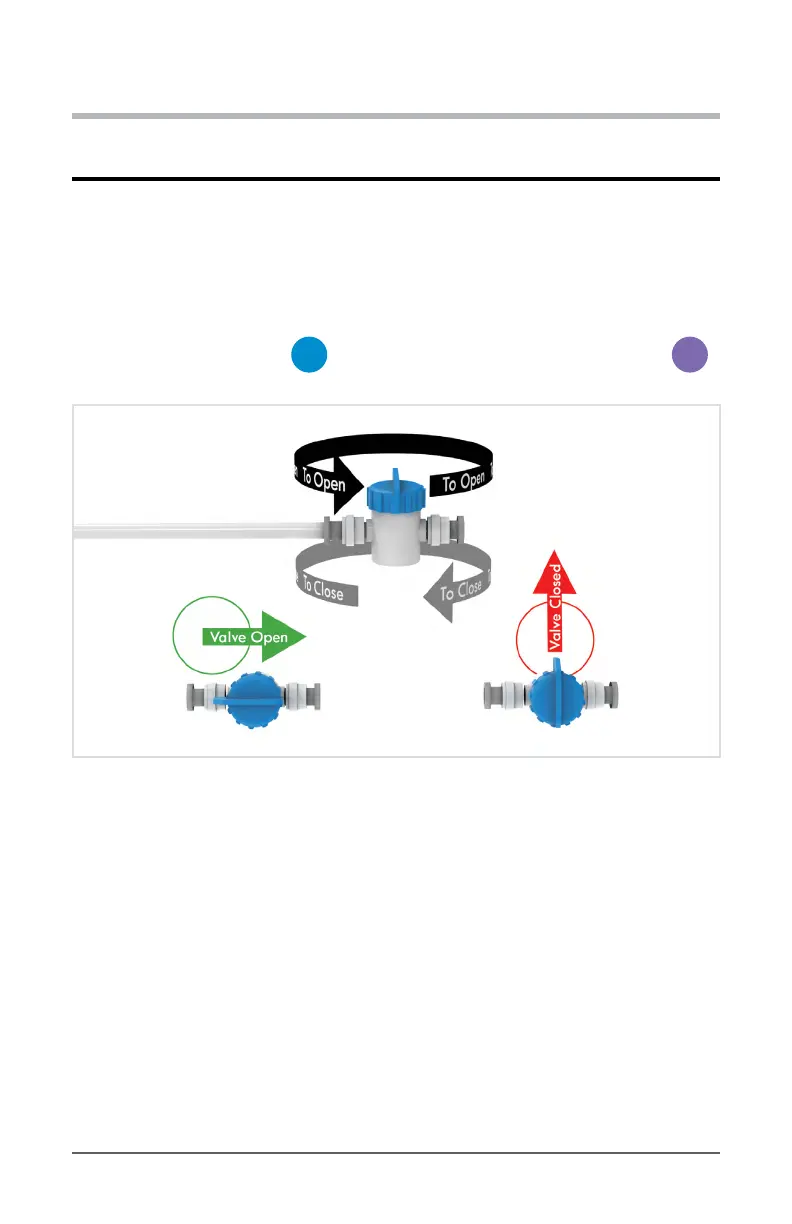
3. Now open the valve on the
C
1/4 in. Quick Connect Shuto Valve on your
M
Water Input Line as shown below.
Diagram 2.9.3 - Open Shuto Valve
4. You should hear water running and lling the DRINKPOD’s tanks. Check for leaks, and
wait until the sound of water running stops.
5. Once the DRINKPOD is lled, plug it in. DO NOT FLIP ON THE POWER SWITCHES
OR CONNECT ACCESSORY LINE YET!
6. We need to ush each temperature mode. For the best experience, we recommend
ushing the full tank capacity for both the Hot Mode and Cold Mode.


 To Next Page