Socket Stud
Pearl
Prong
Prong
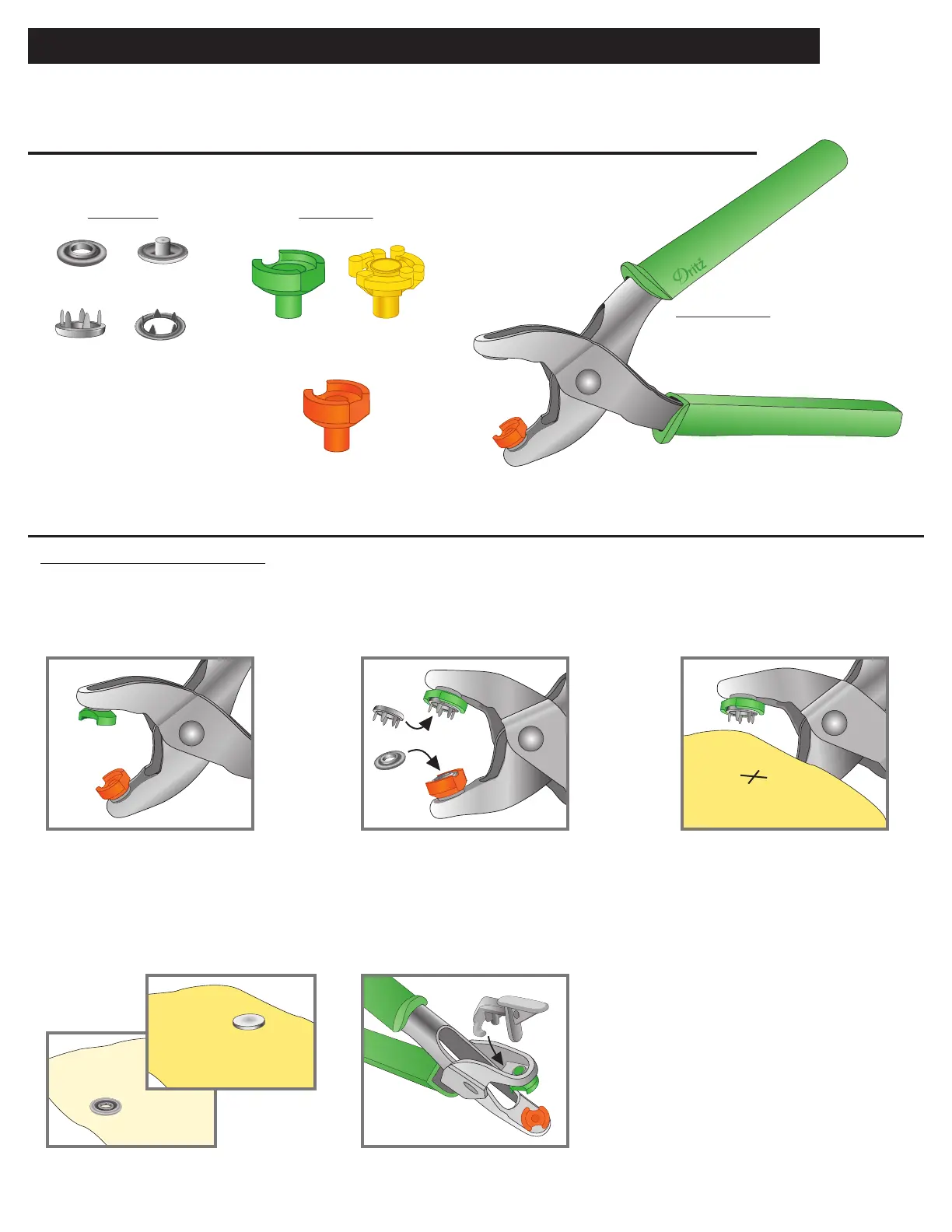
Pliers Tools:
Snap Parts:
Orange Stud/
Socket Holder
Green Prong
Holder
Yellow Prong
Holder
Fabric Preparation for
7/16" Pearl Snaps
Instructions for Applying 7/16" Pearl Snaps
16P SNAP PLIERS – 7/16" Pearl Snap Instructions
Use two layers of light to medium-weight fabric, reinforced with interfacing.
Mark position of snaps on topside and underside of garment.
Test a snap on swatch of fabric.
Inserting Tools:
Insert orange stud/socket
holder in one side of pliers.
Applying Socket (Topside of garment):
5. Remove green pearl prong holder after
applying all pearl prongs. Slip hook of
gray tool remover inside ledge of pliers
and press down to release tool.
Right side
of fabric
Right side
of fabric
Wrong side
of fabric
1. 2. 3.
4.
5.
1. Insert green pearl prong
holder in other side
of pliers.
2. Position pearl prong, point side out, in
green pearl prong holder. Position
socket, raised center out, in orange
stud/socket holder.
3. Position topside of garment in
pliers with snap prong on the right
side of the garment. Center over
marked position.
4. Squeeze pliers rmly to apply
snap. Check for tightness;
squeeze again, if necessary.


 To Next Page