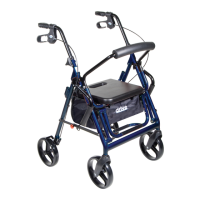
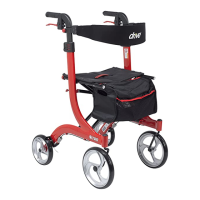
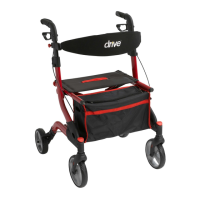
The Drive Medical Bariatric Rollator is a walking aid designed for individuals who require assistance with mobility. It is not intended to be used as a transportation device. This rollator is built to exacting standards and carefully inspected to ensure reliability and safety for the user.
Function Description:
The bariatric rollator provides support and stability for users while walking. It features a sturdy frame, a comfortable seat, and orthodic hand grips for enhanced comfort and control. The rollator is equipped with loop locks, which are a safety system designed to slow down, temporarily stop, or lock the wheels in position. This allows the user to maintain control and stability, especially when sitting or navigating uneven terrain. The folding hinge enhances portability, making it easier to transport and store the rollator. A hanging bag is included for functionality and storage of personal items.
Important Technical Specifications:
- Weight Capacity: 400 lbs (181 Kg)
- Item Numbers: 10216BL-1 (Blue), 10216RD-1 (Red)
- Frame: Sturdy and designed for bariatric use.
- Hand Grips: Orthodic for comfort and support.
- Brakes: Loop locks for slowing, stopping, and locking wheels.
- Seat: Wide and comfortable.
- Storage: Hanging bag.
- Portability: Folding hinge.
Usage Features:
- Assembly:
- Remove all contents from the carton: backrest, handle with tube, rollator frame, and basket.
- Open the frame and slide the padded backrest into the frame brackets, ensuring the snap buttons protrude through the holes.
- Unscrew the tightening knob from the handle, insert the handle tube into the frame at the desired height, aligning the holes appropriately. Slide bolts through the holes from the inside and screw on the tightening knob until secure.
- Height Adjustment: The handles are height adjustable to accommodate users of different heights. Ensure both knobs are fully tightened and at equal heights for stability.
- Loop Lock Operation:
- To Slow Down or Come to a Temporary Stop: Pull up slowly on the loop locks with four fingers until the unit slows down or comes to a temporary stop.
- To Temporarily Lock Wheels in Position: Press down on both loop locks with palms until you hear a "click," indicating the wheels are locked.
- To Release Wheel Locks: Push up on both loop locks with the palms of the hand to their original position.
- Always engage and disengage wheel locks on both sides simultaneously.
- Sitting: Always lock the loop locks before sitting. Do not use the seat when the unit is on an incline or uneven ground.
- Portability: The rollator features a folding hinge, allowing it to be folded for easier transport and storage.
Maintenance Features:
- Tire Replacement: Replace tires when they are significantly worn or damaged to ensure continued safe operation.
- Brake Adjustment: If the wheels turn while the brakes are locked, the unit should be taken back to a dealer for adjustment.
- Non-Durable Components: The warranty does not extend to non-durable components such as rubber accessories, casters, and grips, which are subject to normal wear and tear and require periodic replacement.
Safety Precautions:
- Do not attempt to adjust or operate the rollator without carefully reading all instructions in the manual.
- Ensure the rollator is fully opened, the seat is down, and the folding bar under the seat is locked in the down position before use.
- Test the rollator for stability before applying full weight to the hand grips.
- Test the loop locks before operating the rollator. When wheels are locked, the lock bar on the rear wheels should prevent them from turning. If they turn while locked, seek adjustment from a dealer. When locks are released, the wheels should turn freely.
- Always lock the loop locks before sitting.
- Do not use the seat when the unit is on an incline or uneven ground.
- Do not have anyone push you while you are seated on the rollator. It is a walking aid only and not a transportation device.
Warranty:
The Drive brand product comes with a lifetime limited warranty, ensuring it is free of defects in materials and workmanship for the lifetime of the original consumer purchaser. This warranty reflects confidence in the product's quality and dependable service. However, the warranty does not cover device failure due to owner misuse, negligence, or normal wear and tear. It specifically excludes non-durable components like rubber accessories, casters, and grips, which are expected to wear out and require periodic replacement. For any questions regarding the device or warranty, users should contact an authorized Drive dealer.

 Need help?
 General


 To Next Page