assembly instructions
Weight Capacity: 300 lbs (136 Kg)
1. Remove contents from carton.
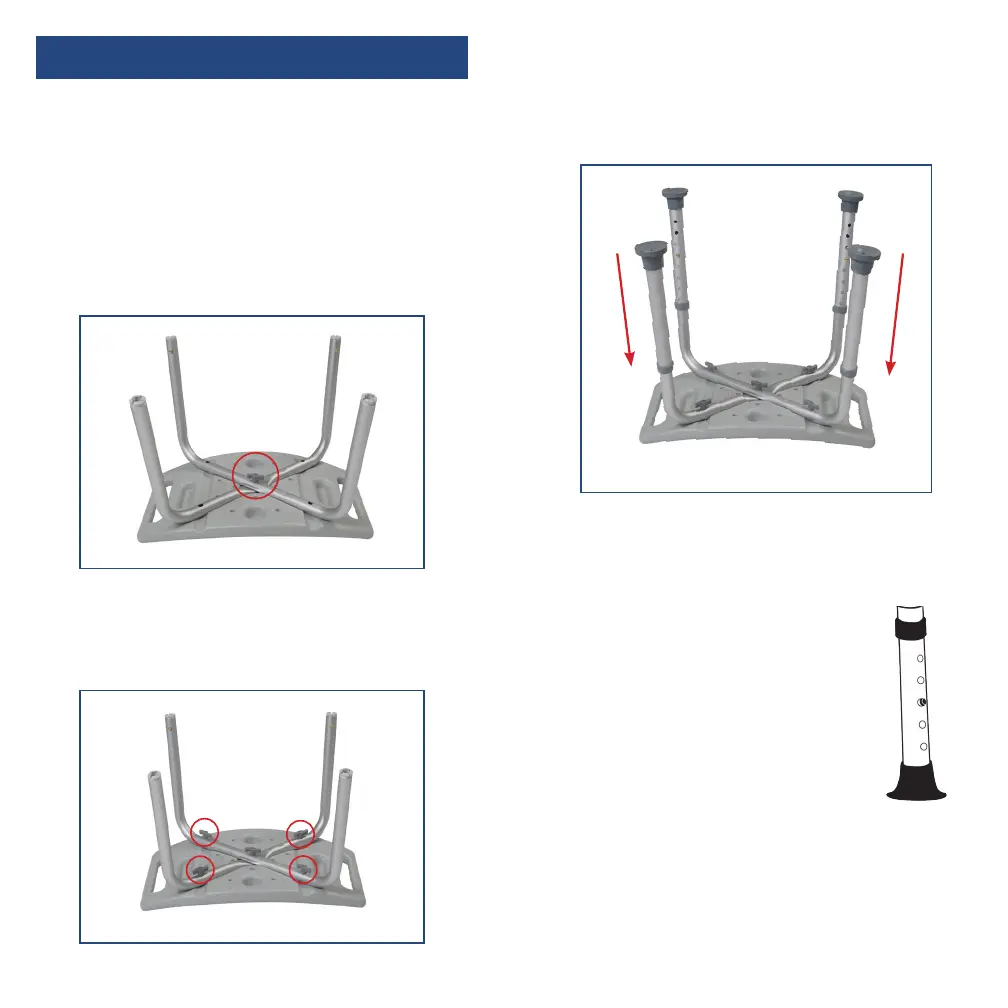
2. Turn seat up-side-down. Place the leg section
marked with a “B” into the groove on the
boom of the seat. Place leg section “A” on
top of section “B” and secure both in place by
inserting a thumb screw through the middle
hole as shown below.
4. Insert legs into leg frames by depressing push
pins, sliding legs over the receptacle and
seing to desired height. Make sure all the
legs are set to the same height.
3. Finish securing the legs in place by inserting
the remaining 4 thumb screws into the 4 outer
holes and tightening as shown below.
1. Before use, adjust height of each
leg to your specific needs,
making sure all legs are at the
same height. When desired
height is reached, lock legs into
place by aligning buons into
proper holes, per illustration.
2. To be sure legs are locked into
place by pushing down on or by
pulling legs.


 To Next Page