3
5
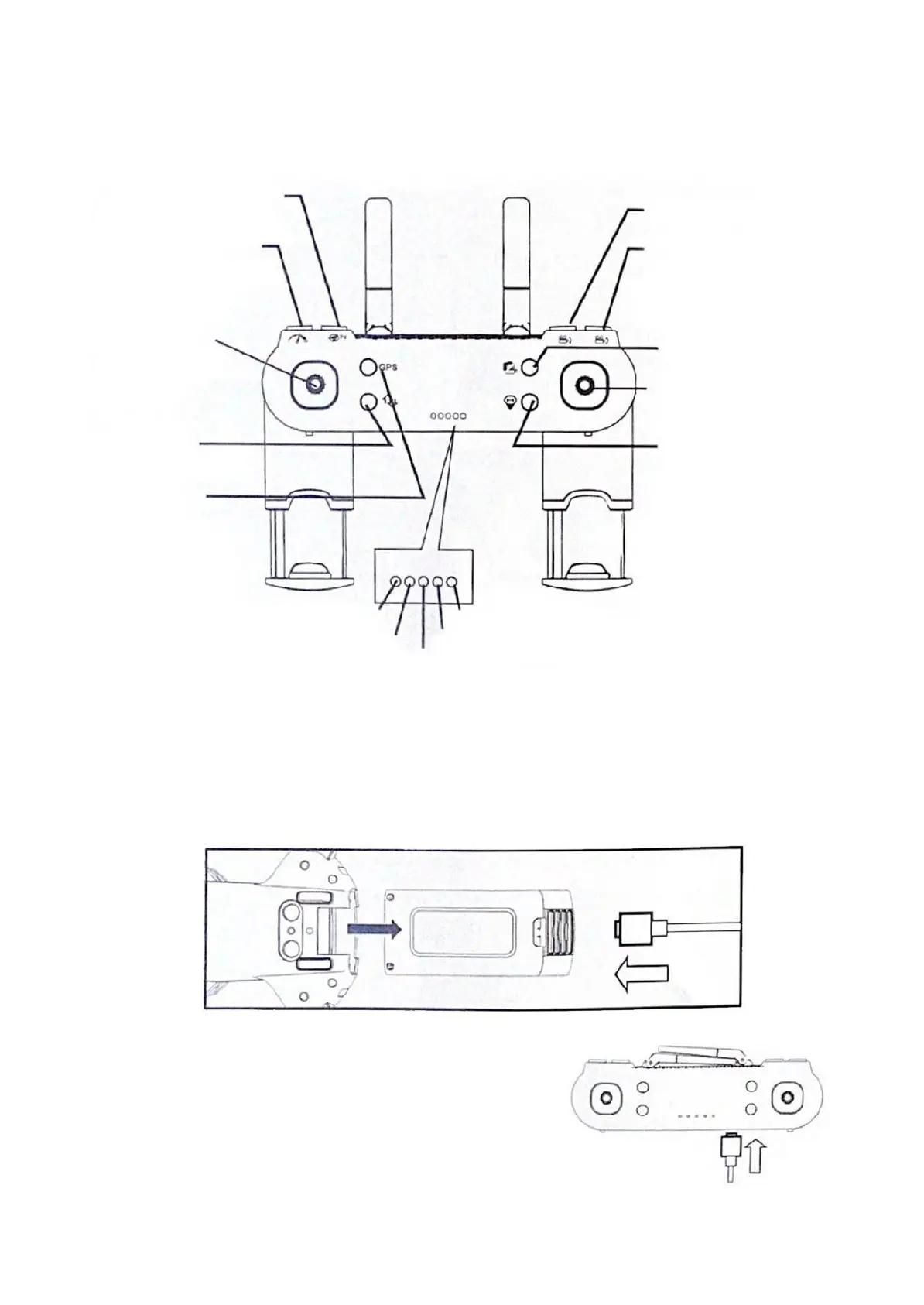
PRESENTATION OF THE FUNCTIONS OF
THE REMOTE CONTROL BUTTONS
Geomagnetic correction
The default starting speed is
low.
Press the buzzer twice (high
speed)
then the button (low speed)
Target down
Upward focus
$
Left Jocktick (up/down
left/right)
One-click take-off
and landing
$
GPS$
Photo/vidéo
Right Joystick
(front and rear, left and right side flight)
$
Return home
Turn the remote control
holder to turn on the
remote control
$
Batterie light
GPS
$
Photo/vidéo
Return home
Speed
How to charge the drone battery
The battery must be connected to a computer using the USB charger supplied in the pack. Also make sure that the
battery and the charger are properly connected to each other. During charging, the LED lights up. When charging is
complete, the LED will go out, so be sure to disconnect the charger and battery. After a flight, it is advisable to wait for
the battery to cool down before charging it again.
Charge the remote control
The remote control contains a built-in battery. During
charging, the red light is on. When charging is complete,
the red light goes out and the charging time is
approximately 40 minutes.
5



 To Next Page