Need help?
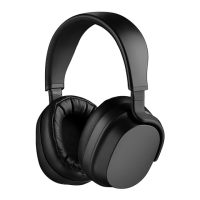
Do you have a question about the Drop PANDA and is the answer not in the manual?
Access the quick start guide in other languages via QR code or URL.
Access the full user manual and additional language versions online.
Attach the USB-C cable to the earpiece port and connect to a power source.
Use a 5V/1A or higher DC charger, powered hub, or USB port for charging.
Find the directional button on the right earpiece and use it to turn the headphones on or off.
Press and hold button for 2 seconds; LED turns white with audio cue.
Press and hold button for 3 seconds; white LED fades with audio cue.
Find the directional button, then press and hold for 4 seconds with power off.
LED blinks blue/red during pairing; solid white indicates successful connection.
 General
| Type | Over-Ear |
|---|---|
| Impedance | 26 Ohms |
| Bluetooth | Yes |
| THD | < 0.1% |
| Bluetooth Chip | Qualcomm QCC5124 |
| Bluetooth Codecs | aptX, aptX HD, AAC, SBC |
| Charging | USB-C |
| Connector | 3.5 mm |
| Ear Pad Material | Protein Leather |
| Battery Life | 30 hours |
| Cable Length | 1.5m |

 To Next Page