EasyManua.ls Logo

Drop THX Panda - User Manual

Drop THX Panda
38 pages
Print Icon
To Next Page IconTo Next Page
Loading...
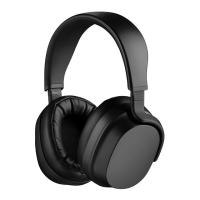
PANDA HEADPHONES
USER MANUAL

Questions and Answers

Summary

Safety Warnings

BATTERIES

Do not remove battery or make alterations. Use only agency-approved power supplies and follow safety guidelines.

HIGH VOLUME

Avoid prolonged high volume listening. Set volume to a moderate level for safe and comfortable audio experience.

LANGUAGE DISCLAIMER

Confirms that all voice prompts and user interface feedback are exclusively in English.

Usage Precautions

BLUETOOTH

Details Bluetooth 5.0, connectivity range, FCC compliance, and potential radio frequency wave emissions.

Product Features Overview

Left Ear Components

Identifies the Analog 3.5mm Headphone Jack located on the left earcup of the headphones.

Right Ear Components

Highlights the Directional Button and LED Indicator found on the right earcup.

Operating Instructions

Wearing the Headphones

Instructions for wearing the headphones, including how to adjust the headband for optimal fit and comfort.

Powering On and Off

Step-by-step guide to turn the headphones on and off using the directional button and observing the LED indicator.

Pairing Bluetooth Devices

Detailed instructions for pairing the headphones with a Bluetooth-enabled device, noting LED pairing status.

Bluetooth Connection Notes

Provides information on the effective Bluetooth range (30 feet) and the device's pairing memory capacity (up to 8 devices).

Media Playback Controls

Call Management Controls

Charging the Headphones

Battery Information and Safety

Details on charging times, quick charging, battery life, and safety information regarding lithium batteries for air travel.

Wired Connection Mode

Cleaning and Maintenance

LED Indicator Meanings

Resetting the Headphones

Troubleshooting Common Issues

Sound Skipping During Playback

Troubleshoot intermittent audio by checking Bluetooth connection stability and adjusting sound quality settings on the source device.

Headphones Fail to Power On

Resolve issues where headphones do not turn on by ensuring the device is adequately charged.

No Audio Output From Headphones

Troubleshoot lack of sound by verifying battery level, volume settings, and checking for interference or obstructions.

Product Specifications

Included in the Box

Lists all items provided in the product packaging, such as headphones, carry pouch, cables, sticker, and warranty card.

General Technical Specifications

Power and Charging Details

Battery Performance

Audio and Connectivity

Microphone Specifications

Physical Characteristics

Optional Accessories Available

Trademark Information

Product Warranty Details

Availability in Other Languages

Online Support Resources

Accessing Additional Languages

Guidance on how to find the user guide translated into different languages using QR codes or web links.

Full User Manual Access

Instructions for locating the complete user manual online, including additional language options, via QR codes or web links.

Summary

Safety Warnings

BATTERIES

Do not remove battery or make alterations. Use only agency-approved power supplies and follow safety guidelines.

HIGH VOLUME

Avoid prolonged high volume listening. Set volume to a moderate level for safe and comfortable audio experience.

LANGUAGE DISCLAIMER

Confirms that all voice prompts and user interface feedback are exclusively in English.

Usage Precautions

BLUETOOTH

Details Bluetooth 5.0, connectivity range, FCC compliance, and potential radio frequency wave emissions.

Product Features Overview

Left Ear Components

Identifies the Analog 3.5mm Headphone Jack located on the left earcup of the headphones.

Right Ear Components

Highlights the Directional Button and LED Indicator found on the right earcup.

Operating Instructions

Wearing the Headphones

Instructions for wearing the headphones, including how to adjust the headband for optimal fit and comfort.

Powering On and Off

Step-by-step guide to turn the headphones on and off using the directional button and observing the LED indicator.

Pairing Bluetooth Devices

Detailed instructions for pairing the headphones with a Bluetooth-enabled device, noting LED pairing status.

Bluetooth Connection Notes

Provides information on the effective Bluetooth range (30 feet) and the device's pairing memory capacity (up to 8 devices).

Media Playback Controls

Call Management Controls

Charging the Headphones

Battery Information and Safety

Details on charging times, quick charging, battery life, and safety information regarding lithium batteries for air travel.

Wired Connection Mode

Cleaning and Maintenance

LED Indicator Meanings

Resetting the Headphones

Troubleshooting Common Issues

Sound Skipping During Playback

Troubleshoot intermittent audio by checking Bluetooth connection stability and adjusting sound quality settings on the source device.

Headphones Fail to Power On

Resolve issues where headphones do not turn on by ensuring the device is adequately charged.

No Audio Output From Headphones

Troubleshoot lack of sound by verifying battery level, volume settings, and checking for interference or obstructions.

Product Specifications

Included in the Box

Lists all items provided in the product packaging, such as headphones, carry pouch, cables, sticker, and warranty card.

General Technical Specifications

Power and Charging Details

Battery Performance

Audio and Connectivity

Microphone Specifications

Physical Characteristics

Optional Accessories Available

Trademark Information

Product Warranty Details

Availability in Other Languages

Online Support Resources

Accessing Additional Languages

Guidance on how to find the user guide translated into different languages using QR codes or web links.

Full User Manual Access

Instructions for locating the complete user manual online, including additional language options, via QR codes or web links.

Drop THX Panda Specifications

General IconGeneral
BrandDrop
ModelTHX Panda
CategoryHeadphone
LanguageEnglish

Related product manuals