EasyManua.ls Logo

Drop massdrop x MEE audio - User Manual

Drop massdrop x MEE audio
2 pages
Print Icon
To Next Page IconTo Next Page
Loading...
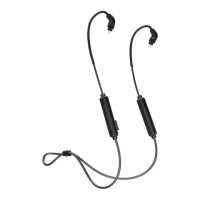
2-Pin Bluetooth Cable
massdrop MEE audio
Charging Time
Welcome Guide
1. Charging
Charging
Charged
2 Hours
Red Light
Blue Light
2. Pairing
Press and Hold for 5 Sec
In Pairing Mode
Select Massdrop x MEE BT Cable in your device’s Bluetooth menu
Pairing Mode
Red and Blue Flashing Lights
Question and Answer IconNeed help?

Do you have a question about the Drop massdrop x MEE audio and is the answer not in the manual?

Summary

Charging

Charging Process and Indicators

Details charging time, and indicator lights for charging and charged states.

Pairing

Pairing Procedure and Device Selection

Outlines steps to enter pairing mode and connect to a Bluetooth device.

Controls

Volume and Track Control

Explains volume adjustments and track skipping using dedicated buttons.

Multifunction Button Actions

Covers power, playback, call handling, and voice assistant activation.

Factory Reset

Resetting the Device

Instructions for performing a factory reset to clear paired devices.
Summary

Charging

Charging Process and Indicators

Details charging time, and indicator lights for charging and charged states.

Pairing

Pairing Procedure and Device Selection

Outlines steps to enter pairing mode and connect to a Bluetooth device.

Controls

Volume and Track Control

Explains volume adjustments and track skipping using dedicated buttons.

Multifunction Button Actions

Covers power, playback, call handling, and voice assistant activation.

Factory Reset

Resetting the Device

Instructions for performing a factory reset to clear paired devices.

Drop massdrop x MEE audio Specifications

General IconGeneral
BrandDrop
Modelmassdrop x MEE audio
CategoryHeadphone
LanguageEnglish

Related product manuals