4
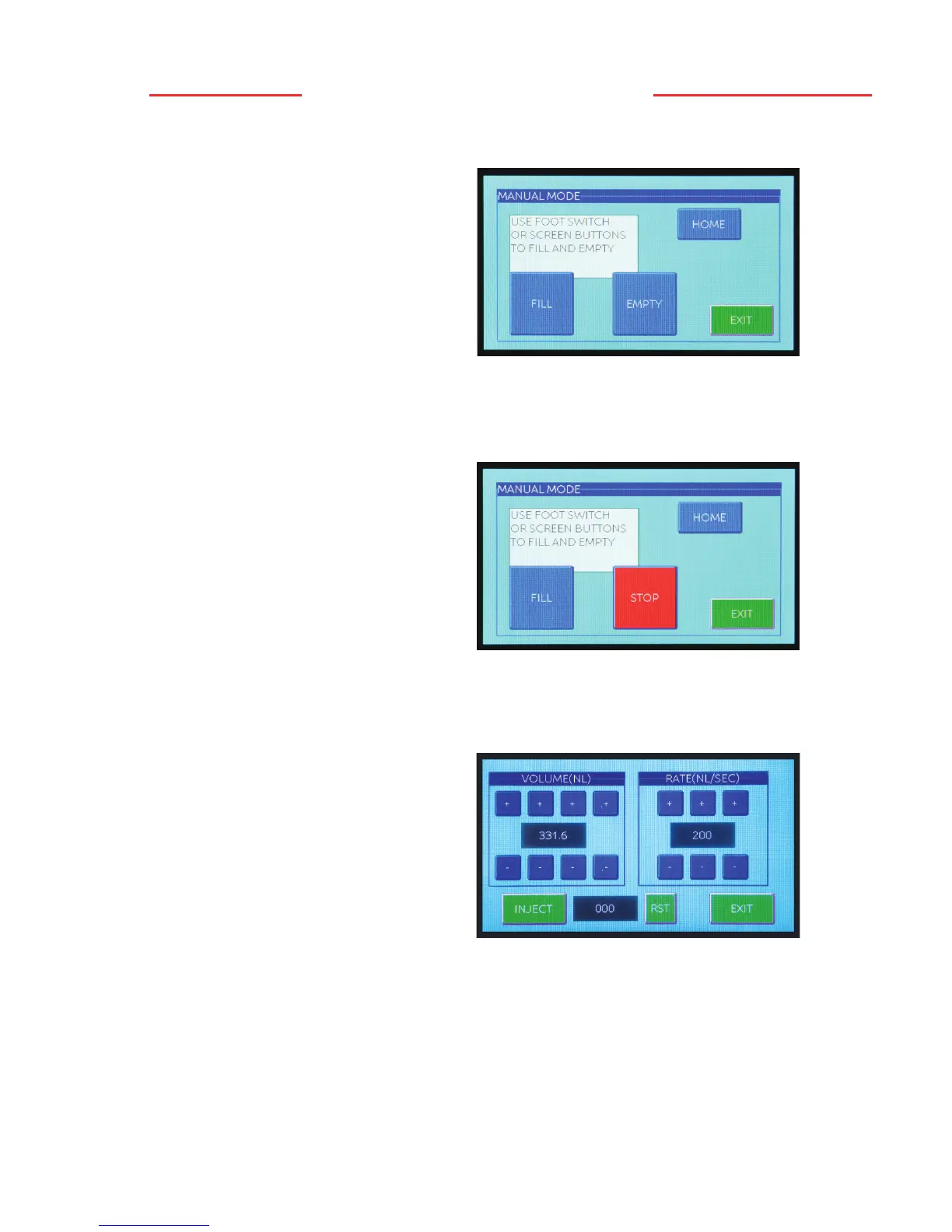
[MANUAL] Mode
This mode will enable the user to
manually fill and empty the micropipet.
Pressing the [FILL] icon will retract the
wire plunger, while pressing the [EMPTY]
icon will cause the wire plunger to extend.
When the [HOME] icon is pressed, the
wire plunger will fully retract to the
“home” position and should be flush with
the end of the black collet.
Operational Modes
[INJECT] Mode
This mode is used to do single manual
injections. It enables the user to program
an injection volume (0.6 – 999.9nL) and
an injection rate (nL/sec) using the
respective [+] and [-] icons. Press the
[INJECT] icon to inject the desired
volume at the rate selected.
To the right of the inject icon, you will
see a counter box. This will count the
number of injections. You can change volume and/or rate and the counter will continue
to count. If you change screens, the counter will zero out. You will also see an [RST]
icon that when pressed, will reset the counter to zero.
Note: Multiple injections can be performed by simply pressing the [INJECT] icon again
and again. The injection rate is independent of the empty rate as programmed in the
[SETUP] mode.
Press the [DONE] icon to exit back to the operational mode screen.
Note: The [HOME] and [EXIT] icons
are disabled while the wire plunger is
in motion.
Note: The speed of the fill and empty
movement can be regulated in the
[SETUP] mode and is independent of
the injection rate.
Press the [EXIT] icon to exit back to
the operational mode screen.
If the [FILL] or [EMPTY] icon has been pressed and you desire to stop the action,
simply press the same icon position (now labeled [STOP]) a second time.


 To Next Page