5
[PROGRAM] Mode
This mode enables the user to
program multiple injection cycle
recipes. To program a new recipe,
press the [NEW] icon. A screen
displaying the sample injection volume
(nL) and an injection rate (nL/sec) will
appear. As before, adjust these
individual values by using the
respective [+] and [-] icons.
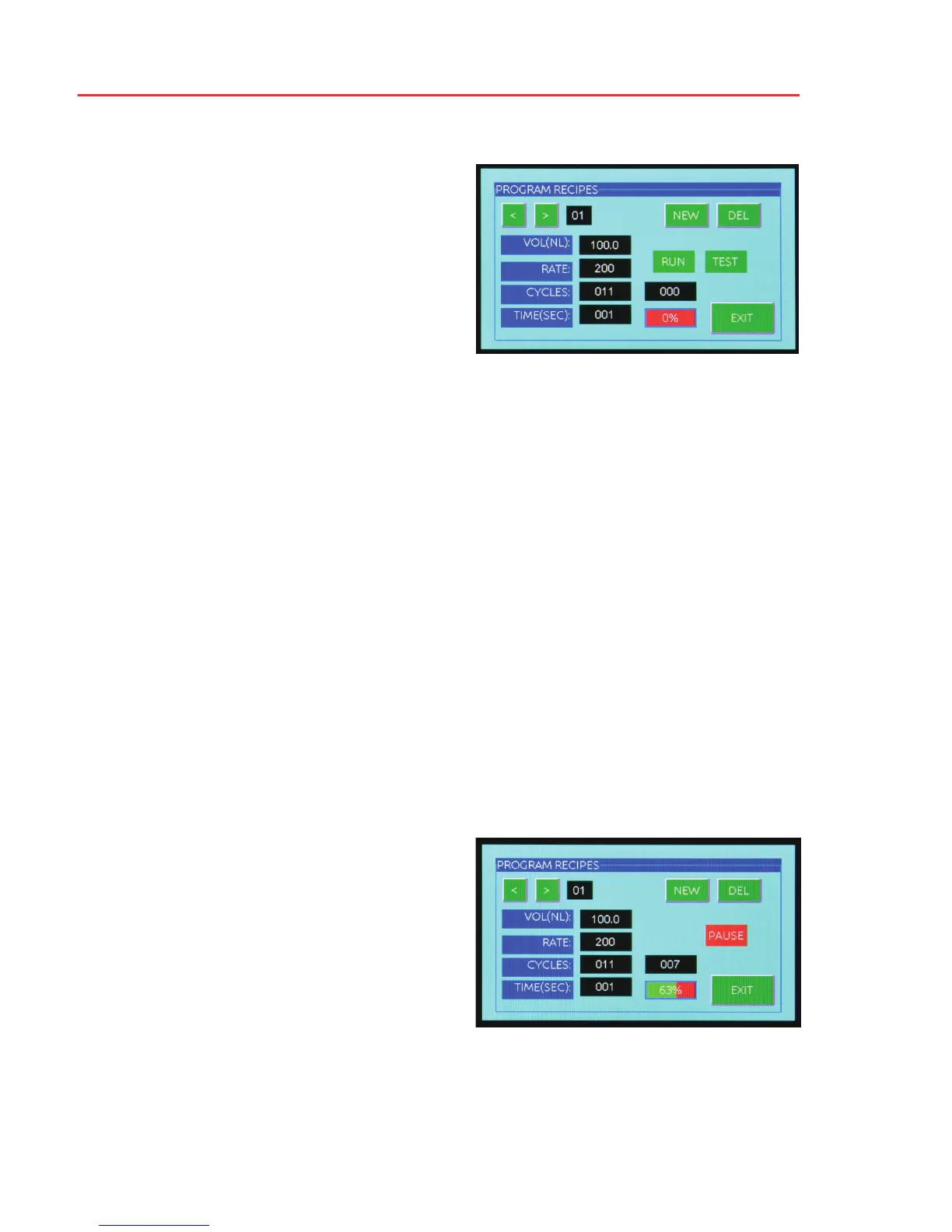
Below the [RUN] icon is a box displaying the number of injection cycles remaining in
the entire program recipe. It will count down toward (0) as the multiple injection cycle
progresses. Below this “counter” box is a display of the percentage of the program recipe
remaining. It will count down toward (0%) as the multiple injection cycle progresses.
Press the [EXIT] icon to exit back to the operational mode screen.
Pressing the [NEXT] icon brings up a screen displaying the number of injection
cycles. Again, use the [+] and [-] icons to select the value desired.
Pressing the [BACK] icon always returns you to the previously displayed screen.
Pressing the [NEXT] icon once again brings up the screen displaying the interval
(secs) between injection cycles. Use the [+] and [-] icons to set the desired time.
Pressing the [NEXT] icon a final time allows you to view the entire program recipe
values in the following format:
VOL (NL) . . . . .volume of injection
RATE . . . . . . . .rate of injection
CYCLES . . . . .number of cycles this volume will be injected
TIME (SEC) . . .time interval between each injection
Note: The program recipes are automatically saved and labelled in sequential order.
You can step through the stored recipes by pressing the [<] and [>] icons. Should you
desire to delete a recipe, simply press the [DEL] icon, and the displayed recipe will be
deleted.
Pressing the [RUN] icon will initiate the currently displayed program recipe.
After pressing the [RUN] icon, a [PAUSE]
icon appears and enables the user to
interrupt the program at any time, and
then resume the program where it was
interrupted by pressing the [RUN] icon
again.
To initiate a single cycle of the displayed
recipe, simply press the [TEST] icon once.


 To Next Page