EasyManua.ls Logo

DTS Top 48 - EDIT SCENE MODE

DTS Top 48
62 pages
Print Icon
To Next Page IconTo Next Page
To Previous Page IconTo Previous Page
Loading...
EDIT
SCENE
MODE
U-
-
THIS
FUNCTION
ALLOWS
TO
MODIFY
TXfE
VALUE
OF
THE
CHANNELS
OF
THE
UNC
TIES
SELECTED
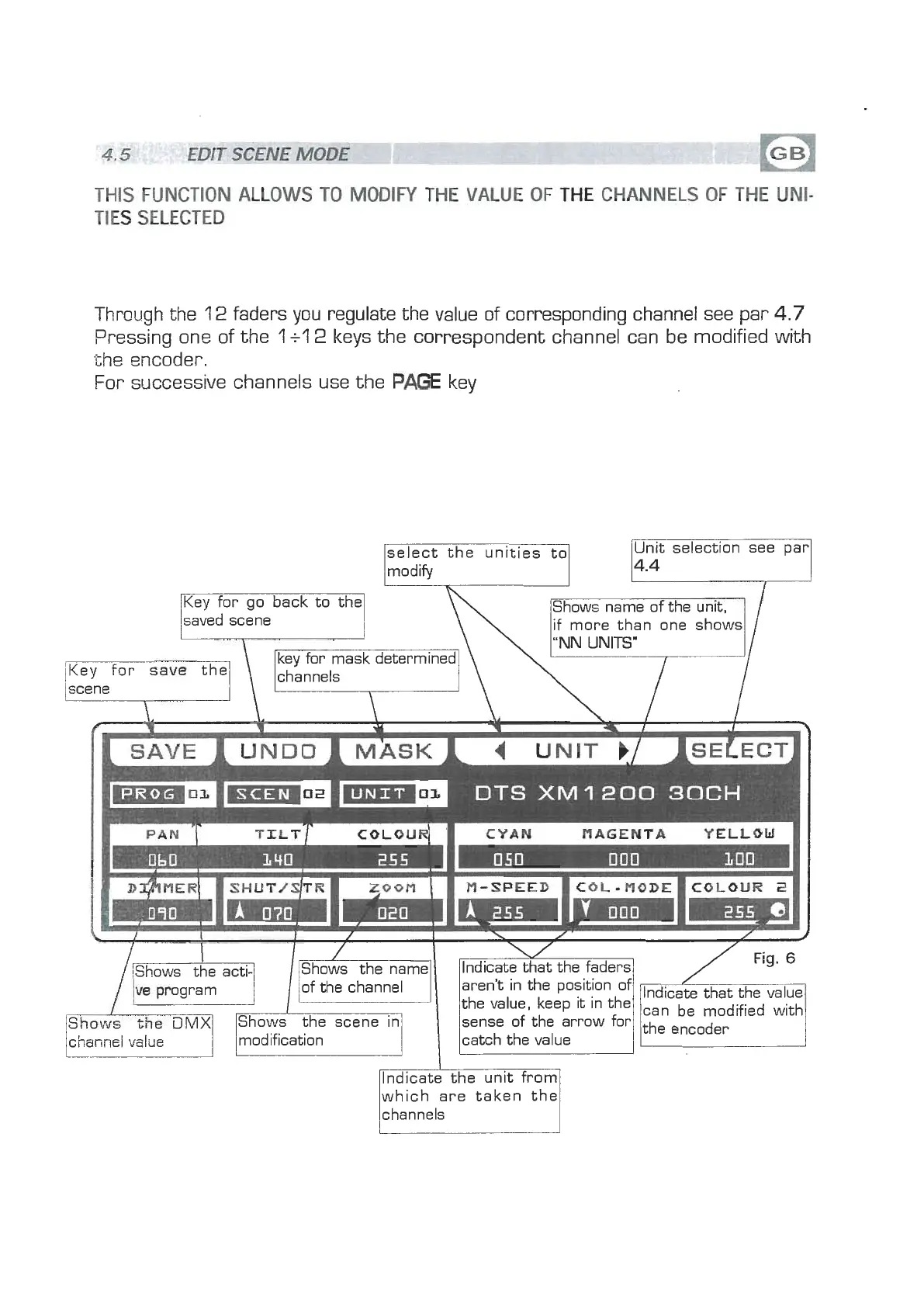
Through the
12
faders you regulate the value of corresponding channel see par
4.7
Pressing one of the
1
+l
2
keys the correspondent channel can be modified with
the encoder.
For successive channels use the
PAGE
key
saved scene
select the unities to
modify1
Unit selection see par
c
n
Shows name of the unit,
if more than one shows
I
/
Key for save the
scene
f
=m
DTS
XM
1200
30CH
I
I
D~~MERI
1
SHUT/~TR
m
Zoom
1
M-SPEED
I
COL-
nODE
B
COLOUR
2
1
1
aren't in the position of
sense of the arrow for
modification catch the value
lndicate the unit from
which are taken the
channels
can be modified with
/the encoder
www.bluelight.at