EasyManua.ls Logo

DTS Top 48 - EDIT STEPS MODE

DTS Top 48
62 pages
Print Icon
To Next Page IconTo Next Page
To Previous Page IconTo Previous Page
Loading...
THIS
FUNCTION
ALLOWS
TO
CREATE
OR
MODIFY
&NE
OF
48
STEP
OF
ACTIVE
CHASE
.
The
graphic display indicates
the
step
(highlighted)
currently active [Fig.
23
par
6.5)
for create/modify
it
press the
EDIT
key
(Fig.
24).
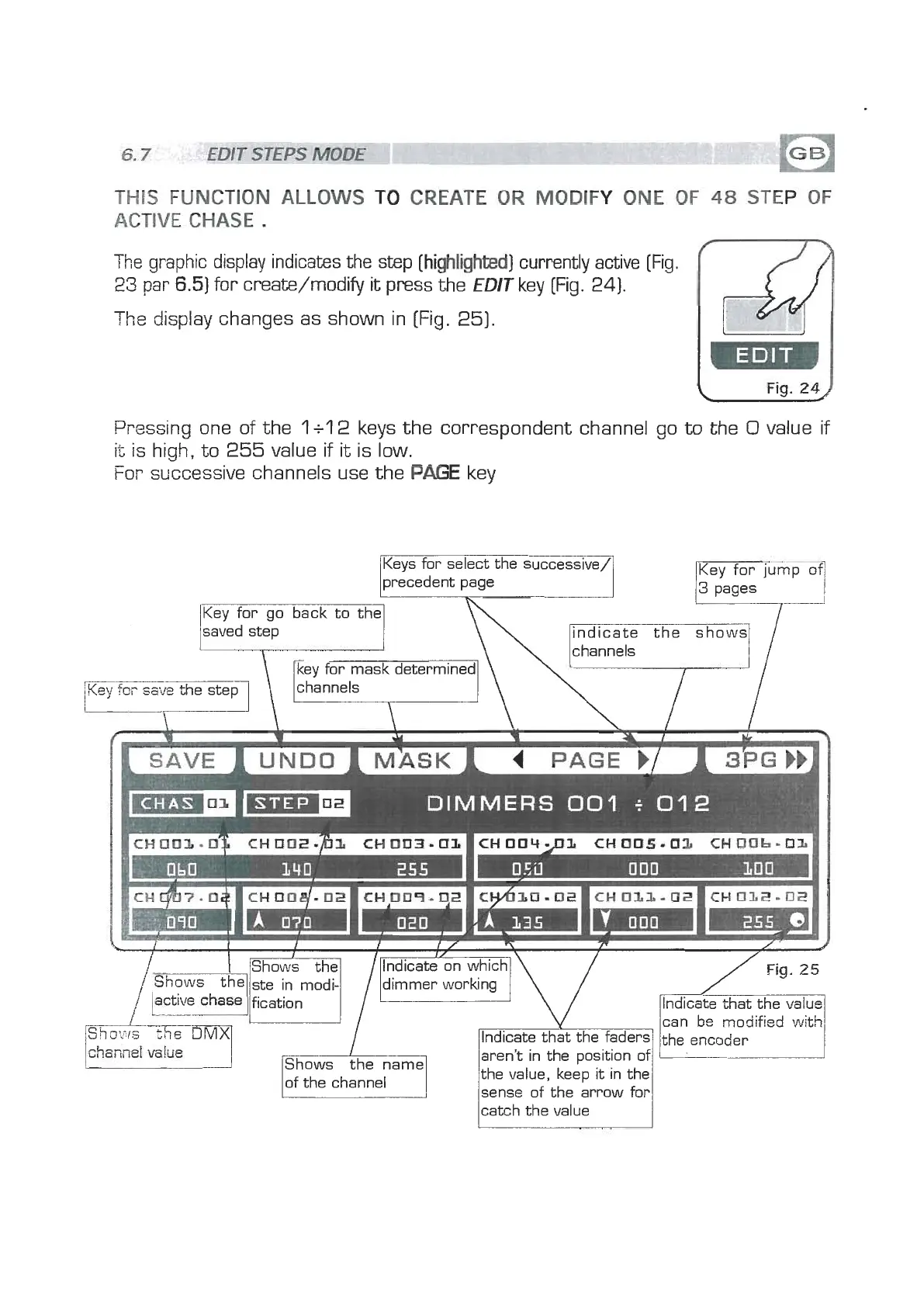
The display changes as shown in
(Fig.
25).
Pressing one of the
l
+l
2
keys the correspondent channel go
to
the
0
value if
it
is high, to
255
value if
it
is low.
For successive channels use the
PAGE
key
Keys for select the successive/
precedent page
y
3
pages
Key tor go back to the
saved step
\\
indicate the show4
/
,\\e~s
,
l,/
key for mask determined
channels
\
DIMMERS
001
+
012
I
I
I
I
I
/
,
I
/
1
IShows the1
I
/~lndicate on which[\
l/
Fia.
25
catch the value
1
www.bluelight.at