Make
sure
you
are
using
&Wed
twisted
cables
slritgMs
for
Ehe
trammlsslon
of
the
DMX
512
signal
with
conwmtors
of
@od
quav
and
crmmrctSon
as
shown
on
the
side
ofm
comac(or.
e)
Plug the 5-pin
XLR
connector coming from the unit completly in the
DMX
51
2
output
Use the "push" safety hook
to
disconnect
it
and than extract
it
gently.
ATTENTION: the shielded part of the cable must never be connected to the ground of
the electrical system as this cauM cause faults during the working of the controller
TOP
48
has a
DMX
51
2
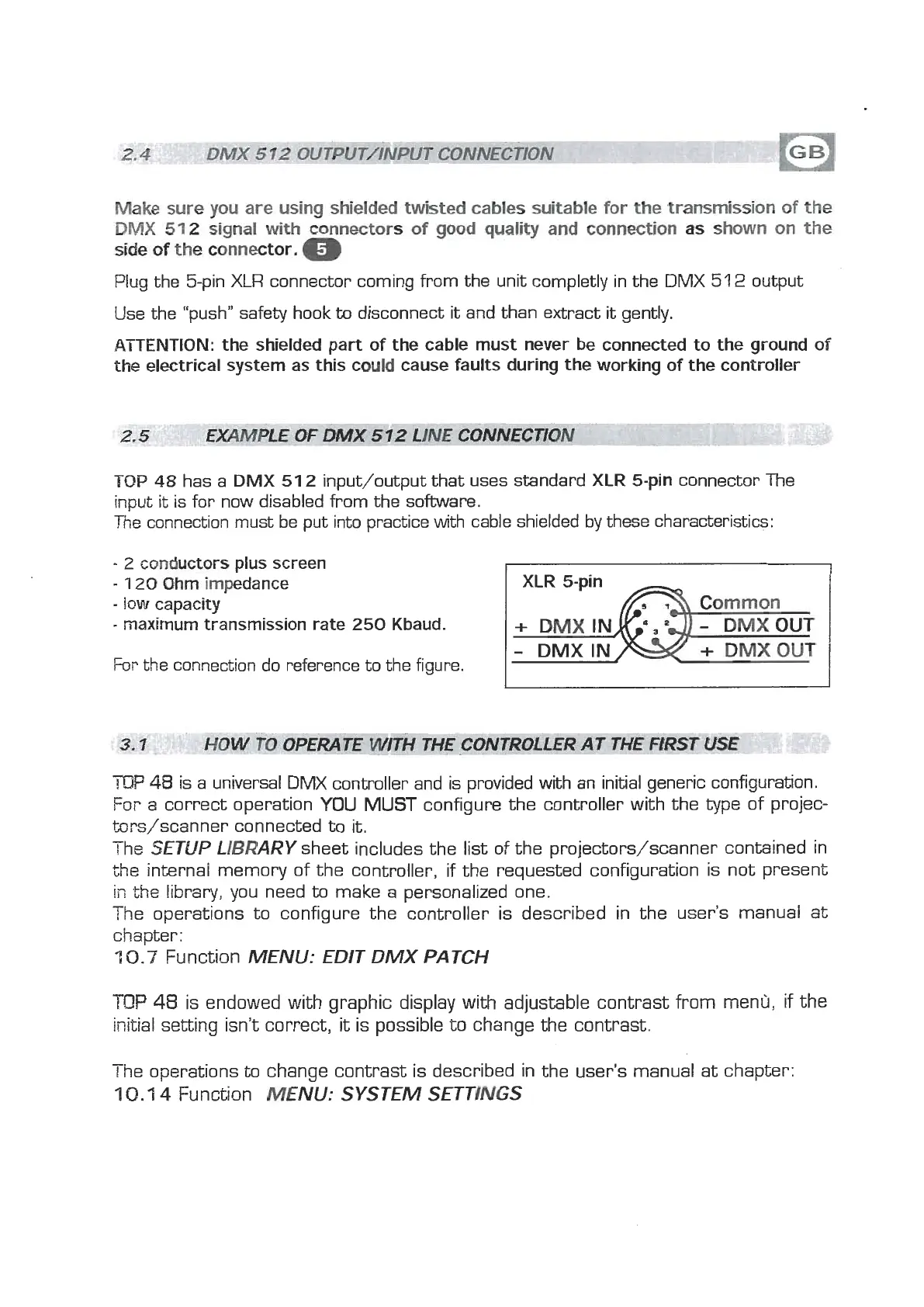
input/output that uses standard
XLR
5-pin connector The
input
it
is for now disabled from the software.
The
connection must be put into practice with cable shielded by these characteristics:
-
2
cwductors
plus screen
-
1
20
Ohm impedance
-
IOW
capacity
-
maximum transmission rate 250 Kbaud.
Fm
the connection do reference to the figure.
TOP
48
is a universal DMX controller and is provided
with
an initial generic configuration.
For a correct operation
YOU
MUST
configure the controller with the
type
of projec-
brs/scanner connected to
it.
The
SETUP LIBRARY
sheet includes the list of the projectors/scanner contained in
the internal memory of the controller, if the requested configuration is not present
ii7
the
library, you need
to
make a personalized one.
The operations to configure the controller is described in the user's manual at
chapter:
7
0.7
Function
MENU: EDIT DMX PATCH
TOP
48
is endowed with graphic display with adjustable contrast from menrj,
if
the
initial setting isn't correct,
it
is possible to change the contrast.
-
r
he operations
to
change contrast is described in the user's manual at chapter:
7
0.1
4
Function
MENU:
SYSTEM SETTINGS



 To Next Page
 Loading...