
 Need help?
Do you have a question about the DTS UHD-402 and is the answer not in the manual?
Step-by-step guide for physically connecting the HDMI matrix switch, sources, and displays.
Explanation of Matrix and Splitter modes, including visual diagrams for clarity.
Detailed instructions for setting up the Audio Return Channel (ARC) functionality.
Manual selection of input channels for Output A via its dedicated key.
Manual selection of input channels for Output B via its dedicated key.
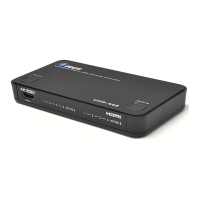
This document describes the OREI UHD-402 4x2 HDMI Matrix Switch, an advanced device designed to enhance your home entertainment or professional AV setups. The UHD-402 functions as both a splitter and a matrix, offering significant flexibility in managing multiple high-definition video and audio sources across various displays.
The OREI UHD-402 is a versatile HDMI matrix switch that allows you to connect up to four HDMI input sources and distribute them to two independent HDMI output displays. Its core functionality revolves around providing a "Full Matrix Selection," meaning each of the two outputs can independently select any one of the four available input sources. This capability is particularly useful in scenarios where different displays need to show different content simultaneously. For instance, in a sports bar, one TV could show a football game from input 1, while another TV shows a basketball game from input 2.
Beyond its matrix capabilities, the UHD-402 also operates in a "Splitter Mode." In this mode, both output displays can simultaneously show the exact same content from a single selected input source. This is ideal for situations where you want to mirror content, such as displaying a presentation on two screens in a conference room or sharing a movie with two different rooms in a home.
A notable feature of the UHD-402 is its support for the Audio Return Channel (ARC) function. This allows audio from a smart TV (connected to Output-A) to be sent back to an audio receiver or soundbar (connected to Input-4), simplifying cabling and enhancing the audio experience, especially for soundbars that lack an HDMI output. This eliminates the need for a separate optical or coaxial audio cable for TV audio.
The device also incorporates "Source Device Auto Detection & Auto Adjustment." In Splitter Mode, the source device will automatically adjust its output audio and video signal to be compatible with both sink devices (Output A and Output B). The device identifies the "Highest Common Factor" between the two displays to ensure optimal compatibility. Users also have the option to manually set the audio/video output signal if desired, provided the settings are supported by the sink devices. Similarly, in Matrix Mode, the source device automatically adjusts its output signal to match the capabilities of the specific sink device connected to either Output A or Output B. This intelligent adjustment helps prevent compatibility issues and ensures a smooth viewing experience.
The UHD-402 is designed for ease of use, offering multiple methods for controlling source selection.
Manual Operation: The front panel of the device features individual source selection keys for Output A and Output B. To change the input channel for Output A, you simply press the "Select A" key. A corresponding LED will light up to indicate the currently selected channel. The same applies to Output B with its "Select B" key. This manual selection process is cyclic, meaning repeated presses of the "Select A" or "Select B" key will cycle through the available input channels (CH1, CH2, CH3, CH4).
IR Remote Operation: For added convenience, the UHD-402 comes with an IR remote control. The remote provides two sets of selection keys, one for Output A and one for Output B, allowing you to control each output individually from a distance. Number keys (1, 2, 3, 4) on the remote are used to directly switch between the four input sources for the selected output. This remote functionality is particularly useful in home theater setups or conference rooms where the device might not be easily accessible.
Connection Illustration: The manual provides clear diagrams for connecting the UHD-402. For a typical application, you would connect your HD sources (such as a PS4 Pro, DVD player, or Blu-ray player) to the input ports (Input-1, Input-2, Input-3, Input-4) of the matrix switch using HDMI cables. Your HD displays (HDTVs or projectors) would then be connected to the output ports (Output-A and Output-B). The device is powered by a DC 5V / 1A power adaptor. Once all connections are made, the "Active-A" or "Active-B" indication LEDs, along with the input indication LEDs, will illuminate, confirming a successful connection.
For ARC functionality, the soundbar should be connected to Input-4, and the HDTV's ARC-capable HDMI input should be connected to Output-A. This setup ensures that audio from the TV can be routed back to the soundbar through the matrix switch.
The UHD-402 is designed to be a robust and reliable device, but like any electronic equipment, proper handling and basic troubleshooting can ensure its longevity and optimal performance.
Troubleshooting: The manual includes a comprehensive troubleshooting section to address common issues.
The UHD-402 is designed with a stylish housing, which helps in preventing interference, contributing to its overall reliability and performance. By following these guidelines and troubleshooting steps, users can maintain the device's functionality and enjoy a seamless high-definition experience.
 General
| Category | Matrix Switcher |
|---|---|
| Output Ports | 2x HDMI |
| Maximum Resolution | 4K@60Hz |
| HDCP Support | HDCP 2.2 |
| Color Depth | 12-bit |
| Chroma Subsampling | 4:4:4 |
| Audio Support | Dolby Atmos, DTS:X |
| Control Interface | RS-232 |

 To Next Page