EasyManua.ls Logo

Dual C839RC - Maintenance and Troubleshooting; Maintenance and Service Procedures; Fault Detection and Solutions

Dual C839RC
Print Icon
To Next Page IconTo Next Page
To Previous Page IconTo Previous Page
Loading...
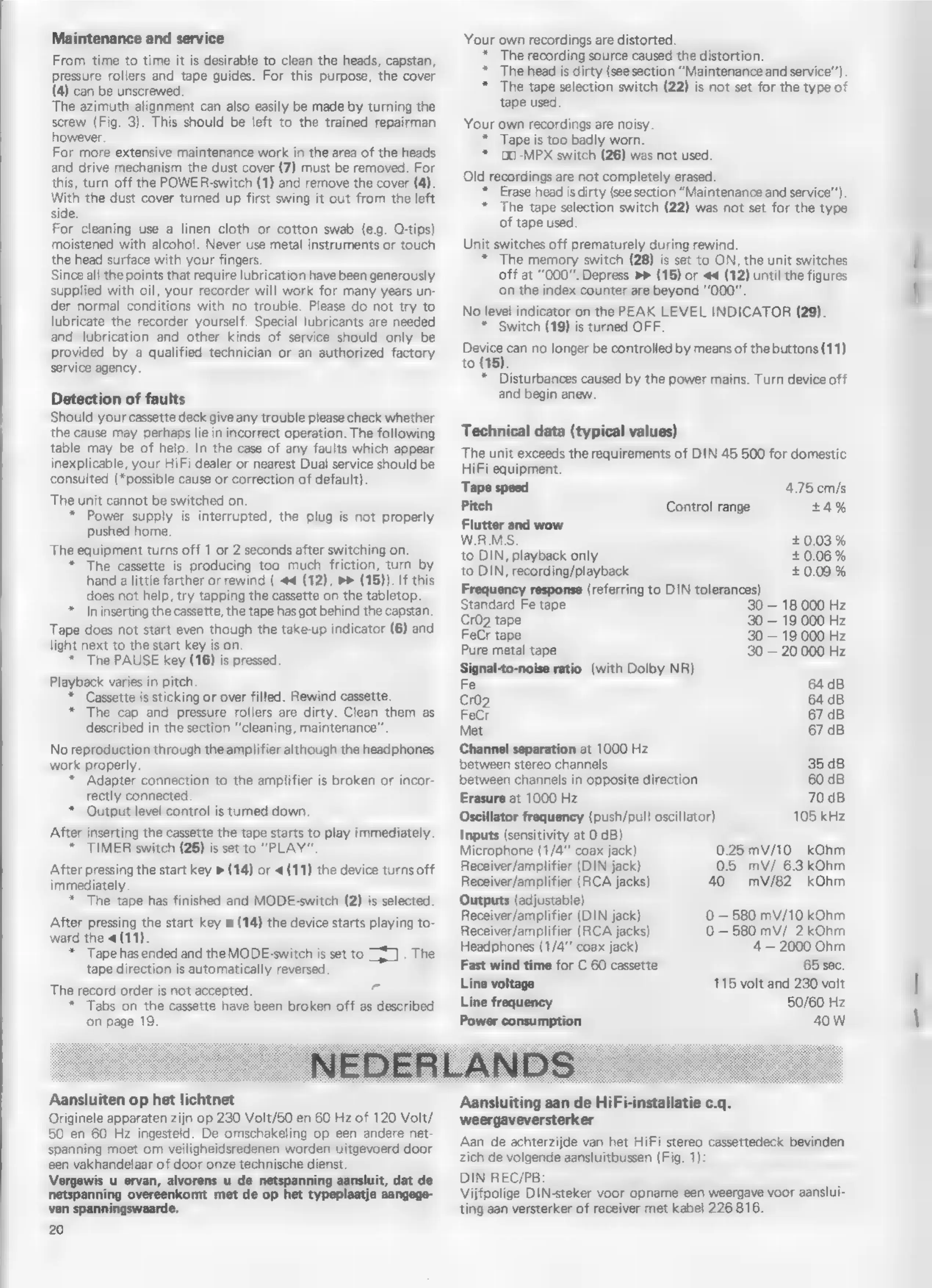
Maintenance
and
service
From
time
to
time
it
is
desirable
to
clean
the
heads,
capstan,
pressure
rollers
and
tape
guides.
For
this
purpose,
the
cover
(4)
can
be
unscrewed.
The
azimuth
alignment
can
also
easily
be
made
by
turning
the
screw
(Fig.
3).
This
should
be
left
to
the
trained
repairman
however.
For
more
extensive
maintenance
work
in
the
area
of
the
heads
and
drive
mechanism
the
dust
cover
(7)
must
be
removed.
For
this,
turn
off
the
POWER-switch
(1)
and
remove
the
cover
(4).
With
the
dust
cover
turned
up
first
swing
it
out
from
the
left
side.
For
cleaning
use
a
linen
cloth
or
cotton
swab
(e.g.
O-tips)
moistened
with
alcohol.
Never
use
metal
instruments
or
touch
the
head
surface
with
your
fingers.
Since
all
the
points
that
require
lubrication
have
been
generously
supplied
with
oil,
your
recorder
will
work
for
many
years
un-
der
normal
conditions
with
no
trouble.
Please
do
not
try
to
lubricate
the
recorder
yourself.
Special
lubricants
are
needed
and
lubrication
and
other
kinds
of
service
should
only
be
provided
by
a
qualified
technician
or an
authorized
factory
service
agency.
Detection
of
faults
Should
your
cassette
deck
give
any
trouble
please
check
whether
the
cause
may
perhaps
lie
in
incorrect
operation.
The
following
table
may
be
of
help.
In
the
case
of
any
faults
which
appear
inexplicable,
your
HiFi
dealer
or
nearest
Dual
service
should
be
consulted
(*possible
cause
or
correction
of
default).
The
unit
cannot
be
switched
on.
Power
supply
is
interrupted,
the
plug
is
not
properly
pushed
home.
The
equipment
turns
off
1
or
2
seconds
after
switching
on.
*
The
cassette
is
producing
too
much
friction,
turn
by
hand
a
little
farther
or
rewind
(
44
(12),
»»
(15)).
If
this
does
not
help,
try
tapping
the
cassette
on
the
tabletop.
*
In
inserting
the
cassette,
the
tape
has
got
behind
the
capstan.
Tape
does
not
start
even
though
the
take-up
indicator
(6)
and
light
next
to
the
start
key
is
on.
*
The
PAUSE
key
(16)
is
pressed.
Playback
varies
in
pitch.
*
Cassette
is
sticking
or
over
filled.
Rewind
cassette.
*
The
cap
and
pressure
rollers
are
dirty.
Clean
them
as
described
in
the
section
“cleaning,
maintenance”.
No
reproduction
through
the
amplifier
although
the
headphones
work
properly.
*
Adapter
connection
to
the
amplifier
is
broken
or
incor-
rectly
connected.
*
Output
level
control
istumed
down.
After
inserting
the
cassette
the
tape
starts
to
play
immediately.
+
TIMER
switch
(25)
is
set
to
"PLAY".
After
pressing
the
start
key
»
(14)
or
«
(11)
the
device
turns
off
immediately.
*
The
tape
has
finished
and
MODE-switch
(2)
is
selected.
After
pressing
the
start
key
»
(14)
the
device
starts
playing
to-
ward
the
4
(11).
*
Tape
has
ended
and
the
MODE-switch
is
set
to
sai
.
The
tape
direction
is
automatically
reversed.
The
record
order
is
not
accepted.
+
*
Tabs
on
the
cassette
have
been
broken
off
as
described
on
page
19.
Aansluiten
op
het
lichtnet
Originele
apparaten
zijn
op
230
Volt/50
en
60
Hz
of
120
Volt/
50
en
60
Hz
ingesteld.
De
omschakeling
op
een
andere
net-
spanning
moet
om
veiligheidsredenen
worden
uitgevoerd
door
een
vakhandelaar
of
door
onze
technische
dienst.
Vergewis
u
ervan,
alvorens
u
de
netspanning
aansluit,
dat
de
netspanning
overeenkomt
met
de
op
het
typeplaatje
aangege-
ven
spanningswaarde.
20
Your
own
recordings
are
distorted.
*
The
recording
source
caused
the
distortion.
+
The
head
is
dirty
(see
section
“Maintenance
and
service’).
*
The
tape
selection
switch
(22)
is
not
set
for
the
type
of
tape
used.
Your
own
recordings
are
noisy.
*
Tape
is
too
badly
worn.
*
(MES
switch
(26)
was
not
used.
Old
recordings
are
not
completely
erased.
*
Erase
head
is
dirty
(see
section
“Maintenance
and
service‘).
*
The
tape
selection
switch
(22)
was
not
set
for
the
type
of
tape
used.
Unit
switches
off
prematurely
during
rewind.
*
The
memory
switch
(28)
is
set
to
ON,
the
unit
switches
off
at
“000”.
Depress
Fr
(15)
or
««
(12)
until
the
figures
on
the
index
counter
are
beyond
"0007".
No
level
indicator
on
the
PEAK
LEVEL
INDICATOR
(29).
*
Switch
(19)
is
turned
OFF.
Me
can
no
longer
be
controlled
by
means
of
the
buttons
(11)
to
(15).
*
Disturbances
caused
by
the
power
mains.
Turn
device
off
and
begin
anew.
Technical
data
(typical
values)
The
unit
exceeds
the
requirements
of
DIN
45
500
for
domestic
HiFi
equipment.
Tape
speed
4.75
cm/s
Pitch
Control
range
+4%
Flutter
and
wow
W.R.M.S.
+0.03%
to
DIN,
playback
only
+0.06%
to
DIN,
recording/playback
+
0.09
%
Frequency
response
(referring
to
DIN
tolerances)
Standard
Fe
tape
30
18
000
Hz
Cr02
tape
30
19
000
Hz
FeCr
tape
30
19
000
Hz
Pure
metal
tape
30
20.000
Hz
Signal-to-noise
ratio
(with
Dolby
NR)
Fe
64
dB
Cro2
64
dB
FeCr
67
dB
Met
67
dB
Channel
separation
at
1000
Hz
between
stereo
channels
35
dB
between
channels
in
opposite
direction
60
dB
Erasure
at
1000
Hz
70dB
Oscillator
frequency
(push/pull
oscillator)
105
kHz
Inputs
(sensitivity
at
O
dB)
Microphone
(1/4”
coax
jack)
Receiver/amplifier
(DIN
jack)
Receiver/amplifier
(RCA
jacks)
40
Outputs
(adjustable)
Receiver/amplifier
(DIN
jack)
Receiver/amplifier
(RCA
jacks)
0.25
mV/10
kOhm
0.5
mV/
6.3
kOhm
mV/82
kOhm
0
580
mV/10
kOhm
0
580
mV/
2
kOhm
Headphones
(1/4""
coax
jack)
4
2000
Ohm
Fast
wind
time
for
C
60
cassette
65
sec.
Line
voltage
115
volt
and
230
volt
Line
frequency
50/60
Hz
Power
consumption
40
W
Aansluiting
aan
de
HiFi-installatie
c.q.
weergaveversterker
Aan
de
achterzijde
van
het
HiFi
stereo
cassettedeck
bevinden
zich
de
volgende
aansluitbussen
(Fig.
1):
DIN
REC/PB:
Vijfpolige
DIN-steker
voor
opname
een
weergave
voor
aanslui-
ting
aan
versterker
of
receiver
met
kabel
226
816.

Related product manuals