QUICK START GUIDE
7
LU44BTS - Wireless Operation
2
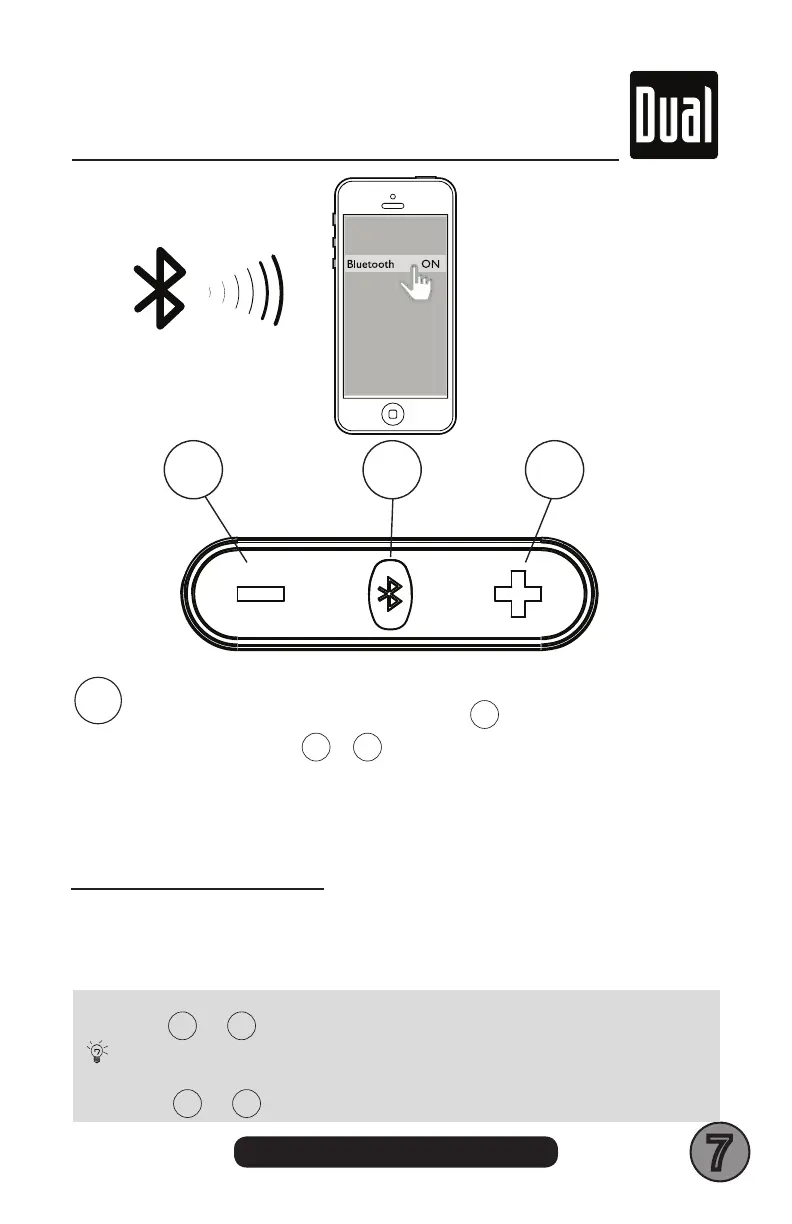
BLUETOOTH PAIRING
- Turn ON the unit - LONG PRESS
2
3 seconds
- LONG PRESS
1
+
3
3 seconds
- Turn on your Devices BLUETOOTH in your SETTINGS MENU
- Look and tap on LU44BTS name
- Once paired, a confi rmation tone will be heard
- Streaming is now ready
Tips
EN
LU48BTS
USB CHARGE
5V 1A
Tips
EN
LU48BTS
USB CHARGE
5V 1A
To disconnect previously paired BT Device - LONG PRESS
1
+
3
for 3 seconds
To clear all previously paired BT Devices - LONG PRESS
1
+
3
for 10 seconds
Tips
EN
LU48BTS
USB CHARGE
5V 1A
Tips
EN
LU48BTS
USB CHARGE
5V 1A
1 2 3
BLUETOOTH LED STATUS
BLUE LED FAST BLINKING = BLUETOOTH NOT PAIRED
BLUE LED ON = BLUETOOTH PAIRED


 To Next Page