71
EN
Use and maintenance manual
ON/OFF FSA SYSTEM
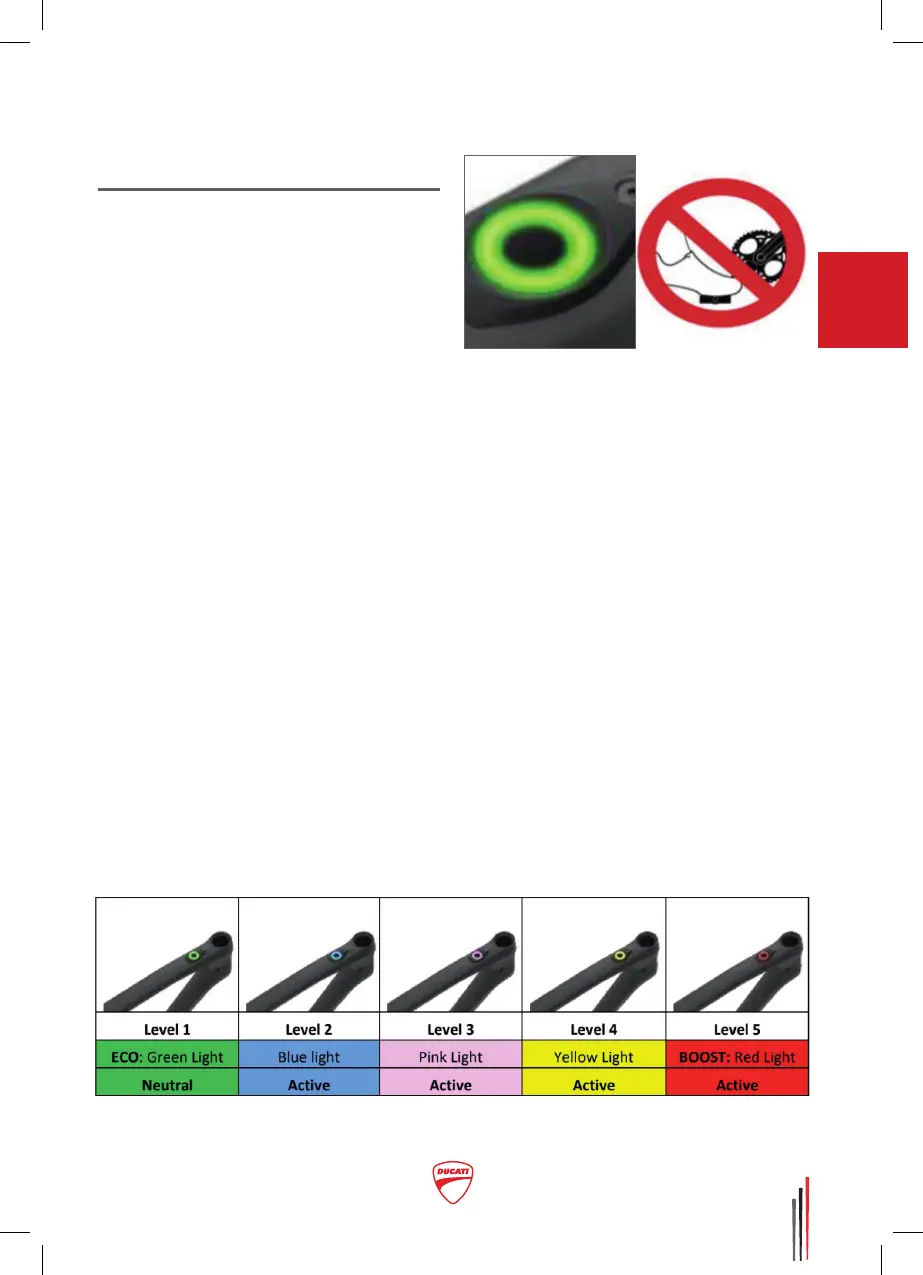
– ON/OFF button:
The on/o button of the motor
system is located on the top
tube of the frame, near the head
tube (see bicycle and component
description).
•To turn on the motor, press and
hold the button for 1 second.
• To the motor, press and
hold the button for 4 seconds.
– Turning on the system:
Once on, the system automatically
selects the ECO level (green).
Meanwhile, do not put your feet
on the pedals and do not move the
bicycle (0 km/h) so that the torque
and speed sensors can calibrate
correctly.
– Level of assistance:
To select the level of assistance
you want, press the button: at each
subsequent pressure, the level of
assistance increases: 1 green, 2
blue, 3 purple, 4 yellow, 5 red. Once
you have selected level 5, press the
button one more time and it will go
back to level 1.
You can adjust the levels of
assistance through the “Garmin
e-Bike remote button” supplied
with the bicycle. For further
information on how it works, follow
the dedicated paragraph in this
manual.
Key showing the colours that indicate the level
of assistance of the motor during use



 To Next Page