A
B
C
D
E
F
G
H
L
M
N
P
Uso e manutenzione
Use and Maintenance
sezione / section
D 5
68 Monster 400 - 620 Aggiornamento/Update - M.Y. 2006 - edizione/edition 00
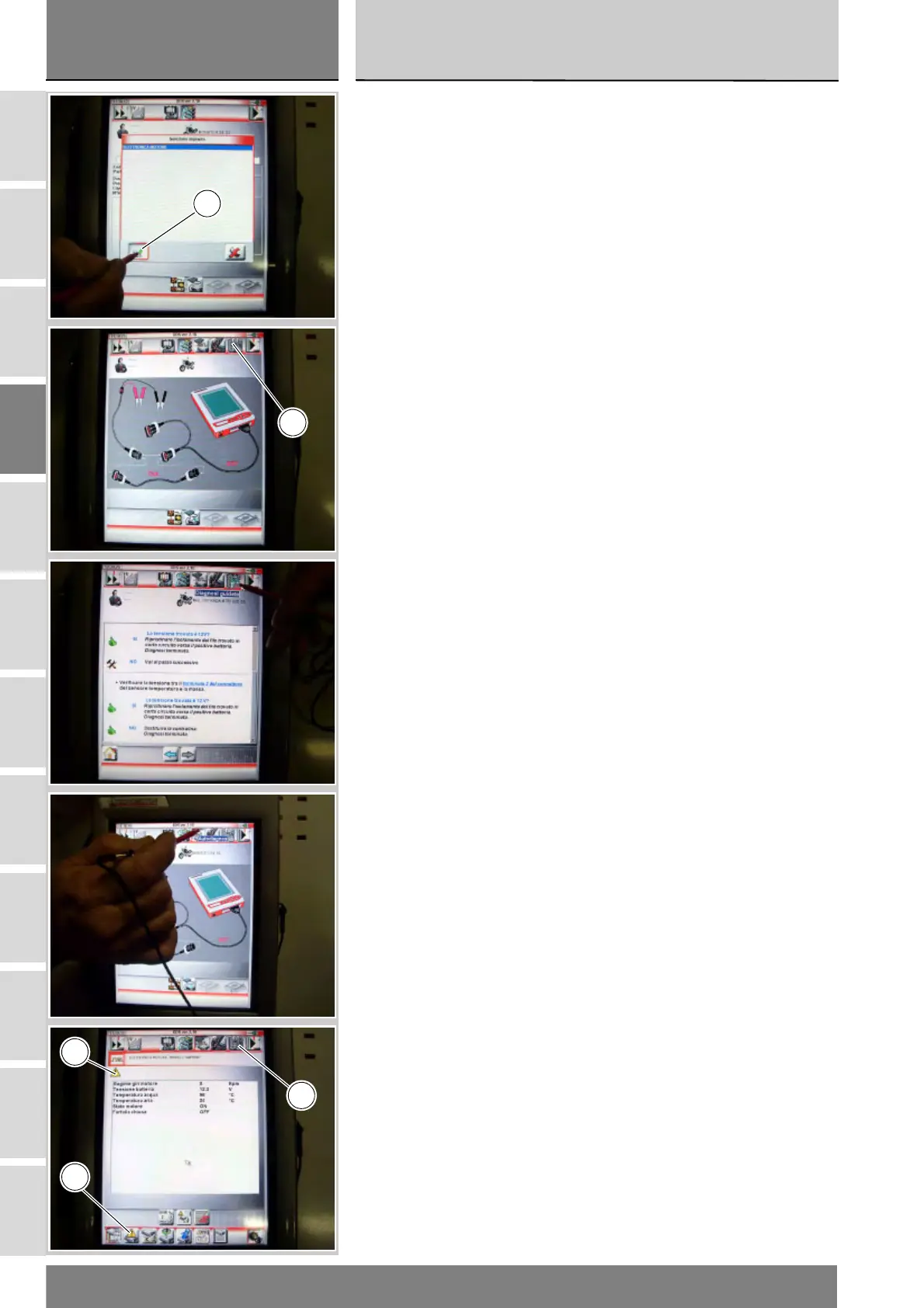
Selezionare l'opzione "Elettronica
motore", confermare premendo
l'icona "Conferma" (B).
Per entrare nella funzione "Diagnosi
guidata", premere l'icona "Diagnosi
guidata" (C).
Si aprono una serie di videate dove
vengono indicate le operazioni da
effettuarsi per una corretta diagnosi.
Per capire se esistono dei problemi
all'impianto è possibile entrare nella
funzione Autodiagnosi, premendo
l'icona "Autodiagnosi". Se sono
presenti errori, viene visualizzato il
simbolo (D). Per visualizzare quali
sono gli errori, premere l'icona "Errori"
(E). Una volta rilevati gli errori è
possibile, quindi, attraverso la
Diagnosi guidata , premendo l'icona
"Diagnosi Guidata" (C), risolverli.
Lo strumento DDS interrogherà la
centralina e verranno visualizzati gli
elementi in esame e i relativi valori.
Select "Engine electronic system" and
press "Confirm" (B) to confirm.
Press "Step-by-step diagnosis" icon
(C) to enter the "Step-by-step
diagnosis" function.
A few pages will give indications on
the procedure for a correct diagnosis.
It is possible to enter the Self-
diagnosis function, pressing "Self-
diagnosis" icon, to see if the system is
faulty. If errors are present, the
symbol (D) is displayed. Press "Errors"
(E) to display the errors. Once errors
are detected, it is possible to fix them
using the Step-by-step diagnosis;
press "Step-by-step diagnosis" icon
(C).
The DDS queries the control unit and
the elements under analysis are
displayed together with their relevant
values.
B
C
E
C
D











 To Next Page