VIDEO
STANDBY/ON
RGB
POSITION
LASER
MENU
RESET
MAGNIFY
FREEZE
OFF
VOLUME
P in P MUTE
AUTOBLANK TIMER
FOCUS ZOOM
17
Adjustments and functions
1
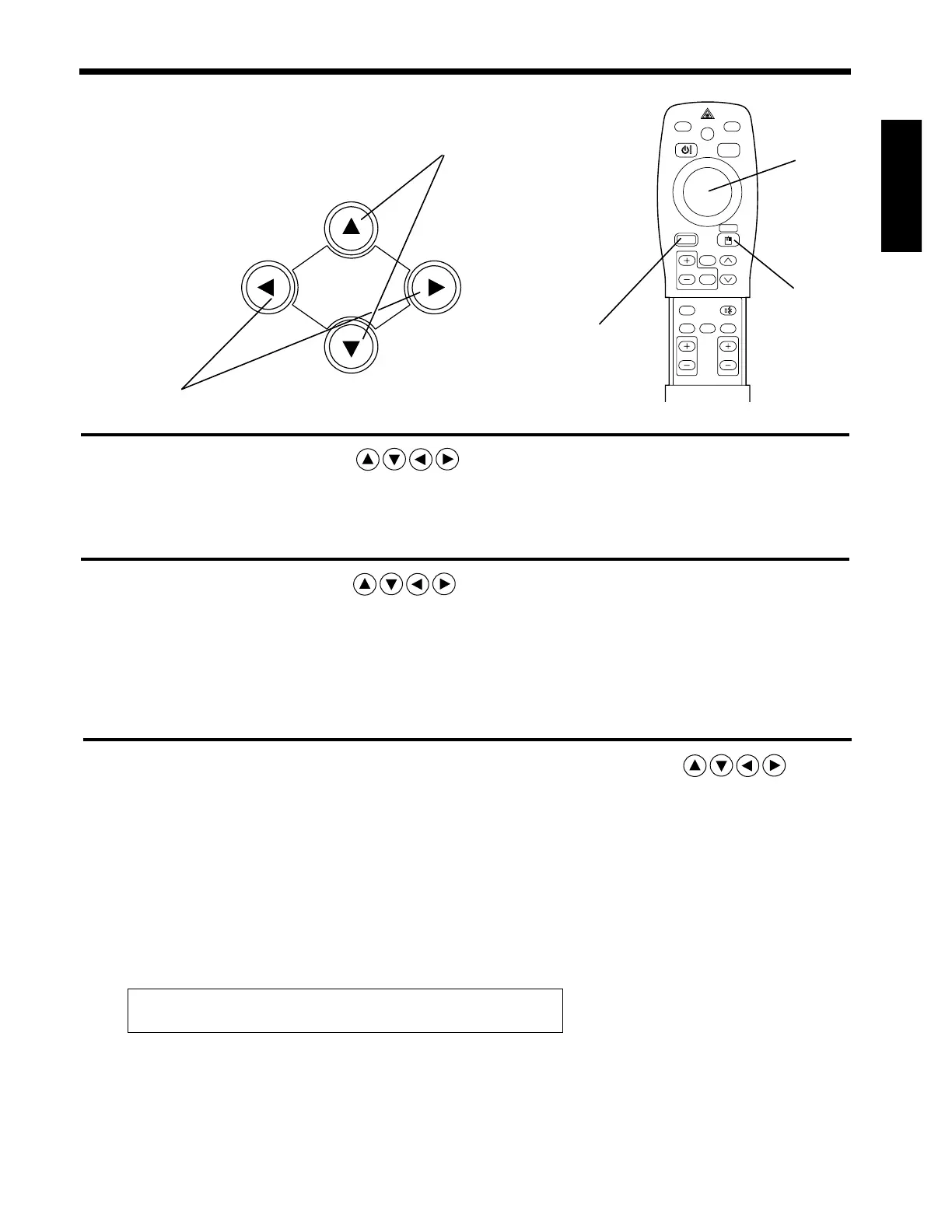
Press the MENU ( ) buttons of the projector or the
MENU button of the remote control.
• The Menu screen will appear. (refer to page 18 - 21 for details.)
2
of the projector or the
button of the remote control to select the menu item to be
• The selected menu item will be displayed in orange.
3
1, 3
1, 2, 3
1
2, 3
3
Returning to the initial settings
• Select the adjustment item to be returned to the initial settings.
• Press the RESET button.
Press the MENU ( ) buttons
DISK PAD
adjusted.
Adjust the selected menu item with the MENU ( )
buttons of the projector or DISK PAD button of the remote
control.
• The selected menu item will be displayed in orange.
The menu will disappear after 5-10 sec.



 To Next Page